Clamp vs MileIQ: Mileage tracking alone, or mileage inside the job it belongs to
MileIQ tracks mileage and costs less. Clamp attaches the drive to the job it belongs to. The comparison only matters if you need both.
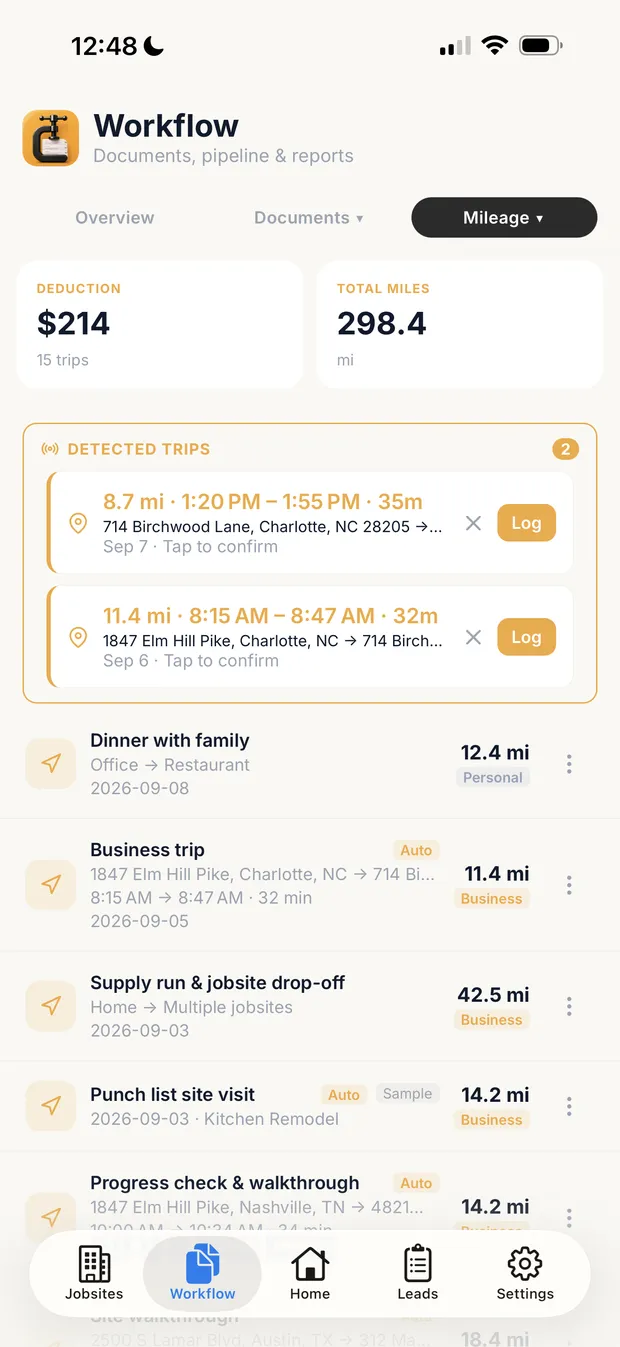
Detected, then confirmed
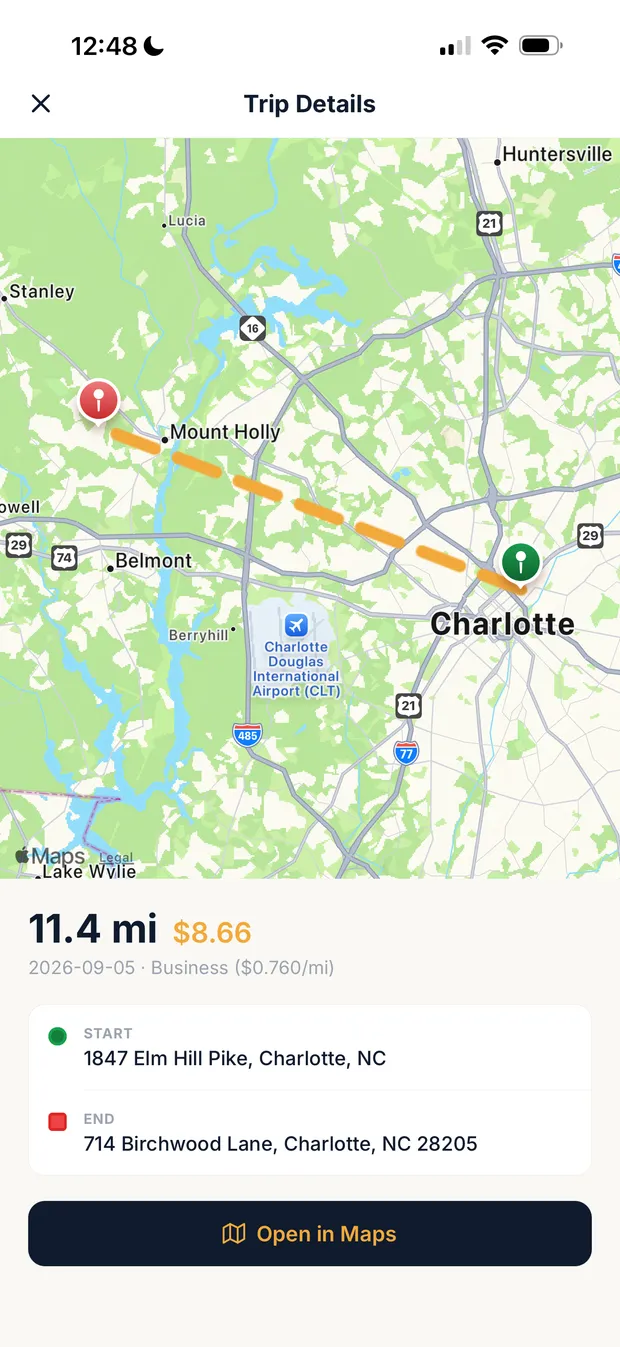
Rate by trip date
Sample data. Detected drives wait for confirmation before they count, a logged trip can sit on the job it belongs to, and each trip carries the IRS rate for its own date.
What it costs
| Situation | Clamp | MileIQ |
|---|---|---|
| One person, free | Not offered | Free No commitment. Ongoing allowance of 40 logged drives per month. |
| One person, billed annually | Solo: the full job workflow, mileage included $12.50 a month $149.99 a year | Unlimited: mileage only $11.66 a month $139.92 a year, calculated |
| One person, billed monthly | Solo: the full job workflow, mileage included $19.99 a month $239.88 a year, calculated | Unlimited: mileage only $13.99 a month $167.88 a year, calculated |
| A crew of 5 drivers, billed annually | Teams: up to 5 people, the full job workflow $83.33 a month $999.99 a year | Teams Lite: mileage only, 5 drivers at $80 $33.33 a month $400.00 a year, calculated Teams Pro: mileage with approvals, 5 drivers at $100 $41.67 a month $500.00 a year, calculated |
Every Clamp feature, next to MileIQ
Solo includes 28 of Clamp's 44 features. MileIQ's pages show 2 of the 44 in full and 5 in part, across its plans.
| Feature | Clamp | MileIQ |
|---|---|---|
| CRM and leads | 3 of 5 | 0 of 5 |
| Email remindersEmail reminders before appointments, follow-ups, and scheduled installs, deliveries, and inspections. | ✓ Assistant and TeamsAssistant, $41.67 a month billed annually | Not foundReport reminders only, Teams Pro |
| Customer appointment remindersHomeowners get an email before an appointment, with confirm and reschedule built in. | ✓ Assistant and TeamsAssistant, $41.67 a month billed annually | Not foundMileage tracker only |
| Five-factor lead scoringA clear yes, no, or maybe on a lead before driving out. | ✓ Every planSolo, $12.50 a month billed annually | Not foundMileage tracker only |
| Lead reportingClose rate, revenue won, open pipeline, close rate by lead source, and lost leads by reason, on Home and the stats screen, with CSV and PDF export. Revenue by source does not exist; see _excluded. | ✓ Every planSolo, $12.50 a month billed annually | Not foundMileage tracker only |
| Daily briefingOverdue invoices, detected trips, follow-ups, appointments, and open proposals in one morning view. | ✓ Every planSolo, $12.50 a month billed annually | Not foundUnclassified drives list only |
| Estimating | 7 of 7 | 0 of 7 |
| Design agreementsPaid preconstruction sits in the document chain, so planning work is paid work. | ✓ Every planSolo, $12.50 a month billed annually | Not foundMileage tracker only |
| Itemized estimatesAssembly-based estimates with quantities and rates the contractor can inspect line by line. | ✓ Every planSolo, $12.50 a month billed annually | Not foundMileage tracker only |
| Estimate templatesSave an estimate as a template for work done often. | ✓ Every planSolo, $12.50 a month billed annually | Not foundMileage tracker only |
| Proposals with multiple package tiersGood, better, best packages in one proposal. | ✓ Every planSolo, $12.50 a month billed annually | Not foundMileage tracker only |
| AI estimating from a plain-language job descriptionDescribe the job in plain words and get an itemized draft: assemblies, quantities, researched baseline rates, with the contractor's own saved rates taking over once set. | ✓ Every planSolo, $12.50 a month billed annually | Not foundMileage tracker only |
| Remodel and new-home estimatingOne estimator covers remodels and new homes and detects which one a description is. Detect is the default job type; a contractor can pick Remodel or New home per estimate, or set Kind of work to Remodeling to turn the choice off. | ✓ Every planSolo, $12.50 a month billed annually | Not foundMileage tracker only |
| Labor hours on estimatesEstimated labor hours, shown as a range, on every labor line, with an allowance for setup, cleanup, and material runs (15% by default) the contractor can change in Settings or per estimate. A planning figure; it never appears on proposals, PDFs, or the portal. | ✓ Every planSolo, $12.50 a month billed annually | Not foundMileage tracker only |
| Contracts and invoicing | 5 of 5 | 0 of 5 |
| Payment schedulesSplit a proposal into a deposit, milestone payments, and a final payment, then invoice each one from the signed contract. | ✓ Every planSolo, $12.50 a month billed annually | Not foundMileage tracker only |
| Sales tax on documentsAdd a sales tax rate or a flat amount to invoices and other documents, with collected tax totaled by quarter and year. The contractor enters the rate; Clamp does not look rates up. | ✓ Every planSolo, $12.50 a month billed annually | Not foundMileage tracker only |
| Customer credits and refundsApply a customer's credit to an open invoice, record a refund, or adjust a balance, with the history kept on the job. Recorded only; Clamp moves no money. | ✓ Every planSolo, $12.50 a month billed annually | Not foundMileage tracker only |
| Change orders that update the contractScope changes get written up and tied to the original contract, so verbal changes stop costing money. | ✓ Every planSolo, $12.50 a month billed annually | Not foundMileage tracker only |
| Invoices tied to the contractEvery invoice belongs to the contract or change order it bills. | ✓ Every planSolo, $12.50 a month billed annually | Not foundMileage tracker only |
| Customer portal | 0 of 6 | 0 of 6 |
| Password-free customer portalThe homeowner opens a link. No account, no password, no app to install. | ✓ Assistant and TeamsAssistant, $41.67 a month billed annually | Not foundMileage tracker only |
| Unlimited documents and photos shared to the portalShare job documents and photos to the customer portal without a count cap, subject to per-item size limits. | ✓ Assistant and TeamsAssistant, $41.67 a month billed annually | Not foundMileage tracker only |
| E-signing on the homeowner's phoneDocuments get signed on the homeowner's own phone, no account required. | ✓ Assistant and TeamsAssistant, $41.67 a month billed annually | Not foundMileage tracker only |
| Several signers on one documentSend one document to up to five people, each signing their own line, see who has signed, and remind anyone who has not. | ✓ Assistant and TeamsAssistant, $41.67 a month billed annually | Not foundMileage tracker only |
| Project updates and decisions in the portalPost project updates to the customer's portal and ask the customer to make a decision, which they answer from their phone. | ✓ Assistant and TeamsAssistant, $41.67 a month billed annually | Not foundMileage tracker only |
| Not delivered email handlingWhen a customer email Clamp sends bounces, the document is marked Not delivered so the contractor can fix the address and resend, or copy the link to text it. | ✓ Assistant and TeamsAssistant, $41.67 a month billed annually | Not foundMileage tracker only |
| Expense tracking | 5 of 5 | 0 of 5 |
| Automatic GPS mileage trackingBackground trip detection, route maps, IRS rates, trips linked to the job that caused the drive. | ✓ Every planSolo, $12.50 a month billed annually | Free, 40 drives a monthAutomatic detection and IRS rate; tied to a client by custom purpose, not a job |
| Automatic time on siteGPS geofence tracking of hours at the jobsite. | ✓ Every planSolo, $12.50 a month billed annually | Not foundTracks drives, not hours on site |
| Receipts and expenses on the jobReceipts logged against the job they belong to. | ✓ Every planSolo, $12.50 a month billed annually | Not foundMileage tracker only |
| Purchase ordersCommitted costs captured between the estimate and the receipt. | ✓ Every planSolo, $12.50 a month billed annually | Not foundMileage tracker only |
| Accounts payable and vendor billsVendor bills tracked and surfaced in the attention flows, with first-class vendor records. | ✓ Every planSolo, $12.50 a month billed annually | Not foundMileage tracker only |
| Job costing and reports | 3 of 3 | 0 of 3 |
| Job costingWhat the job actually cost, with a variance and catalog learning loop. | ✓ Every planSolo, $12.50 a month billed annually | Not foundMileage tracker only |
| Accountant export packageA package of the business's records prepared for an accountant. | ✓ Every planSolo, $12.50 a month billed annually | Every planMileage reports in PDF, CSV, QuickBooks CSV or Concur |
| Time reporting with CSV exportReported labor time with a time-tracking CSV export for payroll preparation and per-person rate decomposition. | ✓ Every planSolo, $12.50 a month billed annually | Not foundMileage reports only, no labor time |
| Jobsites and teams | 2 of 8 | 0 of 8 |
| Teams: up to 5 linked accountsUp to 5 accounts, including the owner, sharing one business. | ✓ TeamsTeams, $83.33 a month billed annually | Teams Lite, $8 a userMileage only, priced per driver |
| Role-based permissionsFive roles: owner, admin, staff, contributor, viewer. | ✓ TeamsTeams, $83.33 a month billed annually | Teams Pro, $10 a userAdmins and drivers; multiple admins on Teams Pro |
| Unlimited subcontractor linkingSubs share jobsite photos and notes into the business account without consuming a seat. | ✓ TeamsTeams, $83.33 a month billed annually | Not foundEach driver is a paid user |
| Jobsites tab: jobs and schedule in one placeA Jobsites tab with Jobs and Schedule views. With Assistant each job has its own screen with its schedule, photos, and updates, and the Schedule view holds every install, delivery, inspection, appointment, and follow-up; Teams adds the crew and subs on each job, shaped by role. Subs invited to a job use it free and see their own jobs grouped by builder. | ✓ Assistant and TeamsAssistant, $41.67 a month billed annually | Not foundNo job records; custom purposes per client |
| Job scheduleSchedule installs, deliveries, and inspections on each job, with the contractor, a supplier, or nobody yet on each item, and see them all in the Jobsites tab. Putting crew or subs on an item is the Teams shared schedule. | ✓ Assistant and TeamsAssistant, $41.67 a month billed annually | Not foundMileage tracker only |
| Shared job scheduleOne schedule for the business: installs, deliveries, and inspections visible to the team, with clash notes when dates collide. | ✓ TeamsTeams, $83.33 a month billed annually | Not foundMileage tracker only |
| Punch listsThe small final items that close a job out, tracked per job and shareable as a text message or a PDF. | ✓ Every planSolo, $12.50 a month billed annually | Not foundMileage tracker only |
| Job site photosPhotos saved to the project with full-screen viewing. | ✓ Every planSolo, $12.50 a month billed annually | Not foundMileage tracker only |
| Backup and offline | 3 of 5 | 2 of 5 |
| Full job workflow, offlineLeads, design agreements, estimates, proposals, change orders, and invoices on the phone, working without a connection. | ✓ Every planSolo, $12.50 a month billed annually | Not foundNo job workflow; offline drive capture not stated |
| Cloud backupBusiness data backed up to the cloud and restorable on a new device. | ✓ Assistant and TeamsAssistant, $41.67 a month billed annually | ✓ Every planDrives stored in the cloud, restored on a new device |
| Business portal: read-only web viewA read-only view of the business in a browser. | ✓ Assistant and TeamsAssistant, $41.67 a month billed annually | ✓ Web dashboarddashboard.mileiq.com; Teams reporting dashboard from Teams, $9 |
| Device backup, restore, CSV export, bulk importLocal backup and restore with CSV export and bulk import. | ✓ Every planSolo, $12.50 a month billed annually | PartlyDrive reports as CSV; no local backup or bulk import |
| No account required to startThe app opens to local use; an account is needed only for server features or subscribing. | ✓ Every planSolo, $12.50 a month billed annually | Not foundDrives tied to an account email |
| Only in MileIQ | Where MileIQ is ahead | |
| Swipe to classify drives | Detected trips confirmed one by one | ✓ Swipe left or right for personal or business |
| QuickBooks CSV and Concur report formats | IRS mileage tax report as PDF and CSV (rates, odometer, deduction); no QuickBooks or Concur format | ✓ PDF, CSV, QuickBooks CSV and Concur |
| Lower price for mileage only | Solo $149.99 a year, the full job workflow | ✓ Free tier, or Unlimited $11.66 a month billed annually |
| Drive approvals and commute exclusion for employees | Not in Clamp | ✓ Teams Pro, $100 a user a year |
Nothing here matches. Pick All or another filter.
MileIQ column from its pricing page, feature pages and help center, checked October 14, 2026. Not found means not on those pages, not that MileIQ can't do it another way. Partly means something narrower than the Clamp feature. No product was tested against another.
Where each MileIQ answer comes from
- MileIQ Pricing MileIQ, accessed October 14, 2026
- MileIQ Pricing for Business MileIQ, accessed October 14, 2026
- How to edit the Business Rate and Distance Unit MileIQ, accessed October 14, 2026
- How to create a custom Drive purpose MileIQ, accessed October 14, 2026
- How to create a Report MileIQ, accessed October 14, 2026
- MileIQ for Teams: How do I create a consolidated mileage Report? MileIQ, accessed October 14, 2026
- Drive Detection Best Practices MileIQ, accessed October 14, 2026
- How to put MileIQ on a new device MileIQ, accessed October 14, 2026
Verdict
Clamp may fit when
- The drive belongs to a job you are also estimating, proposing and invoicing
- You want the trip attached to that job record, not to a label
- You would otherwise pay for a mileage tracker and a job workflow separately
MileIQ may fit when
- Mileage is the only thing you need tracked
- You want mileage tracking that stays free indefinitely, within 40 logged drives a month
- You need mileage approval for employees, which Clamp does not offer
- You want the lower price for unlimited individual mileage tracking
Before you compare them
- MileIQ is a mileage tracker. Clamp is a job workflow that includes mileage. Compared on mileage alone, MileIQ is cheaper.
- Both can relate a drive to client work. MileIQ uses purposes, labels and notes; Clamp attaches the trip to the job record holding its documents.
- The free paths are not equivalent. MileIQ's 40 logged drives a month continues indefinitely; Clamp's free month is a trial that ends.
- Neither product was tested against the other. No accuracy or reliability claim is made here.
- Still working out what the miles are worth? The mileage deduction guide covers the 2026 split year and the substantiation rules.
Workflow
| Feature | Clamp | MileIQ |
|---|---|---|
| Automatic drive detection | Yes, detected trips are held for review before they count | Yes |
| Classify business or personal | Yes | Yes |
| Relate mileage to client work | Attached to the job record holding its estimates, proposals, change orders and invoices, and shown in that job's mileage section. The accountant export groups by rate period rather than by job | Custom purposes, client labels and notes, which are not the same as a shared estimate-to-invoice job record |
| Estimates, proposals, change orders, invoices | Yes | Not offered; MileIQ is a mileage product |
| Mileage-report approval workflow for employees | Not offered | Listed in Teams plans |
| Ongoing free allowance | None. Clamp's free use is the one-month trial; after that mileage needs a Solo subscription | 40 logged drives per month |
| Paid-plan trial | First month free on Solo monthly billing, mileage included | No trial advertised on the individual pricing page. Teams Pro offers 30 days free, no credit card required |
| 2026 midyear IRS rate change | Resolved by trip date | MileIQ's documentation states it updates automatically unless a custom rate is set |
What was and was not tested
What was compared: Comparative drive-detection and accuracy testing. Neither product was tested against the other, and no advantage is claimed either way. Documented, not tested.
| Statement | Basis |
|---|---|
| Published by Clamp, using each product's own documentation and pricing pages. | Clamp's own statement |
| MileIQ publishes a monthly figure and no annual total, so $139.92 is calculated. Clamp publishes $149.99 a year. | Verified against a published source |
| Clamp Solo is about $10 a year more on annual billing, and $72.00 more across twelve monthly payments. | Calculated from published prices |
| Clamp's free first month applies to Solo monthly billing, making year one $219.89 against MileIQ's $167.88. | Calculated from published prices |
| On annual billing, one subscription only wins if the software you would otherwise buy alongside MileIQ costs more than $10.07 a year. On monthly billing the gap is $72.00, and $52.01 in year one with Clamp's free month. | Calculated from published prices |
| No drive-detection or accuracy testing was performed, by us or by anyone we cite. | Clamp's own statement |
| MileIQ's documentation says it updates automatically for the July 1 2026 rate change, so no rate-handling advantage is claimed. | Verified against a published source |
| For a crew of 5 drivers, MileIQ Teams Lite is $400 a year and Teams Pro $500 (calculated from per-driver prices); Clamp Teams is $999.99 a year for up to 5 people and includes the whole job workflow, not just mileage. | Calculated from published prices |
Switching
- Export and retain your existing mileage records before changing subscriptions.
- Do not assume historical trips can be imported into Clamp. Confirm supported formats and fields before relying on a migration.
- MileIQ's free tier stays available at 40 drives a month, so you can leave it in place while you try something else.
- Check whether you need a mileage-report approval workflow for employees, which Clamp does not offer.
- Decide whether you actually need the job workflow. If your estimates and invoices are handled well elsewhere, the cheaper dedicated tracker is the better answer.
Questions
How much does MileIQ cost for one person?
MileIQ is free for 40 drives a month, and Unlimited is $11.66 a month billed annually or $13.99 month to month. Clamp Solo is $19.99 a month or $149.99 a year and includes automatic mileage plus leads, estimates, proposals, change orders, invoices and job costing. If mileage is all you need, MileIQ costs less.
How much does MileIQ cost for a small crew?
MileIQ's team plans are priced per driver: Teams Lite is $8 a month or $80 a year, Teams $9 or $90, and Teams Pro $10 or $100, with approvals, custom rates and several admins on Teams Pro. Five drivers on Teams cost $450 a year (calculated). Clamp Teams is $999.99 a year for up to 5 accounts and covers the whole job workflow.
Does MileIQ tie each drive to a job?
Not to a job record. MileIQ detects drives automatically and lets you tag them with a custom purpose, such as a client name, while Clamp keeps each drive on the same job as the estimate, proposal, change order and invoice. That matters when you want mileage in the job's cost. If you only need a mileage log, MileIQ's purposes are enough.
What mileage rate do MileIQ and Clamp use?
Both use the IRS business rate. MileIQ says it updates the rate automatically, 76 cents a mile for the second half of 2026 by its own page, unless you set a custom rate; custom rates on team plans need Teams Pro. Clamp applies the IRS rate to each trip on the job. Check the rate against the IRS notice before you file.
Can I export my MileIQ drives for my accountant?
Yes. MileIQ emails drive reports in PDF and spreadsheet formats, and its web dashboard exports a QuickBooks-compatible CSV with dates, destinations, distances and classifications. Clamp exports an IRS mileage tax report as PDF and CSV, with the IRS rates, odometer readings and deduction total, and its accountant export includes mileage with payments, receipts and bills.
Sources & provenance
- MileIQ Pricing MileIQ (official source)
- MileIQ Pricing for Business MileIQ (official source)
- How to edit the Business Rate and Distance Unit MileIQ (official source)
- Clamp pricing Clamp Research
- Contractor mileage deduction, including what Clamp records Clamp Research
- How to create a custom Drive purpose MileIQ Support (official source)
- Drive Detection Best Practices MileIQ Support (official source)
- How to create a Report MileIQ Support (official source)