Compare software · alternatives

AI Estimating Software for Contractors: Handoff, SimplyWise, Clamp and Alternatives

Five tools that turn a job description into an estimate, compared on whose prices fill the lines, how you revise the draft, what AI estimates cost, and what happens after the customer says yes.

Direct answer: AI estimating software turns a job description into an itemized draft you check and price. Handoff ($119 to $719 a month billed annually) goes deepest on imported price catalogs and AI revisions. SimplyWise ($239.99 a year) is the lowest paid plan for one person. Contractor+ ($29 a month billed annually) pairs its Estimatic AI with a per-user business app. Buildxact adds AI to builder estimating and takeoff, from a free credit plan. Clamp ($41.67 a month billed annually for 25 AI credits) carries the draft through proposals, change orders, invoices and job cost on your phone. No product was tested against another.

At a glance

AI estimating software turns a description of a job into an itemized draft. The draft is the start of the work: you still check quantities, set your prices, revise the scope and carry the approved work into change orders and invoices. Compare the tools on those steps as well as the price.

Clamp publishes this comparison and is one of the five products in it. Every competitor price and feature comes from that vendor's own pricing, product or help pages, read October 11, 2026. No product was tested against another, so this page makes no accuracy or speed claim.

AI estimating, feature by feature

FeatureClampHandoffSimplyWiseContractor+Buildxact
Price and AI limits
Starts at$12.50/mo billed annually; AI plans from $41.67$119/mo billed annually ($149 monthly)$239.99 a year or $29.99 a month$29/mo billed annually ($49 monthly)Go $0 with 5 AI credits; Foundation $169/mo billed annually
AI estimates included3 free AI credits to start; 25 a month on Assistant; 50 shared on Teams; an estimate is 1 credit, a revision half50 credits a month on Flex; unlimited on Pro and ScaleNo limit stated on its pricing page10 credits a month on Pro; unlimited on Pro Team, per its support articleEstimate Generator from Pro; +$99/mo on Foundation; credits on Go
Users1 on Solo and Assistant; up to 10 on Teams2 on Flex; 5 on Pro; 5+ on Scale1 login; no team plan for the Estimator1 on Pro; 2 on Pro Team, +$20 each billed annuallyUnlimited from Foundation
CommitmentMonthly or annual12 months on Pro and ScaleMonthly or annual; 7-day trialMonthly, annual or $997 lifetime on ProMonthly, or annual with a 12-month commitment
Starting the estimate
From a descriptionYesYesYesYesYes
VoiceDictate the descriptionVoice transcription to estimateVoice descriptionNot found on official pagesDictate the description
Photos and scansNot offered; describe the job in wordsRoom Scan beta on iPhonePhotos; LiDAR room scan on Apple Pro devicesPhotos, drawings or a competing quote as contextNot found on official pages
Plans and takeoffNo plan takeoffAI takeoff on Scale, residential up to 7,000 sq ftUpload a blueprint for context; dimensions go in the descriptionBlueprints as contextTakeoff Assistant on Master; +$99/mo on Pro
Open questionsLists what it assumed; possible extra work priced apart from the totalNot found on official pagesAsks clarifying questionsNot found on official pagesAsks follow-up questions, or skip them
Whose prices
Your own ratesYour saved rate replaces the baseline line by lineCustom catalogs first, then supplier catalogs, then AI pricingAdjusts for region and learns from your editsYour cost book, supplier pricing and local laborStart from your own estimate or template; prices localized to the job address
Price sheet importNot offered; rates are saved in the appPDF, Excel, CSV, Word or imageNot found on official pagesNot found on official pagesNot found on official pages
Learns from your jobsSuggests rates from what your jobs actually costNot found on official pagesLearns from your editsNot found on official pagesNot found on official pages
MarkupOn the job cost, shown apart from itMarkup, margin and tax per rateMaterials only on mixed estimatesNot found on official pagesNot found on official pages
Revising the draft
Edit any lineYesYesYesYesYes, with Estimate Assistant
Revise by asking the AIRevise with AI: changes only what you asked, shown for review before it appliesFollow-up messages refine the estimateEdit with A.I., not for taxes, markup or feesNot found on official pagesEstimate Assistant
Saved AI instructionsNot offeredPresets applied to every estimateNot found on official pagesNot found on official pagesNot found on official pages
After the customer says yes
Proposal and e-signatureProposals on every plan; e-signature on Assistant and TeamsDigital signatures on estimates, proposals and invoicesCustomer signs to approveContracts on Pro; client eSignDigital signatures from Foundation
Change ordersEvery plan; updates the contractClient approves onlineNo change order feature yet; duplicate the estimateNot found on official pagesNot found on official pages
Invoices and paymentsInvoices on every plan; your own payment link, recordedCard and ACH paid online, on ProInvoices with deposits; Pay Now through StripeCard and ACH payments on ProInvoicing; payments not found on official pages
Estimate vs actual costEvery plan, with receipts, mileage and time on siteBudget vs actual on ProReceipts and mileage are separate apps in the planJob costing on Pro TeamNot found on official pages
Phone appiOS and Android; works offline except AIiPhone, Android and webiOS and Android; the web edits estimates onlyWeb, mobile and tabletOnsite app for iOS and Android

From each vendor's own pricing, product and help pages, read October 11, 2026. 'Not found on official pages' means exactly that; the product may do it another way. Plan names show where a feature starts. Clamp publishes this page.

What they all do, and where they differ

All five turn a written or spoken job description into an itemized estimate you can edit. They differ on whose prices fill the lines, how you revise the draft, what an AI estimate costs, and what happens after the customer says yes.

Five AI estimating tools

Not a ranking. Each entry says what the product is best for, where it is stronger and where it falls short, from its own pages.

ClampBest for a residential contractor who wants the draft to carry through to change orders, invoices and job cost on a phone

Price
Assistant $49.99 a month or $499.99 a year with 25 AI credits a month, each AI estimate is 1 credit. Teams $99.99 a month or $999.99 a year with 50 AI credits a month, shared across the team of up to 10. Every account gets 3 free AI credits to start. Revising an estimate with a prompt is half a credit.
Team
One account on Solo and Assistant; up to 10 on Teams, plus free sub invites who never see your prices.

Where it is stronger

  • The draft becomes the estimate, proposal, change orders and invoices for the same job, and job cost compares what you estimated with your receipts, mileage and hours.
  • Every line shows its quantity and rate at direct job cost, with your markup shown apart from it.
  • Your saved rates replace the baseline line by line, and My Pricing suggests rates from what your past jobs actually cost.
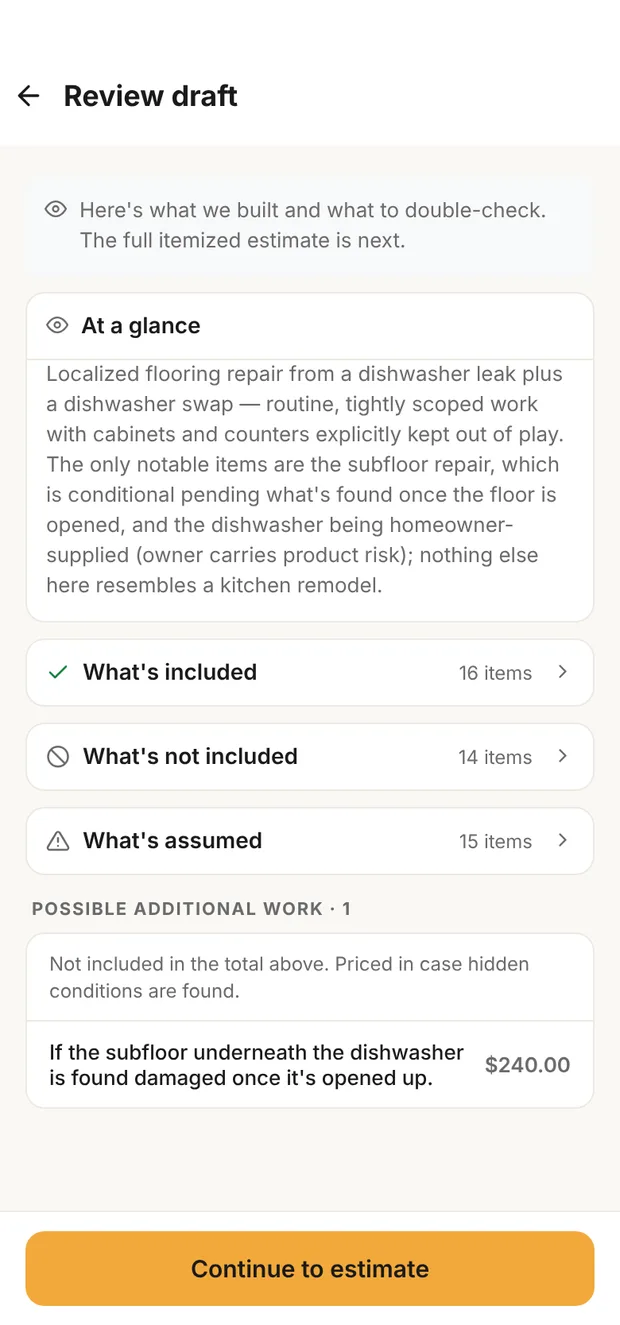
  • Possible extra work, like a subfloor that may be soft, is priced apart from the total instead of buried in it.
  • Revise with AI: say what to change, like 'she's keeping her vanity' or 'make the shower 5 by 8'. Clamp changes only that, keeps any number you typed by hand, and shows each change with its price before you apply it. A revision is half a credit, and a question it asks you is free.
  • Up to 10 people with 50 AI credits a month shared across the team, for $83.33 a month billed annually.
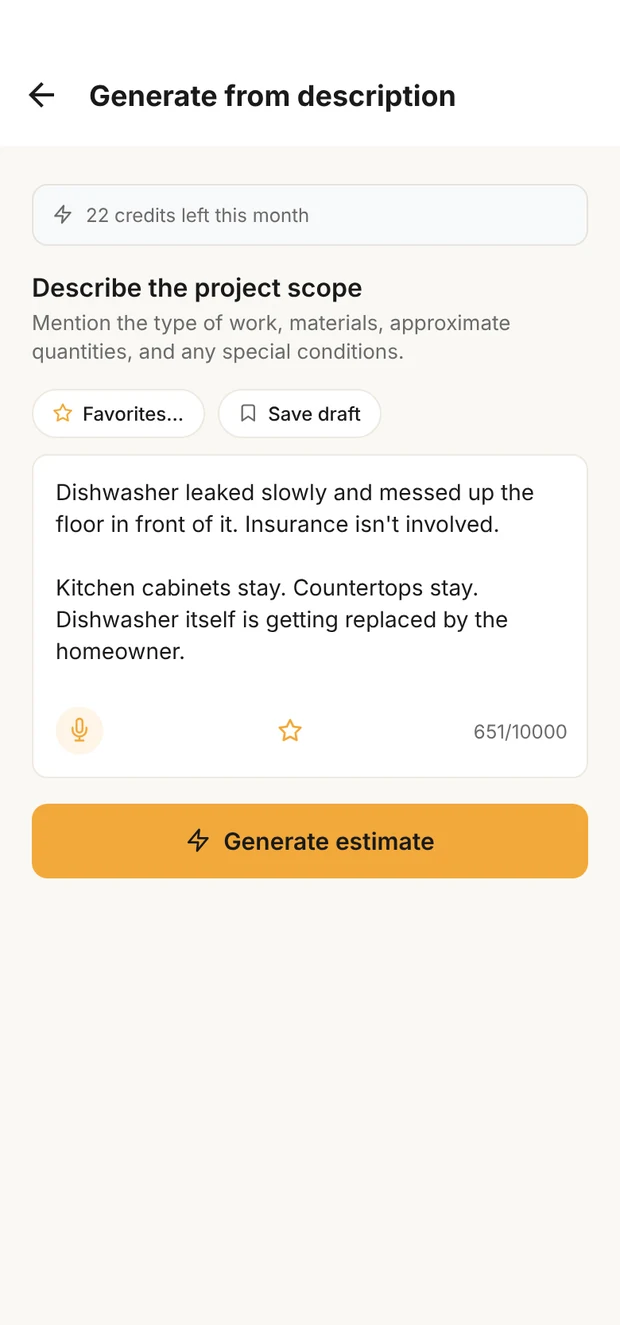
Clamp's Generate from description screen with a dishwasher leak described in plain words

Describe it

Clamp's review draft with what's included, not included and assumed, and a possible subfloor repair priced apart from the total

Review the draft

An AI estimate in Clamp: the job described the way you would say it, then the draft for review, with a possible subfloor repair priced apart from the total. Sample data.
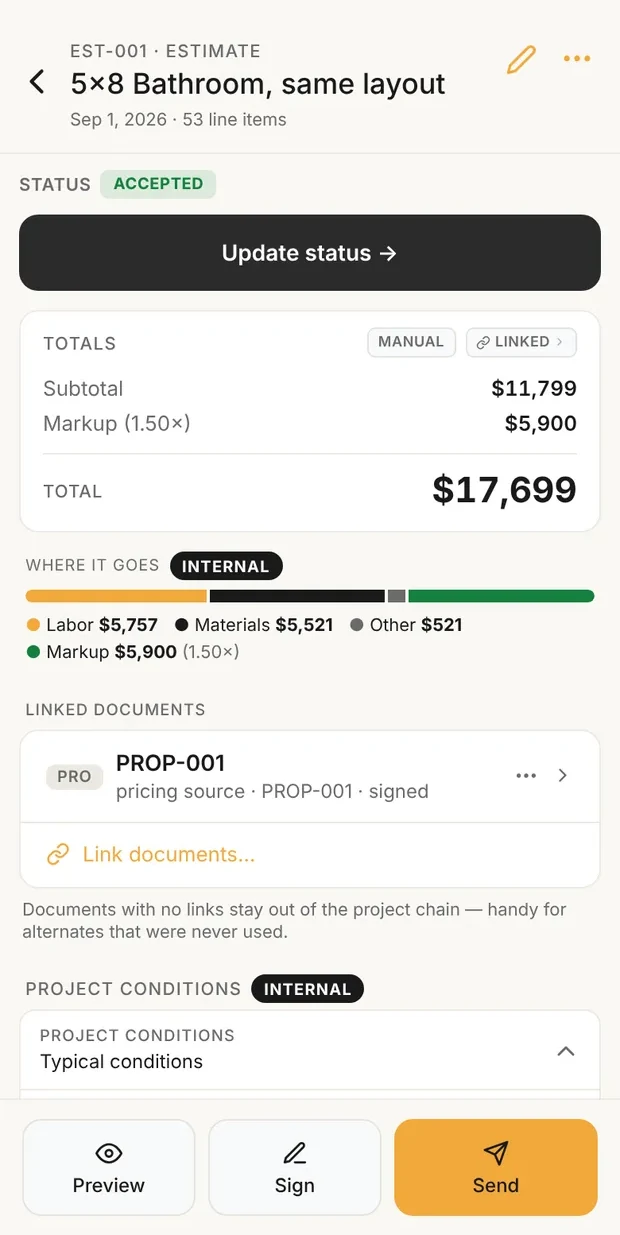
Clamp estimate showing subtotal, markup and total, with a bar of where the money goes

Cost, markup, price

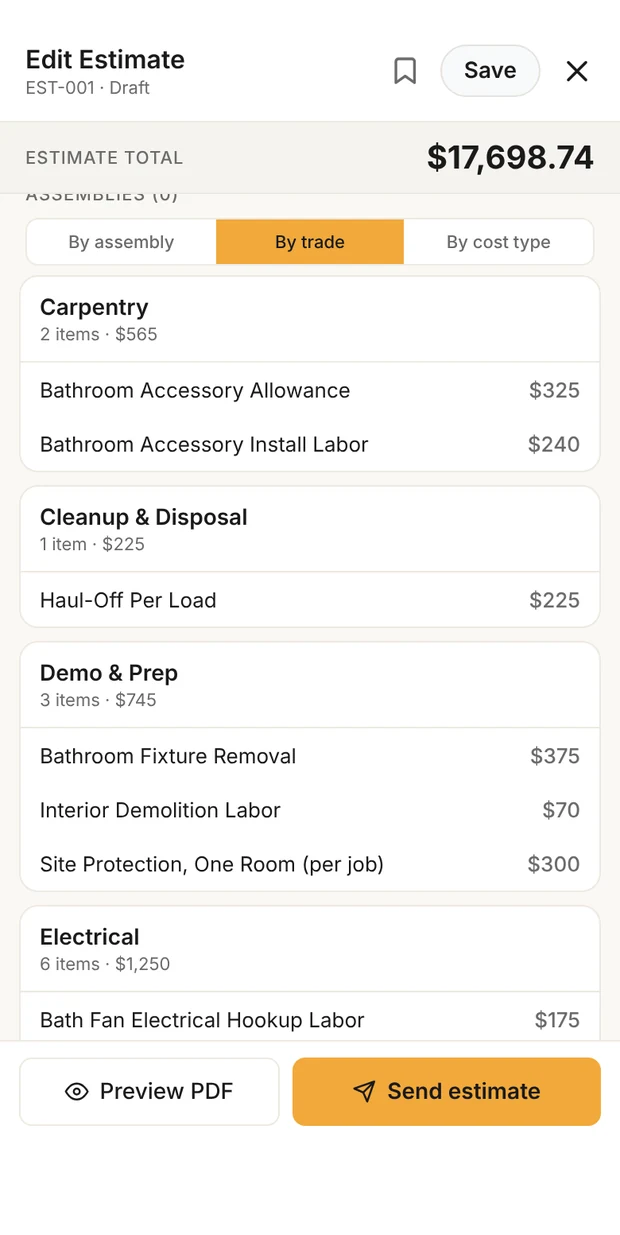
Clamp estimate lines grouped by trade: carpentry, cleanup and disposal, demo and prep, electrical

Every line, by trade

After the draft: the estimate at cost with your markup on top, and every line grouped by trade. Sample data: the published 5x8 bathroom.

Where it falls short for a small residential contractor

  • No AI takeoff from plans and no photo input; you describe the job in words.
  • No price-sheet import and no saved AI instructions; you save rates in the app.
  • Revising doesn't do a discount or a target for the whole job, like $500 off; you add a credit line or lower the markup.
  • Revising works on draft, final and sent estimates, not signed work; changes to signed work go in a change order.
  • Payments are your own payment link, recorded in Clamp, not processed by it.
  • The 3 free AI credits are one time, not monthly.

How to generate an AI estimate in Clamp →

HandoffBest for a contractor who already keeps price sheets and wants the AI to price from them

Price
Flex $149 a month or $119 billed annually, 50 AI credits a month. Pro $299 or $239 billed annually, unlimited AI credits. Scale $899 or $719 billed annually, with AI takeoffs. Pro and Scale carry a 12-month commitment.
Team
2 users on Flex, 5 on Pro, 5 or more on Scale.

Where it is stronger

  • Price catalogs you import from PDF, Excel, CSV, Word or a photo of a price sheet, with markup, margin and tax set per rate.
  • Your catalog prices first, then supplier catalogs, then the AI's own pricing.
  • You refine the draft by sending follow-up messages, and saved presets apply to every estimate.
  • AI takeoff from residential plans up to 7,000 square feet on Scale.
  • Online card and ACH payments, budget vs actual and time tracking on Pro.

Where it falls short for a small residential contractor

  • The lowest plan is $119 a month billed annually, for 50 AI credits.
  • Pro and Scale carry a 12-month commitment.
  • Budget vs actual is Pro only, and AI takeoff is a Scale plan feature.
  • A business mileage log was not found on Handoff's official pages.

SimplyWiseBest for a solo contractor who mostly needs fast, low-cost estimates from photos or a description

Price
$29.99 a month or $239.99 a year, including the other SimplyWise apps such as receipts and mileage. SimplyWise says it runs pricing experiments, so check the price at checkout.
Team
No team plan for the Estimator; a shared login gives full access to the account.

Where it is stronger

  • The lowest paid plan here for one person with AI estimating: $239.99 a year.
  • Starts from photos, a voice description, an uploaded blueprint or a LiDAR room scan on Apple Pro devices, and asks clarifying questions.
  • Edit with A.I. changes the draft, and the app adjusts for region and learns from your edits.
  • Invoices with deposits, customer signature and a Pay Now button through Stripe.

Where it falls short for a small residential contractor

  • On an estimate with labor and materials, markup applies to materials only.
  • No change order feature yet; the workaround is to duplicate and resend the estimate.
  • No team plan for the Estimator, and the web version creates and edits estimates only.
  • Dimensions are not read from an uploaded plan; they go in the description.

Contractor+Best for a contractor who wants AI estimates inside a broader business app, priced per user

Price
Pro $49 a month or $348 a year. Pro Team $98 a month for 2 users or $696 a year, plus $29 a month or $240 a year per extra user. A free Freedom plan and a $997 lifetime Pro option are also listed.
Team
1 user on Pro; 2 on Pro Team, with extra users priced each.

Where it is stronger

  • Estimatic starts from a description and can take photos, blueprints, drawings or a competing quote as context.
  • Prices from your cost book, supplier pricing and local labor data, and every line can be overridden.
  • Scheduling, contracts and card and ACH payments on Pro; job costing, a client portal and QuickBooks Online on Pro Team.

Where it falls short for a small residential contractor

  • Its support article lists 10 AI credits a month on Pro and unlimited on Pro Team; the pricing page lists Estimatic without a limit.
  • Job costing starts on Pro Team.
  • Ten people on Pro Team is $218 a month billed annually, calculated from $58 plus 8 extra users at $20.

BuildxactBest for a builder who estimates from plans and wants AI alongside takeoff and builder estimating

Price
Go is $0 with 5 AI credits and paid top-ups. Foundation $199 a month, or $2,030 a year billed annually, plus $99 a month for Estimate Generator. Pro $399 a month or $4,070 a year includes Estimate Generator. Master $599 a month or $6,110 a year adds Takeoff Assistant and Estimate Reviewer.
Team
Unlimited users from Foundation.

Where it is stronger

  • Estimate Generator turns a typed or dictated description into categories, materials and labor, and can start from one of your own estimates or templates.
  • Asks follow-up questions, localizes pricing to the job address, and refines the result with Estimate Assistant.
  • Takeoff Assistant and Estimate Reviewer on Master, with unlimited users from Foundation.
  • A free Go plan with 5 credits to try it.

Where it falls short for a small residential contractor

  • Estimate Generator is a $99 a month add-on on Foundation and included from Pro, at $339 a month billed annually.
  • The price of Go credit top-ups was not found on official pages.
  • Annual billing carries a 12-month commitment.
  • Payment acceptance was not found on Buildxact's official pages.

What AI estimating costs

The lowest plan with AI estimate generation for each product, what it includes, and the next step up. Monthly-billing prices first; annual prices as each vendor publishes them.

What AI estimating costs
SoftwareLowest plan with AIAI includedBilled monthlyBilled annually
ClampAssistant, 1 account; Teams, up to 1025 credits a month; 50 shared on Teams; a revision is half a credit$49.99; Teams $99.99$499.99 a year; Teams $999.99
HandoffFlex, 2 users50 credits a month; unlimited on Pro$149; Pro $299$119 a month; Pro $239 a month, 12-month commitment
SimplyWiseOne plan, 1 loginNo limit stated on its pricing page$29.99$239.99 a year
Contractor+Pro, 1 user10 credits a month; unlimited on Pro Team (support article)$49; Pro Team $98 for 2 users$348 a year; Pro Team $696 for 2 users
BuildxactGo, credits only; Pro includes Estimate Generator5 credits on Go, then paid top-ups$0 on Go; Pro $399Pro $4,070 a year, 12-month commitment

From each vendor's own pricing page, October 11, 2026. A credit is not necessarily one estimate, and the plans are not equivalent: check what each includes. Every Clamp account gets 3 free AI credits to start, and Clamp's credits also cover revising an estimate with a prompt (half a credit).

How to test them on your own job

Questions to ask before you subscribe

  1. Whose prices fill the lines, and can you load or save your own?
  2. What counts as one AI credit, and do revisions use credits?
  3. Can you revise the draft by asking, or only line by line?
  4. Does the phone app do everything the web version does?
  5. Can a crew member or sub see the job without seeing your prices?
  6. When the scope changes, does the change order update the contract and the invoice?
  7. Can you export your estimates and customers if you leave?

Try a published Clamp example

How this comparison was made

Questions

Can AI write a contractor estimate from a job description?

Yes. All five products here turn a written or spoken description into an itemized draft you edit. You still check the scope, quantities and prices before it goes to a customer.

Can I use my own prices?

In all five, to different degrees. Handoff prices from catalogs you import first; Contractor+ uses your cost book; Buildxact can start from your own estimate or template; SimplyWise learns from your edits; Clamp uses your saved rate on each line in place of its baseline.

Is an uploaded blueprint the same as a takeoff?

No. SimplyWise and Contractor+ take a plan as context; SimplyWise says dimensions go in the description. Handoff's AI takeoff (Scale) and Buildxact's Takeoff Assistant (Master) are separate takeoff features.

Does an AI estimate include my markup?

It depends on the product. Clamp drafts at direct job cost and shows your markup apart from it. Handoff sets markup per rate. SimplyWise applies markup to materials only on an estimate with both labor and materials.

What happens when the scope changes?

Before the customer signs, Clamp revises the estimate from a prompt. After signing, Clamp and Handoff have change orders the customer approves. SimplyWise has no change order feature yet and suggests duplicating the estimate. Change orders were not found on Contractor+ and Buildxact's official pages.

How do Handoff and SimplyWise differ?

Handoff starts at $119 a month billed annually, with 2 users, imported price catalogs and change orders. SimplyWise is $239.99 a year for one login, starts from photos or a description, and has no change order feature yet.

Related

Sources & provenance

  1. Buildxact Blu Estimator: Estimate Generator Buildxact (official source)
  2. Buildxact Onsite app Buildxact (official source)
  3. Buildxact US pricing Buildxact (official source)
  4. How to generate an AI construction estimate from a project description Clamp Research
  5. Clamp free AI estimate Clamp Research
  6. Clamp FAQ: does it work offline? Clamp Research
  7. Clamp plans and prices Clamp Research
  8. Clamp FAQ: AI credits and revising an estimate Clamp Research
  9. Contractor+ AI estimating software Contractor+ (official source)
  10. Contractor+ pricing plans Contractor+ (official source)
  11. Contractor+ pricing Contractor+ (official source)
  12. Is Handoff on the app stores? Handoff (official source)
  13. Handoff subscription length and billing options Handoff (official source)
  14. Handoff budget tab Handoff (official source)
  15. Handoff catalogs Handoff (official source)
  16. Handoff change orders Handoff (official source)
  17. Handoff: AI create an estimate Handoff (official source)
  18. Handoff: save preferences for estimates Handoff (official source)
  19. Handoff pricing Handoff (official source)
  20. Handoff: how to run an AI takeoff Handoff (official source)
  21. Does the Handoff trial have all the features? Handoff (official source)
  22. SimplyWise construction cost estimator SimplyWise (official source)
  23. SimplyWise cost estimator FAQs SimplyWise (official source)
  24. SimplyWise pricing SimplyWise (official source)
Changes: Oct 11, 2026: Initial publication: five AI estimating tools compared from each vendor's own pages, read 2026-10-11.