Clamp vs Joist: Estimate-to-payment simplicity, or a connected residential project
Joist centers on estimates, invoices, payments and solo job administration. Clamp connects the residential project from lead qualification and cost estimating through milestones, customer decisions, change orders and job cost review.
Direct answer: Choose Joist when your main workflow is estimating, getting approval, invoicing and collecting payment, with extras such as expense tracking, financing, work orders, business reports and solo scheduling on higher plans. Choose Clamp when you need the records around a longer residential job to stay connected: lead qualification, cost-based estimating, milestones, customer decisions, signed change orders, time and mileage, sub access and the estimate-against-actual job cost review. Both cover estimates, invoices, signatures, deposits and milestone payments. The difference is what you need to manage between the signed estimate and the final payment.
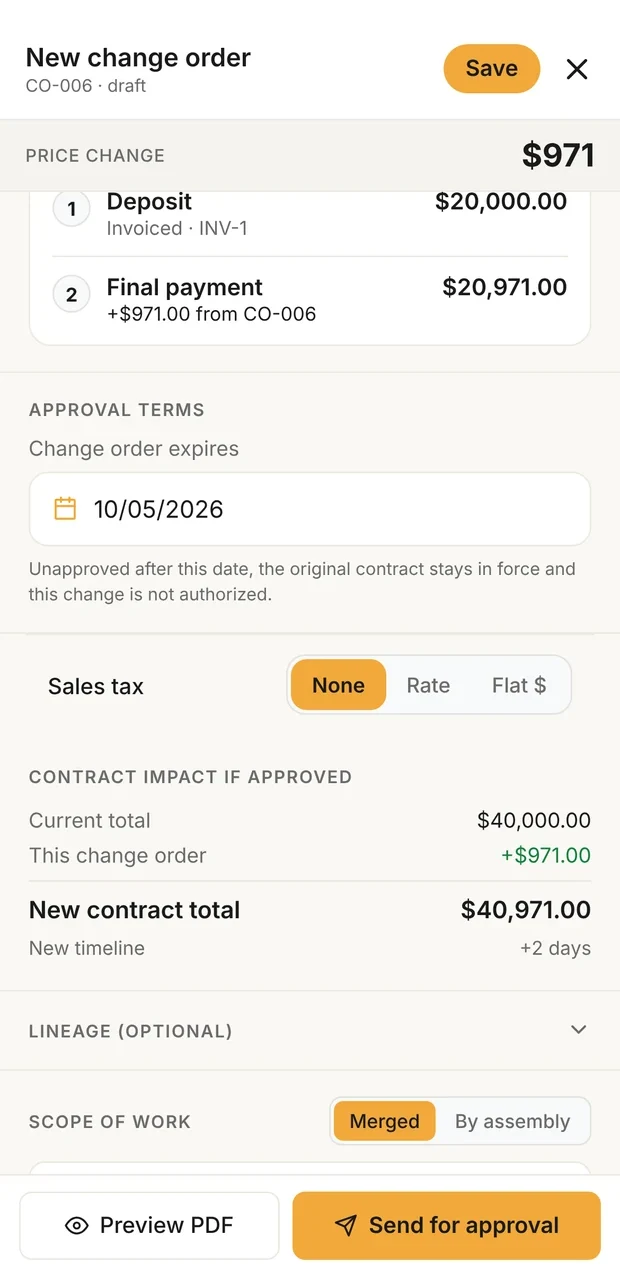
Change order, priced
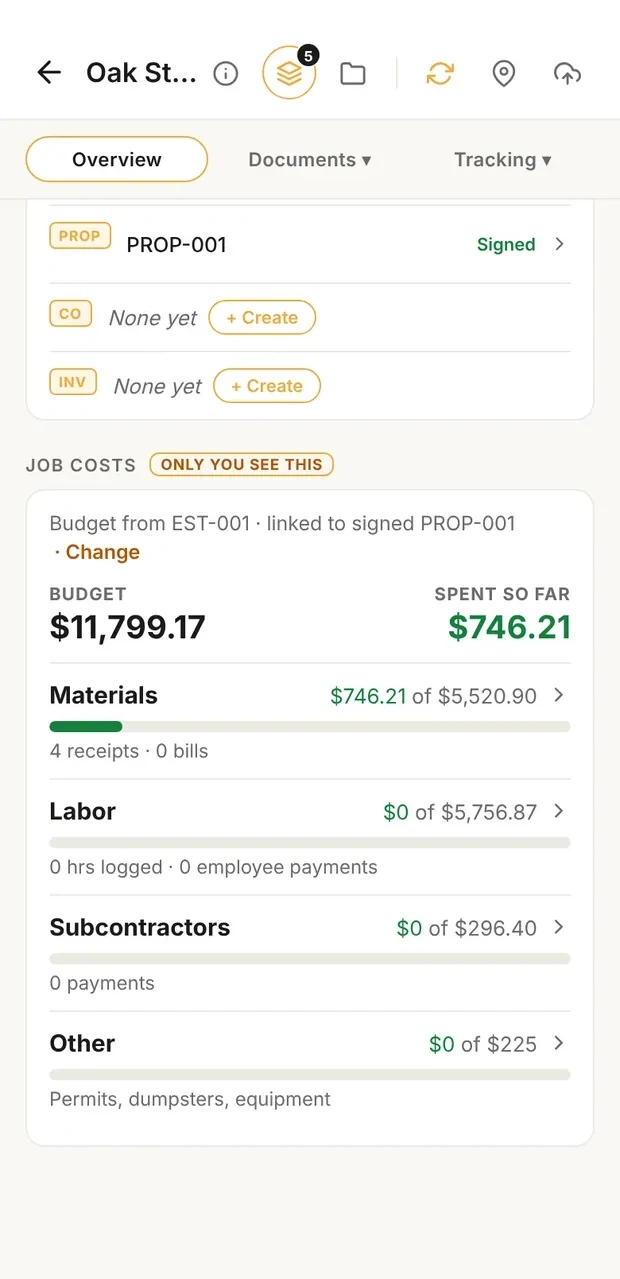
Job cost against budget
Sample data. A change order shows its effect on the contract before it is signed, and the job costs card compares what the job is consuming with its budget.
What it costs
| Situation | Clamp | Joist |
|---|---|---|
| One person, up to 5 documents a month | Solo, billed monthly $19.99 a month $239.88 a year, calculated | Basics, billed monthly $10.00 a month $120.00 a year, calculated |
| One person, unlimited documents | Solo, billed monthly $19.99 a month $239.88 a year, calculated | Pro, billed monthly $17.00 a month $204.00 a year, calculated |
| One person who needs change orders | Solo, billed monthly $19.99 a month $239.88 a year, calculated | Elite, billed monthly $32.00 a month $384.00 a year, calculated |
| One person, billed annually | Solo $12.50 a month $149.99 a year | Any plan Annual plans get two months free; Joist shows no annual dollar figure on its pricing page. |
| A crew of 5 | Teams (up to 10 people), billed annually $83.33 a month $999.99 a year | Not available Joist accounts are set up for a single user with one login. |
Verdict
Clamp may fit when
- You run residential projects where estimating, milestones, customer decisions, changes and closeout need to stay in one job record
- You estimate at direct job cost and apply your company markup after the cost is built
- You want signed change orders without moving to a higher plan
- You track labor, mileage, receipts and bills against the estimate and review actual job cost at close
- You work with employees or subs who need their own access without seeing your customer prices
Joist may fit when
- Your main workflow is creating estimates, getting signatures, invoicing and collecting payment
- You want cards, ACH, PayPal, Venmo, Tap to Pay or Pay Later processed in the same system
- You want deposits and milestone payment schedules on a low-cost plan
- You want homeowner financing, contractor lending, work orders or reusable project templates
- You want QuickBooks Online sync, expense tracking and built-in business reports
- You work alone and want jobs and visit scheduling on Run
Before you compare them
- The overlap is real. Both handle estimates, invoices, signatures, deposits, milestone payments, client records and payments, processed or recorded.
- Joist's strongest documented advantages are its estimate-to-payment workflow, payment options, homeowner financing, work orders, templates, QuickBooks sync and solo scheduling on Run.
- Clamp's advantage is the connected residential project around the documents: qualification, estimates at cost, milestones, customer decisions, change orders on every plan, team and sub access, time, mileage and the estimate-against-actual review.
- Joist Basics is limited to 5 documents a month; Pro and above are unlimited.
- Joist change orders start on Elite. Clamp change orders are on every plan.
- Joist processes payments. Clamp records them and can show your own payment link in the customer portal.
- Joist's Help Center says accounts are set up for a single user with one login. Clamp Teams has up to 10 accounts plus free sub access.
- "Not found" on this page means not found on Joist's current pricing, feature or Help Center pages. It does not mean Joist cannot do it another way.
- Neither product was tested against the other. No speed or accuracy claim is made.
Workflow
| Feature | Clamp | Joist |
|---|---|---|
| Document limits | Unlimited documents on every plan | Basics: up to 5 documents a month; Pro and above unlimited |
| Estimates | Line by line in the order the job is built, at direct cost, with allowances visible | Line items, saved items, project templates, markups and taxes |
| Templates and reuse | Saved rates and saved estimate descriptions | Project templates and reusable line items and descriptions |
| AI estimates | A draft at direct cost from a project description, then your markup (3 free, then 50 or 100 a month by plan) | Estimate with AI and Invoice with AI on all plans: a draft with line items from a typed or spoken description |
| Paid design agreement | A design agreement document on every plan | Contracts and terms can be attached to an estimate; a dedicated paid design agreement was not found on Joist's current pricing, feature or Help Center pages |
| Signatures and deposits | Proposals signed in the customer portal (Assistant and Teams); the deposit is the first milestone | Customers review and sign estimates on any device; deposits on estimates or invoices |
| Change orders | Every plan: priced, signed and billed | Elite and above |
| Progress billing | Milestones tied to job events, each with a checklist of evidence; billed as the stage starts | Deposits and milestone payment schedules |
| Customer decisions after signing | A Decisions needed list: needed by, what it blocks, who owes the answer, the resolution | A decision list after the estimate is signed was not found on Joist's current pricing, feature or Help Center pages |
| Payments | Not processed by Clamp: add your own payment link and record what was paid | Stripe and PayPal: cards, PayPal, Venmo, Pay Later, Tap to Pay, ACH 1% capped at $15 |
| Homeowner financing | Not offered | Financing offers from 30+ lenders on estimates, all plans |
| Work orders | No separate work order; crew and subs see the job, its schedule and shared photos (Teams) | Pro and above |
| Job costing | Every plan: receipts, bills, time at the loaded rate and returns, reviewed against the estimate at close | Expense tracking tied to jobs, and business reports on Elite; a review of estimated against actual cost by category was not found on Joist's current pricing, feature or Help Center pages |
| Business reports | Workflow overview totals, lead statistics, and the accountant export | Business and sales reports on Elite and above |
| Time on site | Logged by role, or detected automatically when you leave a job site | Job time tracking was not found on Joist's current pricing, feature or Help Center pages |
| Business mileage log | Automatic trip detection, confirmed per trip, at the IRS rate for its date | An IRS-style business mileage log was not found on Joist's current pricing, feature or Help Center pages |
| Customer portal | One place to sign proposals and change orders, see milestones and invoices, and answer decisions (Assistant and Teams) | Customers review, sign and pay through shared links; a persistent project portal like Clamp's was not found on Joist's current pricing, feature or Help Center pages |
| Scheduling | A shared job schedule your crew and subs confirm (Teams) | Run: jobs and visits for solo contractors |
| Team and subs | Up to 10 accounts on Teams, plus unlimited free sub invites who never see your prices | Accounts are set up for a single user with one login |
| Lead qualification | A five-question score on the first call | Client profiles and how each customer found you; a lead-scoring workflow was not found on Joist's current pricing, feature or Help Center pages |
| Review requests | Not offered | Joist Reviews on Elite and above |
| Accounting | An accountant export package | QuickBooks Online sync |
What was and was not tested
What was compared: Hands-on testing of either product. Neither was tested against the other, and no speed or accuracy claim is made. Documented, not tested.
| Statement | Basis |
|---|---|
| Published by Clamp, using each product's own pricing, feature and help pages. | Clamp's own statement |
| Occasional use, up to 5 documents a month: Joist Basics is $10 a month, less than Clamp Solo at $19.99. | Calculated from published prices |
| Unlimited documents, billed monthly: Joist Pro is $17 and Clamp Solo is $19.99. With change orders: Joist Elite is $32 a month; Clamp Solo stays $19.99, or $149.99 a year billed annually. The plans are not equivalent: Joist includes payment processing and financing Clamp does not offer, and Clamp includes project records Joist does not document. | Calculated from published prices |
Switching
- Export your clients, estimates and invoices from Joist before you cancel.
- Do not assume Joist history can be imported into Clamp; confirm formats first.
- If you depend on in-app card payments or homeowner financing, set those up another way before you switch.
- Save your Joist line items somewhere you can re-enter them as Clamp rates.
- Finish open jobs where they started; start new ones in Clamp.
Sources & provenance
- Joist Pricing Joist (official source)
- Joist for AI assistants Joist (official source)
- Quick Estimate and Invoice with AI Joist Help Center (official source)
- Estimates Joist (official source)
- Features Joist (official source)
- Payments Joist (official source)
- Homeowner financing Joist (official source)
- Business loans Joist (official source)
- Client management Joist (official source)
- Client reviews Joist (official source)
- Expense tracking Joist (official source)
- QuickBooks Online sync Joist (official source)
- Is Joist set up for teams? Joist Help Center (official source)
- What is Joist Run? Joist Help Center (official source)
- Clamp Pricing Clamp Research
- The Clamp Method Clamp Research
Changes: Oct 10, 2026: Initial publication. Reviewed against Joist's official pages: Joist's AI estimates and invoices on all plans, deposits and milestone payments, financing, work orders, reports, review requests and Run scheduling are credited; the single-user account limit is cited from Joist's Help Center.