Compare software · alternatives

Houzz Pro Alternatives for Small Residential Contractors (2026)

Houzz Pro is $99 to $399 a month, mostly on 12-month contracts. Six alternatives for one to ten person residential crews, priced by team size, and when to keep Houzz Pro for its leads.

Direct answer: For a one to ten person residential crew, Clamp is the lowest published price with change orders, job costing and mileage on every plan and no annual contract: $12.50 a month billed annually, or $83.33 for up to 10 people. JobTread and Buildertrend go deeper on budgets and scheduling; Contractor Foreman starts at $49; Jobber suits service crews; Joist suits a solo estimator. Clamp is not a lead source: stay with Houzz Pro if the marketplace brings your work.

At a glance

Houzz Pro is good software. It is also priced and built for a different contractor than a one to ten person residential crew. This list compares the alternatives on what a small residential contractor runs every week: estimates, change orders, invoices, job cost and the costs that leak, like mileage.

Every price and feature comes from each vendor's own pricing, feature or help pages, read on October 11, 2026. Where a page doesn't mention something, this list says 'not found on official pages' rather than 'can't'.

Feature by feature

FeatureClampHouzz ProJobTreadBuildertrendContractor ForemanJobberJoist
Price and team
Starts at$12.50/mo billed annually$99/mo (Design, 1 user)$199/mo with 1 userNot published; quoted$49/mo$29/mo billed annually (1 user)$10/mo (5 documents)
Team1 on Solo; up to 10 on Teams+$50/user; Teams from $399, unlimited+$20/mo per user; subs and clients freeUnlimited usersBy plan tier; check plans page1 to 15 users; +$29/userOne user per account
Winning the job
Lead trackingEvery planYes, CRM; marketplace leadsYes, sales pipelineYes, CRMYes, leads managerRequests; pipeline on PlusClient profiles
Lead scoringFive-question score on the first callScreening questionnaire, no scoreNot found on official pagesManual confidence levelNot found on official pagesNot found on official pagesNot found on official pages
AI estimating3 free; 50 or 100 a month by planFrom text, voice or filesAI budget draftingNot found on official pagesAI takeoff in developmentAI drafts quotesFrom a typed or spoken description
Design agreementsEvery planRetainersNot found on official pagesNot found on official pagesNot found on official pagesNot found on official pagesNot found on official pages
ProposalsEvery planDesign and upYesYesEstimates for online approvalQuotes, every planEstimates
E-signaturesAssistant and TeamsContracts, Pro and upYesYesYesOn quote approvalYes
Running the job
Change ordersEvery planPro and upYesYesYesThrough DocuSignElite and Run
SchedulingShared schedule on TeamsPro; Google, iCloud, Office 365 syncGantt; Google, Outlook, iCal syncGantt, dependencies; Google, Outlook syncGantt; Google, Outlook syncEvery plan; calendar syncRun plan
Sub accessFree, unlimited on Teams; prices hiddenFree, no-login dashboardFree, unlimited portalSub portalBids by link; no sub portal foundPaid user seatNot found on official pages
Customer portalAssistant and TeamsClient dashboardFree, unlimitedYesYesClient HubNot found on official pages
Automatic remindersEmail and appointment reminders, Assistant and TeamsContract signing, invoicesUnsigned estimates, unpaid invoicesUnsigned proposals; lead emailsEstimate remindersQuotes, invoices, visits; Connect and upNot found on official pages
Daily logsShared photos and job updates on TeamsPro and upYesYesYesNot found on official pagesNot found on official pages
Punch listsEvery planYesTasks and to-dosYes, through TasksYesJob checklistsNot found on official pages
Getting paid
InvoicesEvery plan; milestone billingYes; milestone schedulesYes; progress billingYes; draws and retainageYes; progress, retainage, AIAEvery plan; progress invoicingYes; deposits and milestones
PaymentsYour own payment link; recorded, not processedCard and ACHCard, ACH, Apple and Google PayCard 2.99%, ACH $15ACH 1%, card 2.9%Card 2.9% + 30¢, ACH 1%Card and ACH
Tracking what it cost
Job costingEvery plan; estimate against actualFrom $199/moYesYesYesGrow and upExpenses per job
ReceiptsEvery plan; costed to the jobAI receipt scanAI receipt scanningReceipt scan to a jobExpenses; receipt photos not confirmedReceipt photos, Connect and upReceipt scan, Pro and up
Time on siteDetected automatically, every planClock-in prompt near the siteManual clock-in, location on a mapManual clock-in; geofence locationClock-in with GPS, geofencingLocation timers on GrowNot found on official pages
MileageTrips detected automatically, IRS rate, every planNot found on official pagesNot found on official pagesNot found on official pagesManual vehicle logNot found on official pagesNot found on official pages

From each vendor's own pricing, feature and help pages, read October 11, 2026. 'Not found on official pages' means exactly that; the product may do it another way. Plan names show where a feature starts. Clamp publishes this page.

Why small contractors look past Houzz Pro

Houzz Pro has a free basic plan, Design at $99 a month and Pro at $199 a month for one user each, and Teams from $399 a month. Extra users are $50 a month on Design and Pro. Most plans are 12-month contracts.

6 Houzz Pro alternatives

In order of fit for a small residential contractor. Each entry says where it is stronger, not only where it falls short.

1 ClampBest for one to ten person residential crews running the job from a phone

Price
Solo $19.99 a month or $149.99 a year. Teams $99.99 a month or $999.99 a year for up to 10 accounts.
Team
One account on Solo and Assistant; up to 10 on Teams, plus free sub invites who never see your prices.

Where it is stronger

  • The whole residential job in one record, first call to final invoice: lead score, design agreement, AI estimate at cost, proposal, change orders and invoices.
  • Change orders, job costing, receipts and punch lists on every plan, including Solo.
  • Mileage and time on site detected automatically and costed to the job, on every plan.
  • A customer portal with e-signatures and email reminders from Assistant, $41.67 a month billed annually.
  • Teams covers up to 10 people plus unlimited free sub invites, who never see your prices, for $99.99 a month.
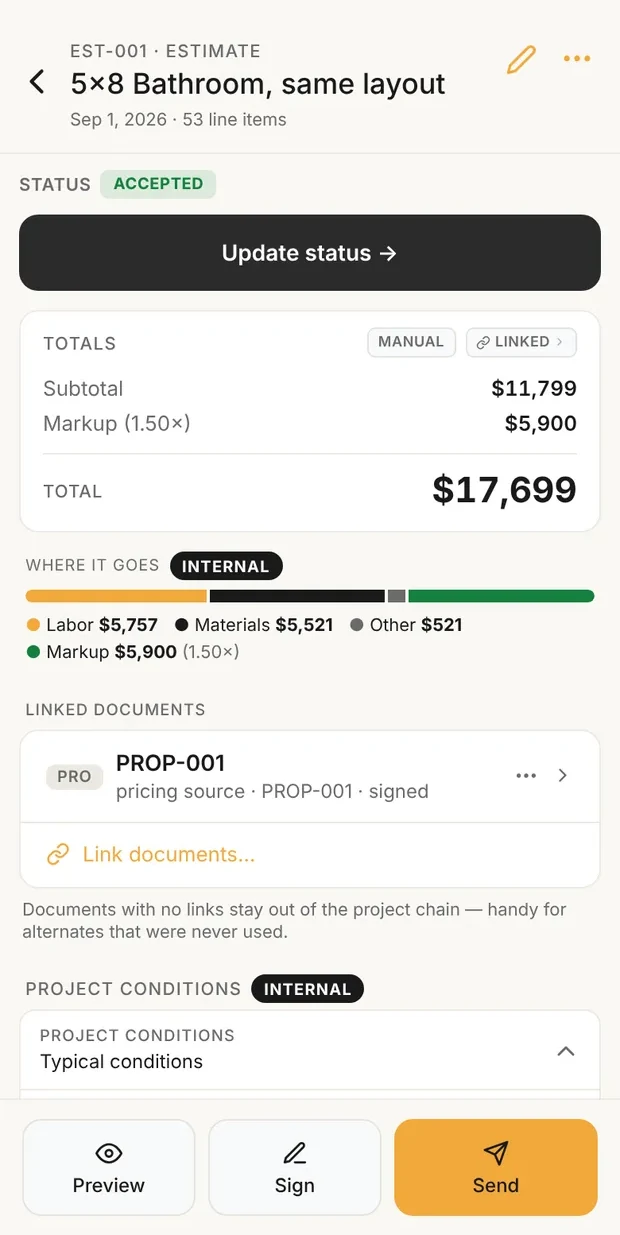
Clamp estimate showing subtotal, markup and total, with a bar of where the money goes

Estimate, cost and price

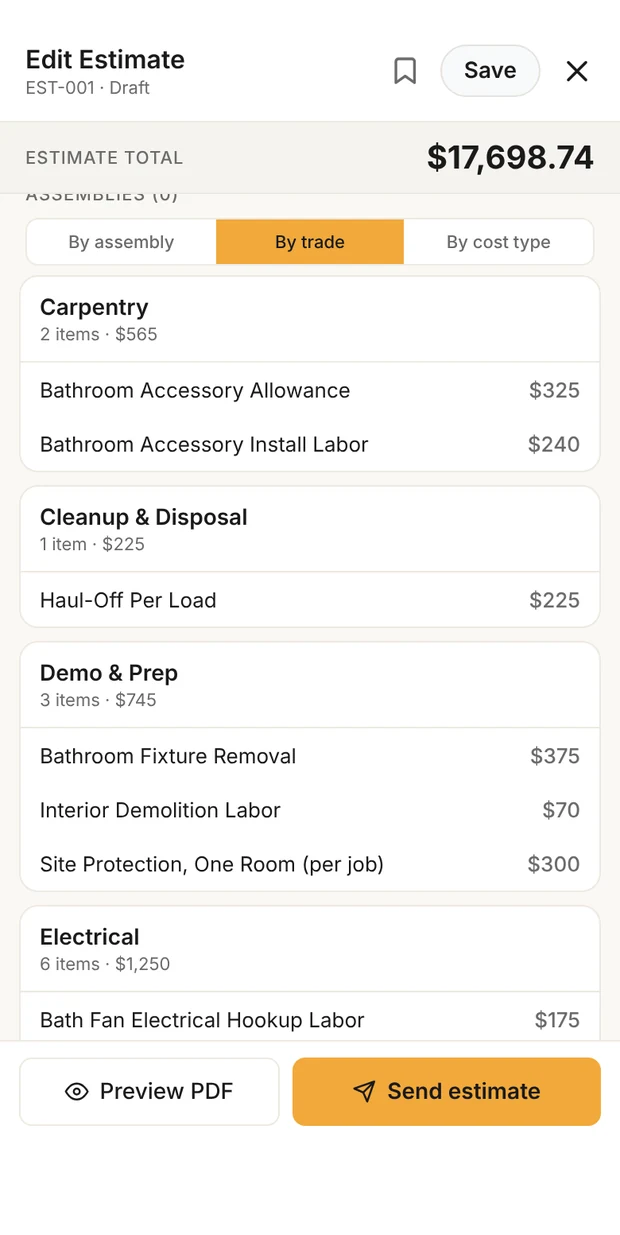
Clamp estimate lines grouped by trade: carpentry, cleanup and disposal, demo and prep, electrical

Every line, by trade

Clamp on a phone: the estimate at cost with the markup on top, and every line grouped by trade. Sample data: the published 5x8 bathroom.

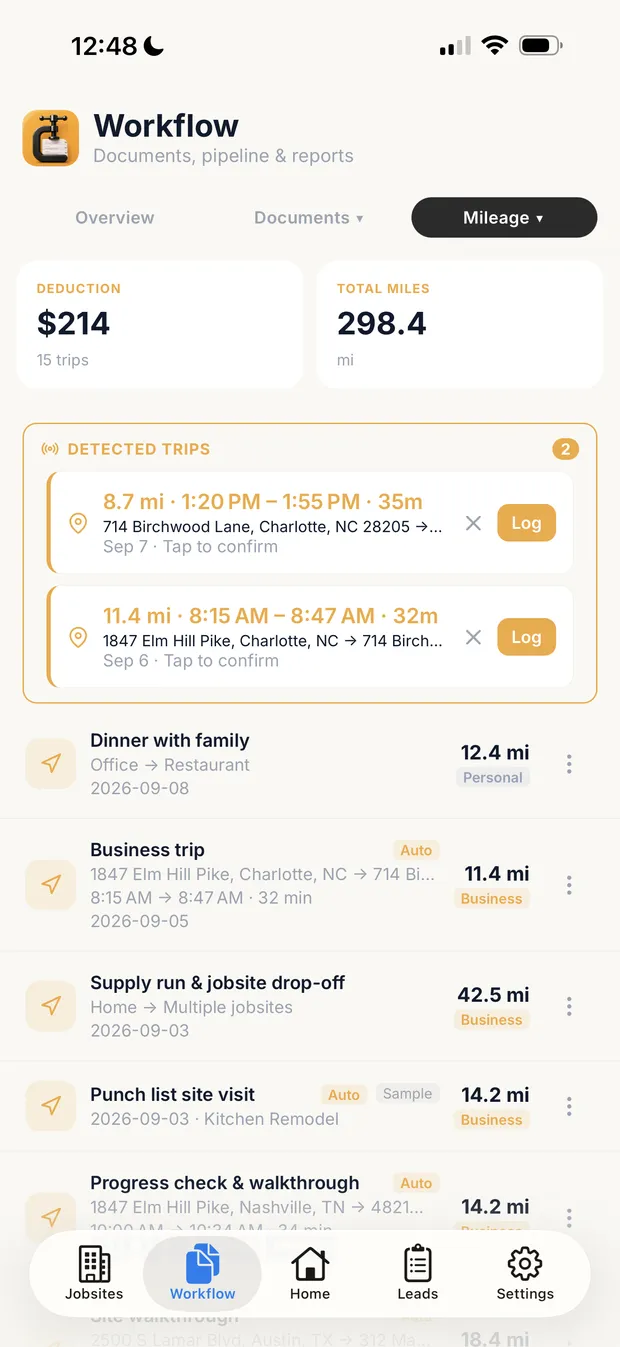
Clamp mileage screen with detected trips awaiting confirmation and logged trips attached to jobs

Mileage, detected

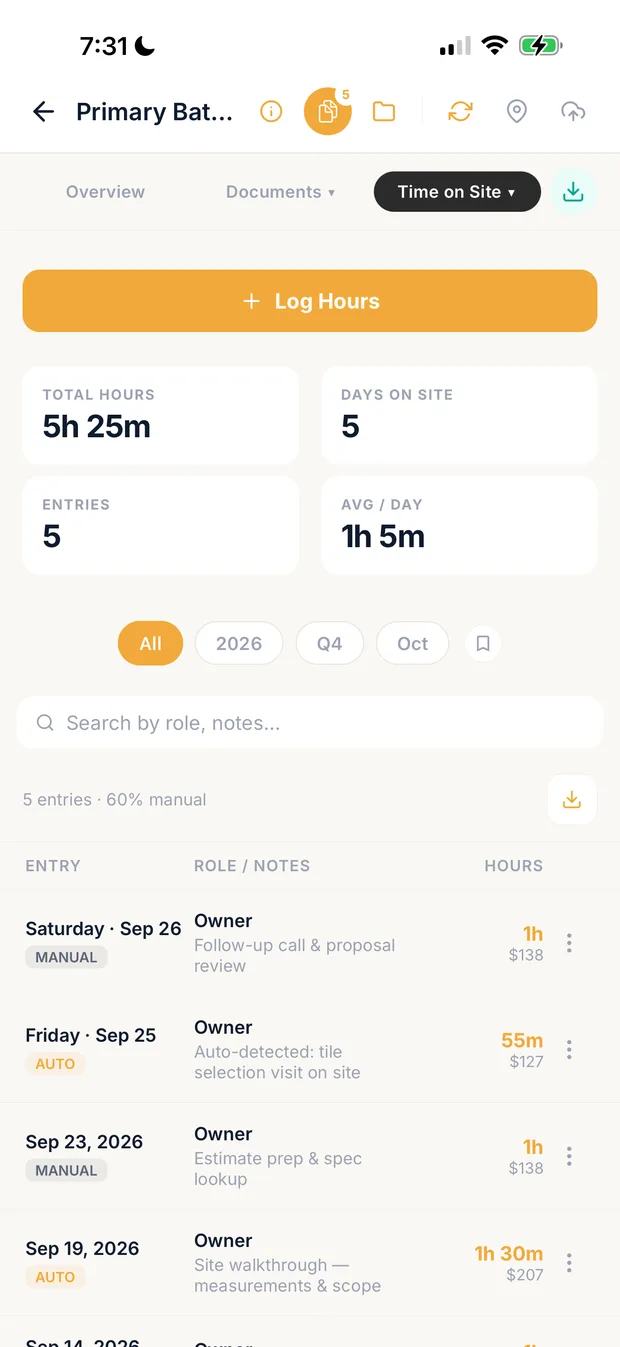
Clamp time on site screen with hours on the job by role

Hours on the job

In the background: drives detected and waiting to be confirmed, and hours on the job by role. Sample data.

Where it falls short for a small residential contractor

  • No takeoff from plans and no Gantt schedule; the shared schedule is whole days, on Teams.
  • Clamp does not process payments; you add your own payment link and record what was paid.
  • No QuickBooks sync; an accountant export package instead.
  • Not a lead source; it scores and follows up the leads you already get.

2 JobTreadBest for remodelers and builders who estimate from plans and want deep budgets

Price
$199 a month with one internal user, plus $20 a month per extra internal user up to 10. 20% off billed annually. No contract or setup fees.
Team
Internal users are paid; vendors, subs and customers are free and unlimited.

Where it is stronger

  • Takeoff on calibrated plans that feeds the estimate and budget.
  • Free, unlimited client and sub portals; subs bid and e-sign purchase orders.
  • Two-way QuickBooks Online sync.
  • Gantt scheduling.

Where it falls short for a small residential contractor

  • $199 a month before a second user.
  • The mobile app is a web app added to the home screen, not an App Store download.
  • Business mileage log: not found on official pages.

3 Contractor ForemanBest for small trade and general contractors who want many modules at a low entry price

Price
Starts at $49 a month. Plans are billed monthly or annually; the 30-day trial is on annual plans only, and there is a non-refundable implementation fee.
Team
User limits by plan tier; confirm current limits on its plans page.

Where it is stronger

  • A low entry price for change orders, job costing and Gantt scheduling.
  • Two-way QuickBooks Online and Desktop sync.
  • Bid management and purchase orders that become bills.
  • GPS time cards and an equipment and vehicle log.

Where it falls short for a small residential contractor

  • Monthly plans have no free trial and are charged immediately.
  • A non-refundable implementation fee; the amount was not found on official pages.
  • A dedicated sub portal was not found on official pages.

4 BuildertrendBest for established builders running many complex projects at once

Price
Not published. Buildertrend quotes by builder type and annual revenue, billed annually or quarterly, with 10% off paid annually upfront.
Team
Unlimited users and projects at no extra cost per user.

Where it is stronger

  • Gantt scheduling with dependencies, critical path and baselines.
  • A sub portal with purchase orders, lien waivers and change order status.
  • Native QuickBooks Online and Xero integrations.
  • Built-in takeoff that feeds estimates.

Where it falls short for a small residential contractor

  • No published price; you need a sales call to learn it.
  • Billed annually or quarterly; monthly billing not found on official pages.
  • Business mileage log: not found on official pages.

5 JobberBest for service work with crews, routes and recurring visits

Price
Core $29 a month billed annually or $49 monthly for one user. Job costing starts on Grow: $149 billed annually or $199 monthly for one user.
Team
Plans priced at 1, 5, 10 and 15 users; extra users $29 a month.

Where it is stronger

  • Scheduling and route optimization for crews.
  • Integrated card and ACH payments.
  • Automated quote and invoice follow-up from Connect.

Where it falls short for a small residential contractor

  • A native change order workflow was not found; Jobber documents DocuSign for signed change orders.
  • Job costing starts on Grow.
  • Business mileage log: not found on official pages.

Clamp vs Jobber, in detail →

6 JoistBest for a solo contractor who mainly needs estimates and invoices

Price
Basics $10 a month (5 documents), Pro $17, Elite $32 with change orders, Run $70 with scheduling.
Team
Accounts are set up for a single user with one login.

Where it is stronger

  • The lowest entry price on this list.
  • Payments and homeowner financing built in.
  • QuickBooks Online sync on Pro and Elite.

Where it falls short for a small residential contractor

  • One user per account.
  • Change orders start on Elite.
  • Business mileage log: not found on official pages.

Clamp vs Joist, in detail →

What each costs by team size

What the whole business pays each month for one person, a three-person crew and ten people.

Monthly cost by team size
Software1 person3 people10 people
Clamp$12.50 billed annually ($19.99 monthly), Solo$83.33 billed annually ($99.99 monthly), Teams$83.33 billed annually ($99.99 monthly), Teams
Houzz Pro$199 monthly, Pro (12-month contract)$299 monthly, Pro plus 2 usersFrom $399 monthly, Teams
JobTread$159.20 billed annually ($199 monthly)$191.20 billed annually ($239 monthly)$303.20 billed annually ($379 monthly)
BuildertrendNot publishedNot publishedNot published
Contractor ForemanFrom $49Not confirmed on official pagesNot confirmed on official pages
Jobber$149 billed annually ($199 monthly), Grow$229 billed annually ($299 monthly), Grow, 5 users$299 billed annually ($399 monthly), Grow, 10 users
Joist$32 monthly, EliteNot offered: one user per accountNot offered: one user per account

Per month for the whole business, from each vendor's own pricing page on 2026-10-11. Billed annually where the vendor offers it, with the monthly-billing price in parentheses; 'calculated' figures add the vendor's per-user price. The plans compared are not equivalent: check what each includes before you compare totals.

When to stay with Houzz Pro

How to choose

  1. Write down the jobs you ran last month and what each one needed: estimates from plans, change orders, progress invoices, crew hours, mileage.
  2. Price your actual team size, including subs who need access, on each vendor's current pricing page.
  3. Check the contract terms before the features: annual minimums, implementation fees and how to cancel.
  4. Run one real job through a trial from first call to final invoice before you move your records.
  5. Keep your current software until the trial job closes cleanly.

Before you switch

How this list was made

Questions

How much is Houzz Pro a month?

Design $99 and Pro $199 a month for one user each; Teams from $399 a month with unlimited users; extra users $50 a month on Design and Pro.

Can you cancel Houzz Pro anytime?

Most Houzz Pro plans are annual 12-month contracts that cannot be cancelled early, according to its help center.

Is Clamp a lead source like Houzz?

No. Clamp scores and follows up the leads you already get; it does not sell leads or ads.

Related

Sources & provenance

  1. Buildertrend mobile app Buildertrend (official source)
  2. Buildertrend budgeting Buildertrend (official source)
  3. Buildertrend change orders Buildertrend (official source)
  4. Buildertrend cost inbox Buildertrend (official source)
  5. Buildertrend CRM Buildertrend (official source)
  6. Buildertrend daily logs Buildertrend (official source)
  7. Buildertrend FAQ Buildertrend (official source)
  8. Buildertrend invoices Buildertrend (official source)
  9. Buildertrend Payments FAQs Buildertrend (official source)
  10. Buildertrend client portal Buildertrend (official source)
  11. Buildertrend Pricing Buildertrend (official source)
  12. Buildertrend proposals Buildertrend (official source)
  13. Buildertrend punch lists Buildertrend (official source)
  14. Buildertrend schedule Buildertrend (official source)
  15. Buildertrend subcontractor portal Buildertrend (official source)
  16. Buildertrend takeoff Buildertrend (official source)
  17. Buildertrend construction software pricing Buildertrend (official source)
  18. Buildertrend time clock Buildertrend (official source)
  19. Buildertrend Xero integration Buildertrend (official source)
  20. Contractor Foreman bid management Contractor Foreman (official source)
  21. Contractor Foreman calendar Contractor Foreman (official source)
  22. Contractor Foreman daily logs Contractor Foreman (official source)
  23. Contractor Foreman estimates Contractor Foreman (official source)
  24. Contractor Foreman features Contractor Foreman (official source)
  25. Contractor Foreman Contractor Foreman (official source)
  26. Contractor Foreman invoices Contractor Foreman (official source)
  27. Contractor Foreman leads manager Contractor Foreman (official source)
  28. Contractor Foreman online payments Contractor Foreman (official source)
  29. Contractor Foreman client portal Contractor Foreman (official source)
  30. Contractor Foreman punchlists Contractor Foreman (official source)
  31. Contractor Foreman refund policy Contractor Foreman (official source)
  32. Contractor Foreman takeoffs Contractor Foreman (official source)
  33. Contractor Foreman time cards Contractor Foreman (official source)
  34. Contractor Foreman equipment and vehicle logs Contractor Foreman (official source)
  35. Contractor Foreman: what's new Contractor Foreman (official source)
  36. Clamp jobsites guide Clamp Research (official source)
  37. The Clamp Method Clamp Research
  38. Clamp plans and prices Clamp Research
  39. Houzz Pro 3D floor plans Houzz (official source)
  40. Houzz Pro: create an estimate with AI Houzz (official source)
  41. How to cancel your Houzz Pro subscription Houzz (official source)
  42. Houzz Pro change orders Houzz (official source)
  43. Houzz Pro client dashboard Houzz (official source)
  44. Houzz Pro contracts Houzz (official source)
  45. Houzz Pro CRM Houzz (official source)
  46. Houzz Pro expenses Houzz (official source)
  47. Houzz Pro job costing Houzz (official source)
  48. Houzz Pro lead generation Houzz (official source)
  49. Houzz Pro online payments Houzz (official source)
  50. Houzz Pro Pricing Houzz (official source)
  51. Houzz Pro punchlist Houzz (official source)
  52. Houzz Pro retainers Houzz (official source)
  53. Houzz Pro schedule Houzz (official source)
  54. Houzz Pro subcontractor dashboard Houzz (official source)
  55. Houzz Pro takeoff Houzz (official source)
  56. Houzz Pro time tracking Houzz (official source)
  57. Jobber automations Jobber (official source)
  58. Jobber calendar syncing Jobber (official source)
  59. Jobber Client Hub Jobber (official source)
  60. Jobber customer communication Jobber (official source)
  61. Jobber and DocuSign integration Jobber (official source)
  62. Jobber expenses Jobber (official source)
  63. Jobber location timers Jobber (official source)
  64. Jobber sales pipeline Jobber (official source)
  65. Jobber Pricing Jobber (official source)
  66. Jobber progress invoicing Jobber (official source)
  67. Jobber quote approvals Jobber (official source)
  68. JobTread AI JobTread (official source)
  69. JobTread change orders JobTread (official source)
  70. JobTread CRM JobTread (official source)
  71. JobTread daily logs JobTread (official source)
  72. JobTread estimating JobTread (official source)
  73. JobTread invoicing JobTread (official source)
  74. JobTread job costing JobTread (official source)
  75. JobTread mobile app JobTread (official source)
  76. JobTread payments JobTread (official source)
  77. JobTread Pricing JobTread (official source)
  78. JobTread QuickBooks Online integration JobTread (official source)
  79. JobTread tasks and scheduling JobTread (official source)
  80. JobTread takeoff JobTread (official source)
  81. JobTread time tracking JobTread (official source)
  82. JobTread vendor and subcontractor management JobTread (official source)
  83. JobTread workflows JobTread (official source)
  84. Joist: estimate and invoice with AI Joist (official source)
  85. Joist expenses Joist (official source)
  86. Joist payment fees Joist (official source)
  87. Joist product facts Joist (official source)
  88. Joist Pricing Joist (official source)
  89. Joist scheduling and visits Joist (official source)
  90. Joist: signing an estimate or invoice Joist (official source)
  91. Is Joist set up for teams? Joist (official source)
Changes: Oct 11, 2026: Initial publication after owner review: prices and features from each vendor's own pages, read 2026-10-11.; Oct 11, 2026: The app screenshot now shows the estimate lines grouped by trade.