Clamp vs Jobber: Field-service operations or residential project control
Jobber is stronger for scheduling, routing, recurring work and in-app payments. Clamp is built around the residential project itself: estimate at cost, signed milestones, change orders, customer decisions and job cost review.
Direct answer: Choose Jobber when scheduling crews, recurring visits, routing, automated follow-up and payment processing are central to your business. Choose Clamp when you run fewer, larger residential jobs and need the signed scope, milestones, customer decisions, change orders and actual job cost to stay connected from the first call through closeout. Jobber also supports multi-day jobs and progress invoicing, so the real difference is not short jobs against long ones. It is which workflow matters more to you.
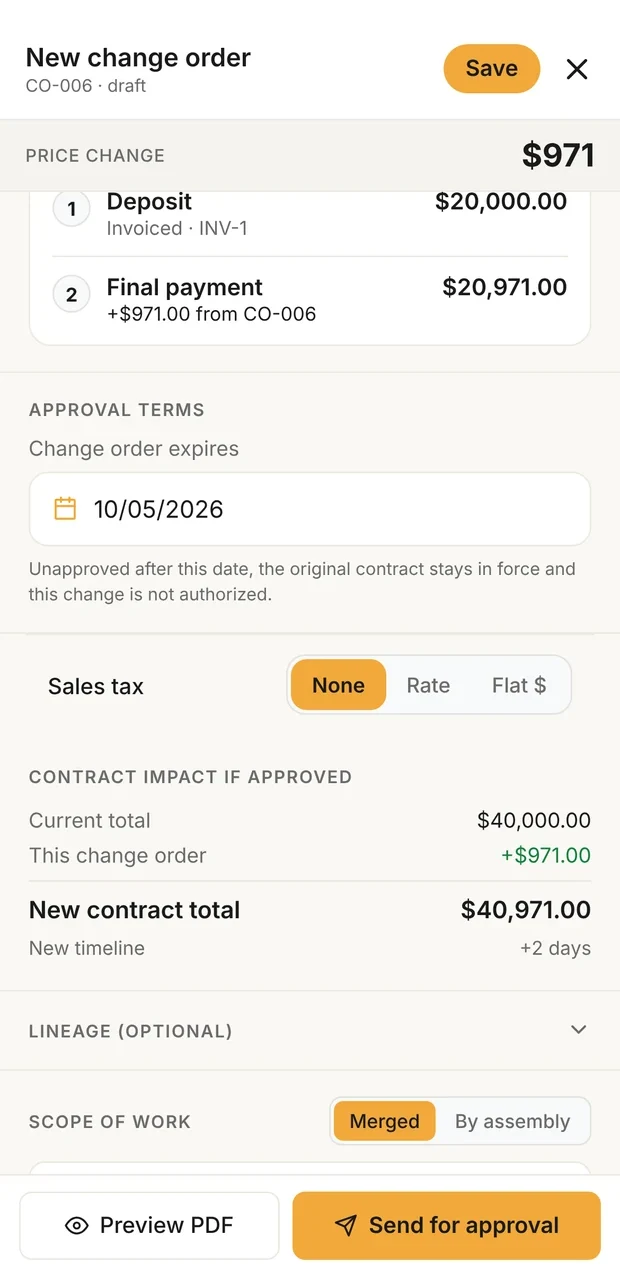
Change order, priced
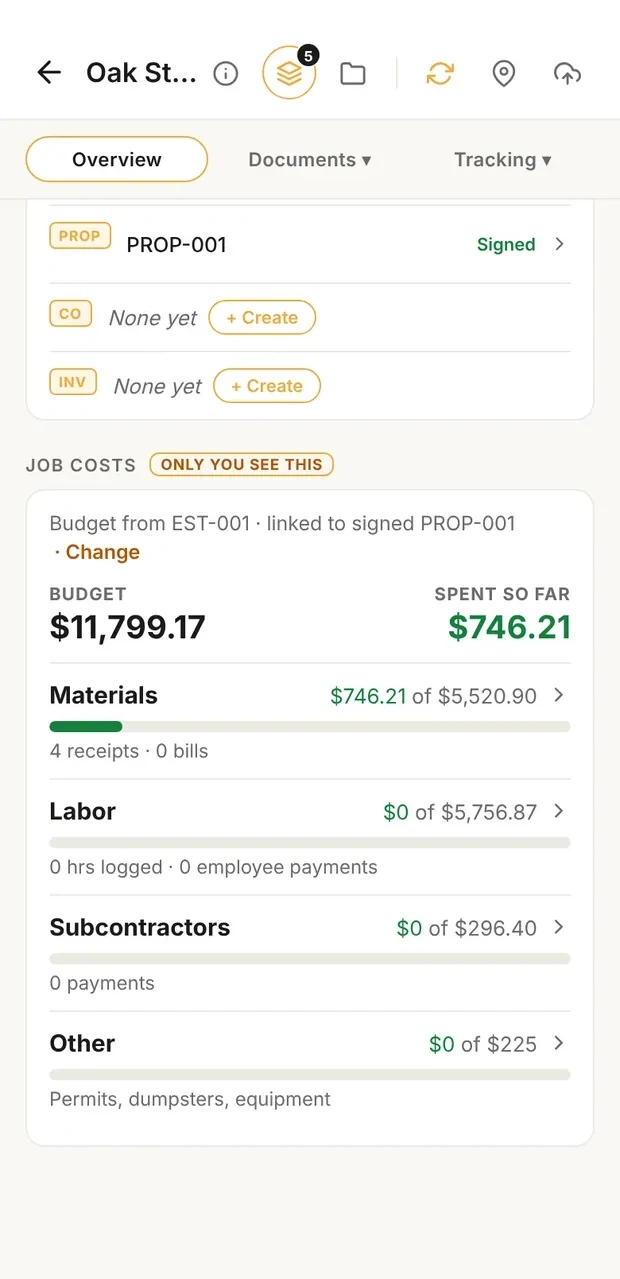
Job cost against budget
Sample data. A change order shows its effect on the contract before it is signed, and the job costs card compares what the job is consuming with its budget.
What it costs
| Situation | Clamp | Jobber |
|---|---|---|
| One person, entry plan | Solo, billed annually $12.50 a month $149.99 a year | Core, billed annually $29.00 a month $348.00 a year, calculated |
| A crew of 5 that needs job costing | Teams (up to 10 people), billed annually $83.33 a month $999.99 a year | Grow (5 users), billed annually $229.00 a month $2,748.00 a year, calculated |
Verdict
Clamp may fit when
- You run residential projects where the signed scope keeps changing as the work develops
- You estimate at job cost, apply your company markup, and review actual cost against the estimate
- You want each scope change priced and signed as its own change order before the changed work starts
- You want milestones, customer decisions and closeout records on the same job
- You work with subs who need job access without seeing your customer prices
Jobber may fit when
- You schedule many appointments, visits or recurring jobs across a field team
- Route optimization and dispatch are part of your day
- You want clients to book work or assessments online
- You want card, ACH and Tap to Pay processing in the same system
- You want automated quote and invoice follow-up
- You want native QuickBooks Online or Xero integrations on supported plans
Before you compare them
- Jobber and Clamp overlap more than a "service against projects" label suggests. Both handle quotes, scheduling, invoicing, progress payments, a customer portal and job cost information.
- Jobber's strongest documented advantages are field-service scheduling, route optimization, recurring work, online booking, automated follow-up and integrated payments.
- Clamp's advantage is the connected residential project: qualification, an estimate at cost, proposal milestones, customer decisions, signed change orders and the estimate-against-actual review.
- Jobber job costing is on Grow and Plus. Clamp job costing is on every plan.
- Jobber processes cards and ACH through Jobber Payments. Clamp records payments and can show your own payment link in the customer portal.
- No native Jobber change order workflow was found on its pricing page or Help Center; Jobber documents using its DocuSign integration for signed change orders.
- "Not found" on this page means not found on Jobber's current pricing page or Help Center. It does not mean Jobber cannot do it another way.
- Neither product was tested against the other. No speed or accuracy claim is made.
Workflow
| Feature | Clamp | Jobber |
|---|---|---|
| Estimate at cost, then markup | Every line at direct cost; the markup from your overhead and profit goal goes on once | Markup per line as a percentage of unit cost, on select plans |
| Paid design agreement | A design agreement document on every plan | Quotes can carry contract text and signatures; a dedicated paid design agreement was not found on Jobber's pricing page or Help Center |
| Quote or proposal e-signature | Proposals signed in the customer portal (Assistant and Teams) | Clients approve quotes in Client Hub with a typed or drawn signature |
| Allowances | Allowance lines on the estimate for selections not yet made, priced like every other line | Quotes support costs, prices, text and optional items; a dedicated allowance workflow was not found on Jobber's pricing page or Help Center |
| Customer decisions after signing | A Decisions needed list: needed by, what it blocks, who owes the answer, the resolution | Optional items let clients choose at quote time; a decision list after the quote was not found on Jobber's pricing page or Help Center |
| Signed change orders | A change order on every plan: priced, signed and billed | A native change order workflow was not found on Jobber's pricing page or Help Center; Jobber documents its DocuSign integration for signed change orders |
| Progress billing | Milestones tied to job events, each with a checklist of evidence; billed as the stage starts | All plans; a payment schedule on a quote or one-off job, by percentage or fixed amount |
| Job costing | Every plan: receipts, bills, time at the loaded rate, returns; reviewed against the estimate at close | Grow and Plus: line-item costs, timesheet labor and expenses, with job profitability |
| Photos and files | Job photos shared with crew and subs or kept private; attachments on documents | Notes and attachments on jobs, quotes, requests and invoices |
| Business mileage log | Automatic trip detection, confirmed per trip, at the IRS rate for its date | GPS waypoints from field actions, and fleet GPS through third-party integrations; an IRS-style mileage log was not found on Jobber's pricing page or Help Center |
| Customer portal | Sign proposals and change orders, see milestones and invoices, answer decisions (Assistant and Teams) | Client Hub: approve and sign quotes, pay invoices and deposits, check appointments, request work |
| Payments | Not processed by Clamp: add your own payment link and record what was paid | Jobber Payments: cards 2.9% + 30¢, Tap to Pay 2.7% + 30¢, ACH 1% |
| Automated quote and invoice follow-up | Not automated; you send a payment reminder from the invoice | From Connect |
| Scheduling and routing | A shared job schedule your crew and subs confirm (Teams); no route optimization | Scheduling on every plan; route optimization from Connect |
| Recurring jobs and online booking | Not offered | Recurring jobs, request forms and online booking |
| External subcontractor access | Unlimited free sub invites on Teams; subs see the job and schedule, never your prices | Team members with roles and permissions; a free external subcontractor access was not found on Jobber's pricing page or Help Center |
| Lead qualification | A five-question score on the first call | Request forms; a sales pipeline on Plus or as a $49 add-on; a lead-scoring workflow was not found on Jobber's pricing page or Help Center |
| Accounting | An accountant export package | QuickBooks Online and Xero integrations on supported plans |
What was and was not tested
What was compared: Hands-on testing of either product. Neither was tested against the other, and no speed or accuracy claim is made. Documented, not tested.
| Statement | Basis |
|---|---|
| Published by Clamp, using each product's own pricing pages and documentation. | Clamp's own statement |
| Solo contractor, entry plan, billed annually: Jobber Core is $348 a year (calculated) and Clamp Solo is $149.99. | Calculated from published prices |
| Five people with job costing, billed annually: Jobber Grow is $2,748 a year (calculated); Clamp Teams is $999.99 for up to 10 accounts. The plans are not equivalent: Grow includes field-service tools Clamp does not offer, and Teams includes project records Jobber does not document natively. | Calculated from published prices |
Switching
- Export your clients, quotes and invoices from Jobber before you cancel.
- Do not assume Jobber history can be imported into Clamp; confirm formats first.
- If you depend on in-app card payments, set up a payment link before you switch.
- If you route several crews a day or run recurring visits, check that a shared job schedule is enough.
- Finish open jobs where they started; start new ones in Clamp.
Sources & provenance
- Jobber Pricing Jobber (official source)
- Create a one-off job Jobber Help Center (official source)
- Progress invoicing Jobber Help Center (official source)
- Job costing Jobber Help Center (official source)
- Markups on quotes Jobber Help Center (official source)
- Quote approvals Jobber Help Center (official source)
- Optional line items on quotes Jobber Help Center (official source)
- Jobber and DocuSign integration Jobber Help Center (official source)
- Client Hub settings Jobber Help Center (official source)
- Notes and attachments Jobber Help Center (official source)
- GPS waypoint tracking Jobber Help Center (official source)
- Create a recurring job Jobber Help Center (official source)
- Online booking Jobber Help Center (official source)
- Route optimization Jobber Help Center (official source)
- Sales pipeline Jobber Help Center (official source)
- Manage your team Jobber Help Center (official source)
- Clamp Pricing Clamp Research
- The Clamp Method Clamp Research
Changes: Oct 10, 2026: Initial publication. Reviewed against Jobber's official pages: Jobber's multi-day jobs, progress invoicing on quotes and jobs, quote signatures and DocuSign change orders are credited, and every 'not found' is limited to its pricing page and Help Center.