Clamp vs Knowify: QuickBooks-synced job costing and AIA billing, or a phone-first residential workflow with job costing on every plan
Knowify is deeper on QuickBooks-synced job costing, WIP reporting, AIA and progress billing, and crew scheduling, with job costing and the client portal on its Advanced plan. Clamp is a phone-first residential workflow with job costing, change orders and milestone billing on every plan, starting at $12.50 a month.
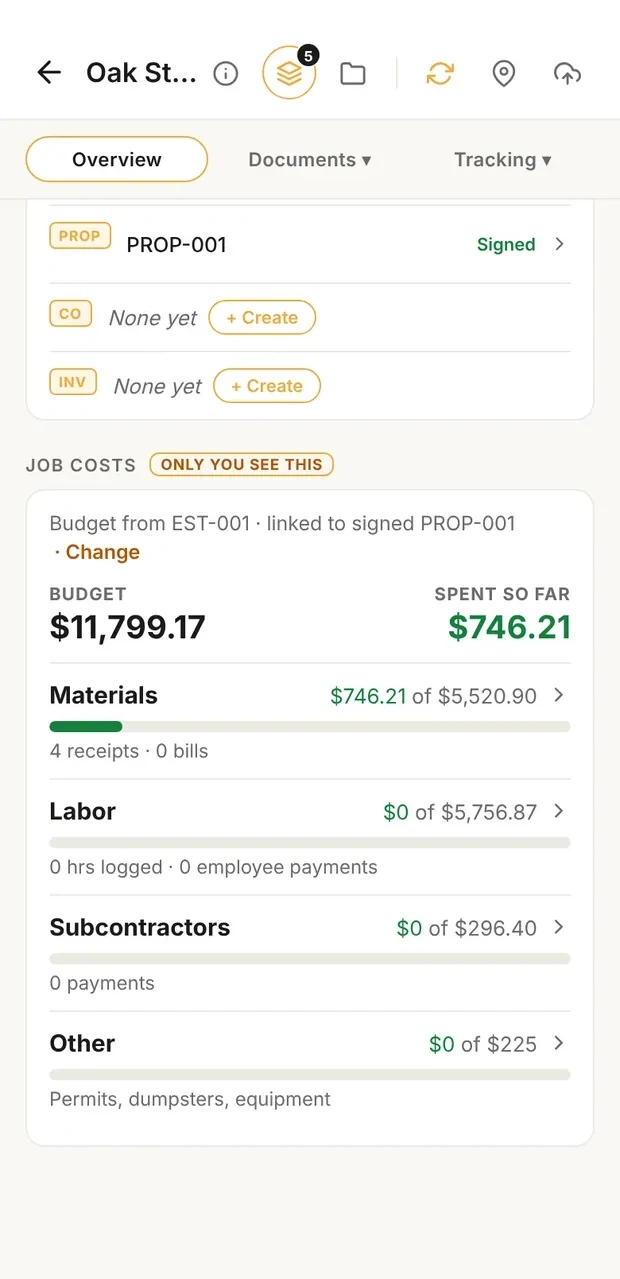
Job cost against budget
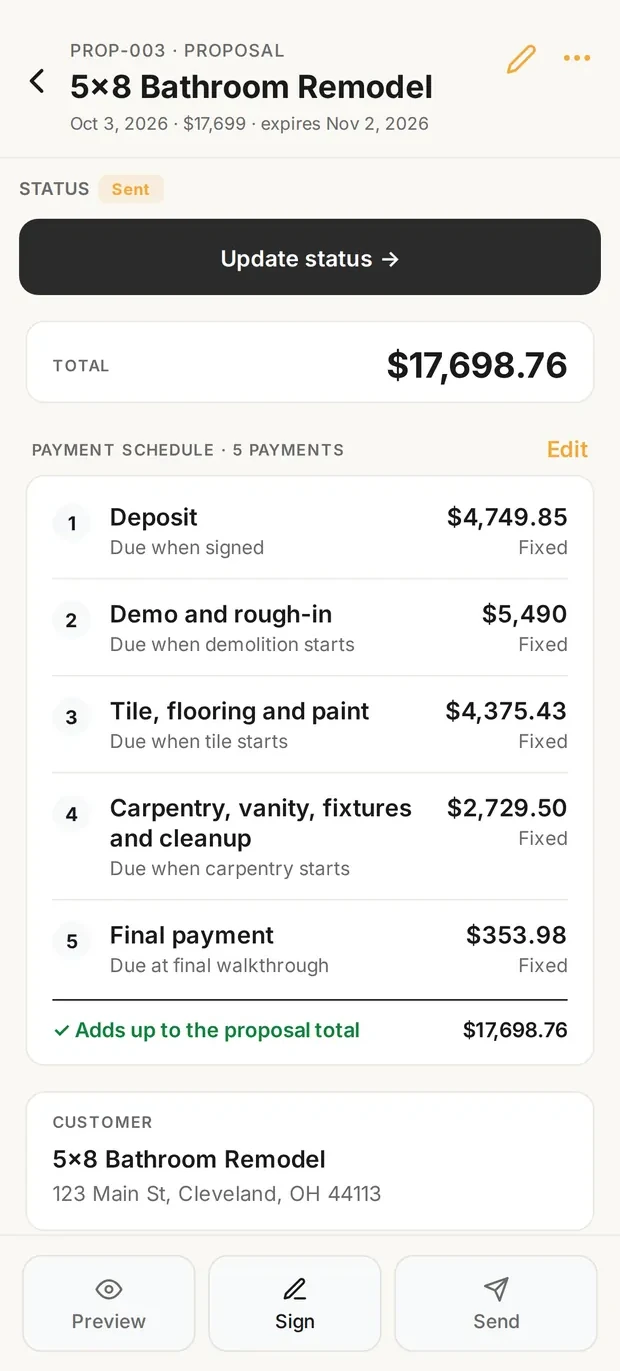
Milestone invoices
Sample data. The job costs card compares what the job is consuming with its budget, and the invoice schedule shows milestone draws against the contract.
What it costs
| Situation | Clamp | Knowify |
|---|---|---|
| One person, entry plan | Solo, billed annually $12.50 a month $149.99 a year | Core, lower listed figure $99.00 a month $1,188.00 a year, calculated Core, higher listed figure $149.00 a month $1,788.00 a year, calculated |
| One person who needs job costing | Solo, billed annually $12.50 a month $149.99 a year | Advanced, lower listed figure $329.00 a month $3,948.00 a year, calculated Advanced, higher listed figure $399.00 a month $4,788.00 a year, calculated |
| One person who needs a client portal and e-signatures | Assistant, billed annually $41.67 a month $499.99 a year | Advanced, lower listed figure $329.00 a month $3,948.00 a year, calculated Advanced, higher listed figure $399.00 a month $4,788.00 a year, calculated |
| A crew of 5 that needs job costing and a client portal | Teams (up to 10 people), billed annually $83.33 a month $999.99 a year | Advanced (10 users), lower listed figure $329.00 a month $3,948.00 a year, calculated Advanced (10 users), higher listed figure $399.00 a month $4,788.00 a year, calculated |
Every Clamp feature, next to Knowify
Solo includes 28 of Clamp's 44 features. Knowify's pages show 21 of the 44 in full and 11 in part, across its plans.
| Feature | Clamp | Knowify |
|---|---|---|
| CRM and leads | 3 of 5 | 0 of 5 |
| Email remindersEmail reminders before appointments, follow-ups, and scheduled installs, deliveries, and inspections. | ✓ Assistant and TeamsAssistant, $41.67 a month billed annually | PartlyUnpaid invoice and service appointment reminders; app alerts for schedule changes |
| Customer appointment remindersHomeowners get an email before an appointment, with confirm and reschedule built in. | ✓ Assistant and TeamsAssistant, $41.67 a month billed annually | Service work onlyAutomated reminders; confirm or reschedule not described |
| Five-factor lead scoringA clear yes, no, or maybe on a lead before driving out. | ✓ Every planSolo, $12.50 a month billed annually | Not foundCRM pipeline stages only |
| Lead reportingClose rate, revenue won, open pipeline, close rate by lead source, and lost leads by reason, on Home and the stats screen, with CSV and PDF export. Revenue by source does not exist; see _excluded. | ✓ Every planSolo, $12.50 a month billed annually | PartlyPipeline board and bid value; no close rate or source reports |
| Daily briefingOverdue invoices, detected trips, follow-ups, appointments, and open proposals in one morning view. | ✓ Every planSolo, $12.50 a month billed annually | PartlyDashboard: today's jobs and check-ins; no overdue invoices |
| Estimating | 7 of 7 | 2 of 7 |
| Design agreementsPaid preconstruction sits in the document chain, so planning work is paid work. | ✓ Every planSolo, $12.50 a month billed annually | Not foundProposals carry terms |
| Itemized estimatesAssembly-based estimates with quantities and rates the contractor can inspect line by line. | ✓ Every planSolo, $12.50 a month billed annually | ✓ Every planBudget, then markup per line |
| Estimate templatesSave an estimate as a template for work done often. | ✓ Every planSolo, $12.50 a month billed annually | ✓ Every planBudget templates |
| Proposals with multiple package tiersGood, better, best packages in one proposal. | ✓ Every planSolo, $12.50 a month billed annually | WorkaroundOptions as $0 lines; client notes choices when signing |
| AI estimating from a plain-language job descriptionDescribe the job in plain words and get an itemized draft: assemblies, quantities, researched baseline rates, with the contractor's own saved rates taking over once set. | ✓ Every planSolo, $12.50 a month billed annually | Not found'Knowify AI' teased; no AI estimating described |
| Remodel and new-home estimatingOne estimator covers remodels and new homes and detects which one a description is. Detect is the default job type; a contractor can pick Remodel or New home per estimate, or set Kind of work to Remodeling to turn the choice off. | ✓ Every planSolo, $12.50 a month billed annually | Not foundNo job-type detection |
| Labor hours on estimatesEstimated labor hours, shown as a range, on every labor line, with an allowance for setup, cleanup, and material runs (15% by default) the contractor can change in Settings or per estimate. A planning figure; it never appears on proposals, PDFs, or the portal. | ✓ Every planSolo, $12.50 a month billed annually | Not foundLabor priced in the budget; no hour ranges described |
| Contracts and invoicing | 5 of 5 | 3 of 5 |
| Payment schedulesSplit a proposal into a deposit, milestone payments, and a final payment, then invoice each one from the signed contract. | ✓ Every planSolo, $12.50 a month billed annually | ✓ Every planProgress billing, AIA G702/G703 |
| Sales tax on documentsAdd a sales tax rate or a flat amount to invoices and other documents, with collected tax totaled by quarter and year. The contractor enters the rate; Clamp does not look rates up. | ✓ Every planSolo, $12.50 a month billed annually | PartlyTax rates sync from QuickBooks; no tax report described |
| Customer credits and refundsApply a customer's credit to an open invoice, record a refund, or adjust a balance, with the history kept on the job. Recorded only; Clamp moves no money. | ✓ Every planSolo, $12.50 a month billed annually | Not foundRetainage adjustments only |
| Change orders that update the contractScope changes get written up and tied to the original contract, so verbal changes stop costing money. | ✓ Every planSolo, $12.50 a month billed annually | ✓ Every planE-signed, feed the billing schedule |
| Invoices tied to the contractEvery invoice belongs to the contract or change order it bills. | ✓ Every planSolo, $12.50 a month billed annually | ✓ Every plan |
| Customer portal | 0 of 6 | 3 of 6 |
| Password-free customer portalThe homeowner opens a link. No account, no password, no app to install. | ✓ Assistant and TeamsAssistant, $41.67 a month billed annually | ✓ Advanced, $329 or $399No-login link; portal page says from $99, pricing page says Advanced |
| Unlimited documents and photos shared to the portalShare job documents and photos to the customer portal without a count cap, subject to per-item size limits. | ✓ Assistant and TeamsAssistant, $41.67 a month billed annually | ✓ Advanced, $329 or $399Photos, invoice PDFs, shared files |
| E-signing on the homeowner's phoneDocuments get signed on the homeowner's own phone, no account required. | ✓ Assistant and TeamsAssistant, $41.67 a month billed annually | ✓ Every planBids and change orders |
| Several signers on one documentSend one document to up to five people, each signing their own line, see who has signed, and remind anyone who has not. | ✓ Assistant and TeamsAssistant, $41.67 a month billed annually | Not found |
| Project updates and decisions in the portalPost project updates to the customer's portal and ask the customer to make a decision, which they answer from their phone. | ✓ Assistant and TeamsAssistant, $41.67 a month billed annually | Advanced, $329 or $399Optional project log; no decisions |
| Not delivered email handlingWhen a customer email Clamp sends bounces, the document is marked Not delivered so the contractor can fix the address and resend, or copy the link to text it. | ✓ Assistant and TeamsAssistant, $41.67 a month billed annually | Not found |
| Expense tracking | 5 of 5 | 3 of 5 |
| Automatic GPS mileage trackingBackground trip detection, route maps, IRS rates, trips linked to the job that caused the drive. | ✓ Every planSolo, $12.50 a month billed annually | Not foundFleet vehicle tracking add-on from $25 a vehicle |
| Automatic time on siteGPS geofence tracking of hours at the jobsite. | ✓ Every planSolo, $12.50 a month billed annually | Every planClock in with optional geofence; not detected automatically |
| Receipts and expenses on the jobReceipts logged against the job they belong to. | ✓ Every planSolo, $12.50 a month billed annually | ✓ Every planPurchases with receipt photo |
| Purchase ordersCommitted costs captured between the estimate and the receipt. | ✓ Every planSolo, $12.50 a month billed annually | ✓ Every planPurchases; POs from the budget |
| Accounts payable and vendor billsVendor bills tracked and surfaced in the attention flows, with first-class vendor records. | ✓ Every planSolo, $12.50 a month billed annually | ✓ Every planBills sync both ways with QuickBooks |
| Job costing and reports | 3 of 3 | 2 of 3 |
| Job costingWhat the job actually cost, with a variance and catalog learning loop. | ✓ Every planSolo, $12.50 a month billed annually | ✓ Advanced, $329 or $399Feature page says from $99; pricing page lists Advanced only |
| Accountant export packageA package of the business's records prepared for an accountant. | ✓ Every planSolo, $12.50 a month billed annually | QuickBooks syncSync and Accountant's View, no export package |
| Time reporting with CSV exportReported labor time with a time-tracking CSV export for payroll preparation and per-person rate decomposition. | ✓ Every planSolo, $12.50 a month billed annually | ✓ Every planTime, labor and payroll reports; export format not stated |
| Jobsites and teams | 2 of 8 | 6 of 8 |
| Teams: up to 10 linked accountsUp to 10 accounts, including the owner, sharing one business. | ✓ TeamsTeams, $83.33 a month billed annually | ✓ Priced per user1 user on Core, 10 on Advanced, $29 each extra |
| Role-based permissionsFive roles: owner, admin, staff, contributor, viewer. | ✓ TeamsTeams, $83.33 a month billed annually | ✓ Per-user permissionsAccess type plus module checkboxes; plan not stated |
| Unlimited subcontractor linkingSubs share jobsite photos and notes into the business account without consuming a seat. | ✓ TeamsTeams, $83.33 a month billed annually | Paid seatsSubs who need the app are paid users; no guest access |
| Jobsites tab: jobs and schedule in one placeA Jobsites tab with Jobs and Schedule views. With Assistant each job has its own screen with its schedule, photos, and updates, and the Schedule view holds every install, delivery, inspection, appointment, and follow-up; Teams adds the crew and subs on each job, shaped by role. Subs invited to a job use it free and see their own jobs grouped by builder. | ✓ Assistant and TeamsAssistant, $41.67 a month billed annually | ✓ Every planJobs, job board and calendars |
| Job scheduleSchedule installs, deliveries, and inspections on each job, with the contractor, a supplier, or nobody yet on each item, and see them all in the Jobsites tab. Putting crew or subs on an item is the Teams shared schedule. | ✓ Assistant and TeamsAssistant, $41.67 a month billed annually | ✓ Every planGantt with dependencies |
| Shared job scheduleOne schedule for the business: installs, deliveries, and inspections visible to the team, with clash notes when dates collide. | ✓ TeamsTeams, $83.33 a month billed annually | ✓ Every planJob and resource boards, crew notifications |
| Punch listsThe small final items that close a job out, tracked per job and shareable as a text message or a PDF. | ✓ Every planSolo, $12.50 a month billed annually | Not foundTasks and deficiency notes only |
| Job site photosPhotos saved to the project with full-screen viewing. | ✓ Every planSolo, $12.50 a month billed annually | ✓ Mobile appPhotos uploaded to the job; plan not stated |
| Backup and offline | 3 of 5 | 2 of 5 |
| Full job workflow, offlineLeads, design agreements, estimates, proposals, change orders, and invoices on the phone, working without a connection. | ✓ Every planSolo, $12.50 a month billed annually | PartlyTime check-in only; estimates and invoices not stated |
| Cloud backupBusiness data backed up to the cloud and restorable on a new device. | ✓ Assistant and TeamsAssistant, $41.67 a month billed annually | ✓ Cloud software |
| Business portal: read-only web viewA read-only view of the business in a browser. | ✓ Assistant and TeamsAssistant, $41.67 a month billed annually | ✓ Web appFull office web app |
| Device backup, restore, CSV export, bulk importLocal backup and restore with CSV export and bulk import. | ✓ Every planSolo, $12.50 a month billed annually | PartlySpreadsheet import only; no export or backup described |
| No account required to startThe app opens to local use; an account is needed only for server features or subscribing. | ✓ Every planSolo, $12.50 a month billed annually | Not foundStarts from a 14-day trial account |
| Only in Knowify | Where Knowify is ahead | |
| Two-way QuickBooks Online sync | Accountant export package | ✓ Every plan |
| AIA billing, retainage and WIP reports | Residential milestones | ✓ Every plan; WIP with job costing |
| Gantt scheduling with dependencies and a resource board | Shared job schedule (Teams) | ✓ Every plan |
| Service dispatch board | Not in Clamp | ✓ Service Pro add-on |
| Daily logs with automatic weather | Not in Clamp | ✓ Advanced |
| Built-in payments | Your own payment link | ✓ Card and ACH via QuickBooks Payments |
Nothing here matches. Pick All or another filter.
Knowify column from its pricing page, feature pages and help center, checked October 14, 2026. Not found means not on those pages, not that Knowify can't do it another way. Partly means something narrower than the Clamp feature. No product was tested against another.
Where each Knowify answer comes from
- Knowify Pricing Knowify, accessed October 14, 2026
- Knowify job costing software Knowify, accessed October 14, 2026
- Knowify construction invoicing software Knowify, accessed October 14, 2026
- Knowify construction scheduling software Knowify, accessed October 14, 2026
- Knowify field service scheduling and dispatch Knowify, accessed October 14, 2026
- Knowify client portal Knowify, accessed October 14, 2026
- Knowify change order software Knowify, accessed October 14, 2026
- Knowify construction time tracking software Knowify, accessed October 14, 2026
- Knowify construction estimating software Knowify, accessed October 14, 2026
- Knowify subcontractor management software Knowify, accessed October 14, 2026
- Knowify homepage Knowify, accessed October 14, 2026
- Construction CRM software Knowify, accessed October 14, 2026
- Offering Options in Knowify Proposals Knowify, accessed October 14, 2026
- E-signature Knowify, accessed October 14, 2026
- Email Defaults in Knowify Knowify, accessed October 14, 2026
- Managing retainage: Using Knowify to fill the gaps in QuickBooks Online Knowify, accessed October 14, 2026
- QuickBooks Online integration Knowify, accessed October 14, 2026
- QuickBooks Payments integration Knowify, accessed October 14, 2026
- Frequently asked questions Knowify, accessed October 14, 2026
- Feature of the week: setting permissions Knowify, accessed October 14, 2026
- Adding or editing a user Knowify, accessed October 14, 2026
- Profitability and reporting Knowify, accessed October 14, 2026
- Construction daily log software Knowify, accessed October 14, 2026
- Importing spreadsheet data into Knowify Knowify, accessed October 14, 2026
- Using Knowify's smartphone app Knowify, accessed October 14, 2026
Verdict
Clamp may fit when
- You run a small residential business from your phone and want estimate, proposal, change orders, milestones, invoices and job cost in one job record
- You want job costing on the entry plan, not on a $329 or $399 a month tier
- You estimate at direct cost and apply your overhead and profit markup once, then review actual cost against the estimate at close
- You want a customer portal with e-signatures, decisions, photos and invoices for $41.67 a month billed annually
- You work with subs who need job access without a paid seat and without seeing your prices
- You bill residential milestones tied to job events rather than AIA pay applications
- You want an automatic business mileage log and time on site in the same app
Knowify may fit when
- Your books are in QuickBooks Online and you want purchase orders, bills, employee time and invoices to sync both ways
- You bill fixed-price contracts by percentage complete or AIA formats, and you need a WIP report for over- and underbilling
- You schedule people, crews and equipment across many jobs with Gantt charts, dependencies and a resource board
- You dispatch service techs from a board and want service tickets alongside project work (Service Pro add-on)
- You want labor burden, geofenced clock-ins and QuickBooks Time and Payroll in the job cost report
- You run cost-plus or T&M contracts, daily logs and work orders (Advanced)
- You want an established construction platform with onboarding sessions and an enterprise tier
Before you compare them
- Both products handle estimates, proposals with e-signatures, change orders, progress billing, time tracking, a client portal and job costing. The difference is depth, plan placement and price.
- Knowify's documented advantages are its two-way QuickBooks Online, Time, Payroll and Payments sync, WIP reporting, AIA billing formats, Gantt scheduling with dependencies, and Service Pro dispatch.
- Clamp's advantage is the connected residential workflow at a lower price: lead qualification, estimate at cost with one markup, milestones, customer decisions, change orders, job costing, time and mileage on every plan.
- Knowify's pricing page lists job costing and the client portal on Advanced ($329 or $399 a month) and not on Core. Knowify's job costing and client portal feature pages say 'starting at $99/month'. The pricing page is treated as authoritative here; the conflict is noted.
- Knowify's pricing page shows two '/ month' figures per plan under a Yearly and Monthly toggle and does not label which is annual billing. Both figures are quoted throughout, and yearly totals are calculated from each.
- Knowify Core includes one user and charges $29 a month for each extra user; subs who need the app are paid users. Clamp Teams includes ten accounts plus unlimited free sub invites.
- Knowify collects cards and ACH through QuickBooks Payments. Clamp records payments and can show your own payment link in the customer portal.
- Clamp is not accounting software: no general ledger, payroll, bank feeds or tax filing, and no QuickBooks sync. Knowify is built around that sync.
- "Not found" on this page means not found on Knowify's pricing page or the feature pages listed in the sources on 2026-10-14. It does not mean Knowify cannot do it another way.
- Neither product was tested against the other. No speed or accuracy claim is made.
Workflow
| Feature | Clamp | Knowify |
|---|---|---|
| Estimate at cost, then markup | Every line at direct cost; the markup from your overhead and profit goal goes on once | Budget first from a products and services catalog, then markup per line for overhead and a target margin, with projected profitability updating as you edit |
| AI estimates | A draft at direct cost from a plain-words description, then your markup (3 free AI credits, then 25 or 50 a month by plan; an estimate is 1 credit) | The estimating page says "Knowify AI is here" and points to an event; an AI estimating feature is not described on the official pages read |
| Plan takeoff | Not offered | Imports takeoff data from tools such as STACK to build the budget |
| Paid design agreement | A design agreement document on every plan | Proposals carry terms and attachments; a dedicated paid design agreement was not found on Knowify's official pages |
| Proposal e-signature | Proposals signed in the customer portal (Assistant and Teams) | E-signable contracts; clients comment, request revisions or sign from the proposal's portal link, and the job goes active when signed |
| Allowances | Allowance lines on the estimate for selections not yet made, priced like every other line | Not mentioned on Knowify's estimating page |
| Customer decisions after signing | A Decisions needed list: needed by, what it blocks, who owes the answer, the resolution | A decision list after signing was not found on Knowify's official pages |
| Change orders | A change order on every plan: priced and billed, e-signed in the portal on Assistant and Teams | Every plan: sent for electronic approval with view and sign tracking, updates projected cost and profit, and feeds the billing schedule once approved |
| Progress billing | Milestones tied to job events, each with a checklist of evidence; billed as the stage starts | Every plan: bill by completion percentage, unit or dollar amount; AIA billing formats and G702/G703 pay apps; tracks total job value and amount previously invoiced |
| Job costing | Every plan: receipts, vendor bills, time on site at the loaded rate; reviewed against the estimate at close | Advanced and Enterprise on the pricing page: labor with burden, materials, equipment and subs against budget by phase, purchase orders from the budget, and a WIP report. The job costing feature page says starting at $99 a month, which conflicts |
| Purchase orders and bills | Vendor bills and receipts logged to the job; no purchase order document | Purchases, bills and expenses on every plan; purchase orders raised from the budget and synced to QuickBooks |
| Time tracking | Time on site logged by role, or detected automatically when you leave a job site; not a GPS time clock with geofencing | Every plan: clock in and out on the app with optional geofencing at clock in, foreman view for crew time, hours hit the job cost report with labor burden, sync with QuickBooks Time and Payroll |
| Business mileage log | Automatic trip detection, confirmed per trip, at the IRS rate for its date | Not mentioned on Knowify's time tracking page; fleet vehicle tracking is a separate add-on from $25 a vehicle a month |
| Customer portal | Sign proposals and change orders, see milestones, photos, schedule and invoices, answer decisions (Assistant and Teams) | Advanced and Enterprise on the pricing page: phase status, photos, high-level schedule, contract with approved and pending change orders, invoiced and paid totals, invoice PDFs and shared files through a no-login link. The portal page says starting at $99 a month, which conflicts |
| Payments | Not processed by Clamp: add your own payment link and record what was paid | Cards and ACH through QuickBooks Payments from invoices, tracked and reconciled; automated reminders for unpaid invoices |
| Scheduling and dispatch | A shared job schedule your crew and subs confirm (Teams); no Gantt chart, no dispatch board | Scheduling on every plan: job board, resource board, Gantt with dependencies, project and corporate calendars, crew notifications. Service dispatching is the Service Pro add-on |
| Team and subs | Up to 10 accounts on Teams, plus unlimited free sub invites who never see your prices | One user on Core, ten on Advanced, $29 a month each beyond that; subs who need the app are paid users with no guest access |
| Lead qualification | A five-question score on the first call | A lead-scoring workflow was not found on Knowify's official pages read for this article |
| Accounting | An accountant export package; no general ledger, payroll, bank feeds or QuickBooks sync | Two-way sync with QuickBooks Online, Time, Payroll and Payments on every plan; QuickBooks Desktop on Enterprise |
What was and was not tested
What was compared: Hands-on testing of either product. Neither was tested against the other, and no speed or accuracy claim is made. Documented, not tested.
| Statement | Basis |
|---|---|
| Published by Clamp, using Knowify's own pricing and feature pages and Clamp's own published plans. | Clamp's own statement |
| Solo contractor, entry plan: Knowify Core is $99 or $149 a month for one user, which is $1,188 or $1,788 a year (calculated); Clamp Solo is $149.99 a year billed annually. | Calculated from published prices |
| Job costing and a client portal: on Knowify's pricing page these start on Advanced at $329 or $399 a month with ten users, $3,948 or $4,788 a year (calculated). Clamp Solo has job costing at $149.99 a year, Assistant adds the portal at $499.99, and Teams covers ten accounts at $999.99. The plans are not equivalent: Advanced includes QuickBooks sync, WIP reporting, AIA billing and Gantt scheduling that Clamp does not offer. | Calculated from published prices |
| Knowify's pricing page does not label which of its two listed figures is annual billing, and its job costing and client portal feature pages say 'starting at $99/month' while the pricing page lists both features on Advanced only. Both are reported as found. | Verified against a published source |
Switching
- Export your customers, contracts, invoices and job cost reports from Knowify before you cancel; Knowify history is not imported into Clamp, so confirm formats first.
- If your bookkeeper relies on the Knowify to QuickBooks sync, plan how bills, time and invoices will reach QuickBooks from Clamp's accountant export before you switch.
- If you bill AIA G702/G703 pay applications or need WIP reports, keep Knowify for those contracts; Clamp bills residential milestones.
- If you dispatch service techs or schedule equipment with Gantt dependencies, check that a shared job schedule is enough.
- Finish open jobs where they started; start new ones in Clamp.
Questions
How much does Knowify cost?
Knowify Core shows $99 and $149 a month for one user, and Advanced shows $329 and $399 a month for ten users, but its Yearly and Monthly toggle does not label which figure is which, so confirm the billing basis before you buy. Extra users are $29 a month. Clamp Solo is $19.99 a month or $149.99 a year, and Teams covers 10 accounts for $999.99 a year.
Does Knowify Core include job costing, or do I need Advanced?
Knowify's pricing table puts job costing on Advanced and Enterprise, while Core includes purchases, bills, expenses, time tracking, change orders, progress billing and QuickBooks Online sync. A Knowify feature page says the product starts at $99 a month, which does not settle which plan has job costing. Confirm with Knowify if job costing is why you are subscribing. Clamp has job costing on every plan.
When does Knowify make sense for a small remodeling business?
Knowify makes sense for a small remodeler who needs a QuickBooks Online connection, progress billing, and labor, bills and purchase orders feeding job-cost reports. Its pricing table puts job costing and the client portal on Advanced, which includes ten users. That package can be worth it for a crew even when it is hard to justify for one person.
How does Clamp Teams compare with Knowify Advanced for a 10-person crew?
Clamp Teams costs $999.99 a year for up to 10 accounts, and Knowify Advanced also includes ten users at $329 or $399 a month, with the billing basis to confirm. Knowify offers QuickBooks Online, Time, Payroll and Payments connections and AIA-style billing. Clamp provides an accountant export instead, so the decision turns on integrations as well as price.
Can Clamp replace Knowify's QuickBooks connection?
No. Clamp does not replace Knowify's two-way QuickBooks Online connection; it provides an accountant export package instead of a live sync. Clamp also has no general ledger, payroll, bank feeds or tax filing. If moving job and accounting records automatically is your main need, Knowify's QuickBooks connections are a real reason to choose it.
Sources & provenance
- Knowify Pricing Knowify (official source)
- Knowify job costing software Knowify (official source)
- Knowify construction invoicing software Knowify (official source)
- Knowify construction scheduling software Knowify (official source)
- Knowify field service scheduling and dispatch Knowify (official source)
- Knowify client portal Knowify (official source)
- Knowify change order software Knowify (official source)
- Knowify construction time tracking software Knowify (official source)
- Knowify construction estimating software Knowify (official source)
- Knowify subcontractor management software Knowify (official source)
- Clamp Pricing Clamp Research
- The Clamp Method Clamp Research