How to Track Time on a Job: What Each Entry Must Show, and Where It Goes
What each time entry needs, how to split a day across jobs, how breaks and travel count for an employee, and where the hours go: payroll and job cost.
The assumptions
This model assumes
- A contractor recording time for themselves and, on a crew, for employees
- Whether the hours matched the estimate is covered in the contractor time tracking guide; this guide is about the record
- The worked example is illustrative: a carpenter on the Oak Street Bathroom, 8:00 AM to 11:45 AM on October 4, 2026
- The owner's practice: time logged the same day, each person logging their own, detection as a backstop, exact minutes, actual breaks recorded and lunch never deducted automatically, and an owner rate for owner production hours
- This is recordkeeping guidance drawn from federal rules, not legal or payroll advice. State rules can differ; confirm with your payroll provider or an employment lawyer.
The model, step by step
A time entry is one record among several that touch the same hours. Each one proves something different.
| Record | What it can support | What it does not establish by itself |
|---|---|---|
| Time entry | Who worked, when, on what, in what role, for how long | Pay owed, or whether the job made money |
| Calendar or schedule | Who was expected where | Hours actually worked |
| Detected site visit | That someone's phone was at the site, and for how long | That the time was work, or which role |
| Mileage log | The drive, its miles and purpose | The hours worked at either end |
| Payroll record | Pay: hours each workday and workweek, rate, earnings, deductions | Which job the hours belong to |
| Job cost | What the job's labor cost the business | Anyone's pay |
| Customer invoice | What the customer owes under the contract | Hours, on a fixed-price job |
A time entry says who worked, when, for how long, and where the work belongs. Payroll and job cost are two places that record feeds. Miles are recorded in the mileage log guide.
For a covered, non-exempt employee, the employer's record must show the hours worked each workday and the total each workweek (DOL Fact Sheet 21; 29 CFR Part 516). The other fields make the entry useful for job cost and easier to check.
| Field | This guide | Why |
|---|---|---|
| Worker | Always | Payroll records identify the employee; job cost needs the right person (DOL Fact Sheet 21) |
| Date | Always | Hours are kept per workday |
| Hours worked | Always | FLSA-required for a non-exempt employee: hours each workday |
| Job or business time | Always | Job costing; this guide's rule, not an FLSA field |
| Role | Always | Picks the cost rate; this guide's rule |
| Start and stop time | Usually | Source detail; the FLSA requires accurate hours, not a particular format |
| What was done | Usually | Explains the cost, a change or a dispute |
| Travel between sites | When it happens | For an employee, travel from one job site to another during the day is hours worked (29 CFR 785.38) |
| A break | When it happens | Short rest breaks of about 5 to 20 minutes count as hours worked (785.18); a bona fide meal period can be excluded when the employee is completely relieved from duty (785.19) |
| Correction reason | When corrected | Keeps the history traceable; this guide's practice |
The payroll record is bigger. For a non-exempt employee, the employer's payroll record also keeps the day and time the workweek starts, the pay basis, the regular rate, straight-time and overtime earnings, additions and deductions, total wages, and the pay date and period (DOL Fact Sheet 21). The time entry feeds it; your payroll system or provider may maintain the rest, but the employer remains responsible for the required records.
Your own time as the owner. Logging your own hours for estimating and job costing is not an FLSA employee record; you keep it to know where your labor goes. If the business treats you as its employee, get payroll or employment-law advice on the wage-and-hour rules that apply.
Clamp saves an entry with a job or business time, a role and hours. That is the app's minimum, not the payroll standard.
Log it the same day, by the person who did the work. On a crew, each person logs their own time; the owner or admin reviews exceptions. The person who did the work knows where the hours went, and the employer still owns the accuracy of the record.
A filled example (illustrative):
| Field | The entry | Note |
|---|---|---|
| Worker | The crew member who did the work | Who actually worked |
| Date | October 4, 2026 | The workday |
| Job | Oak Street Bathroom | The job the hours belong to |
| Role | Carpenter | Picks the rate |
| Start and stop | 8:00 AM to 11:45 AM | Source detail; not a federal requirement |
| Hours | 3.75 | To the minute, not rounded |
| What was done | Set vanity, install blocking, prep trim | Explains the cost, a change or a dispute |
| A correction, if one is needed | "Lunch was included in the original entry" | The reason, kept with the correction |
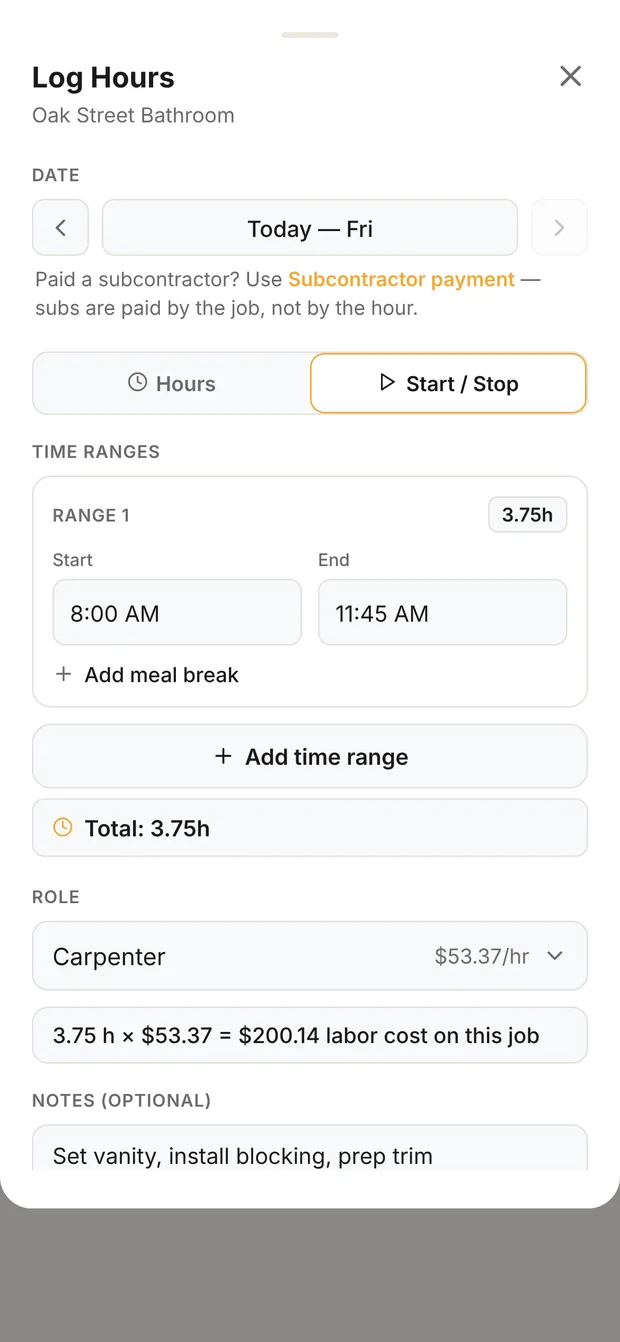
Start / Stop, with the role
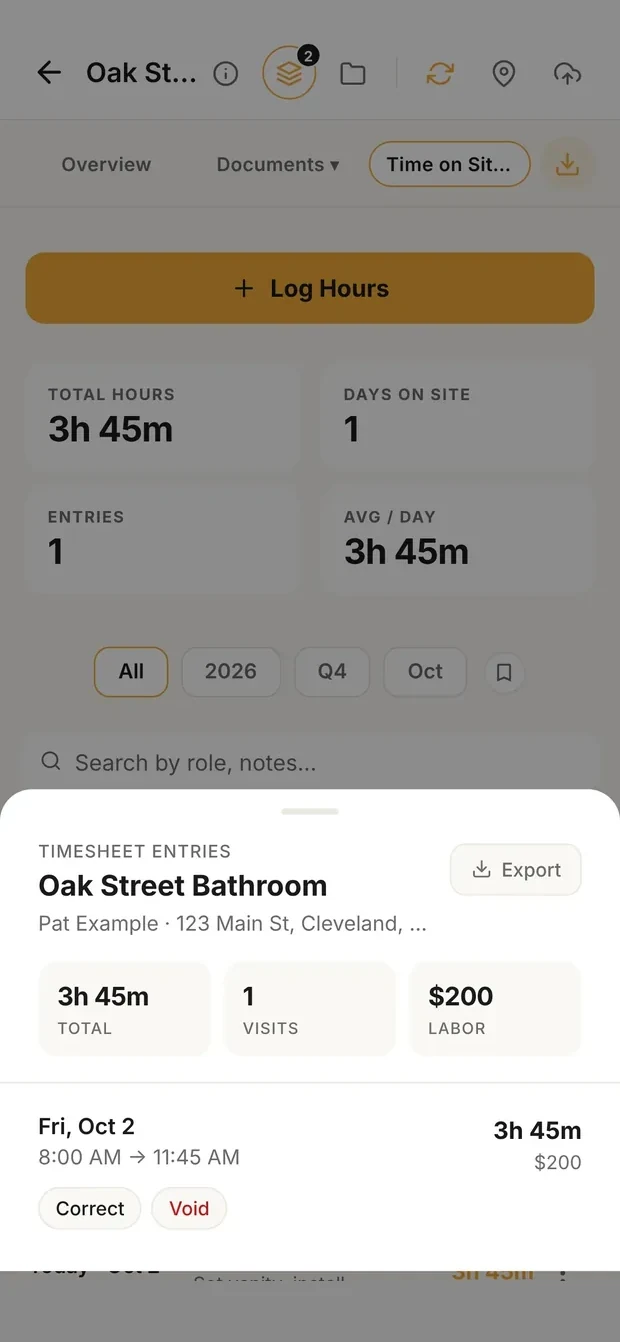
Saved with its times
The example in Clamp: Log Hours with Start / Stop and the role, and the saved entry with its times. Demo data.
| Part of the day | Where it goes |
|---|---|
| Oak Street work | Oak Street, in the role done |
| Supplier run for Oak Street | Oak Street; for a covered non-exempt employee, count the travel when it is compensable workday travel |
| Lunch, completely relieved from duty | A bona fide meal period, not hours worked (785.19); not logged as work |
| Drive from Oak Street to Pine Street | Paid time for an employee (785.38); on the job it served, or business time if it served both |
| Pine Street work | Pine Street, in the role done |
| Estimate for a new customer | Business time |
Time entries roll up. The time tracking guide's published job (contractor time tracking) was estimated at 100 hours. If its entries add up to 125:
That difference is only as good as the entries under it: the right job, the right role, the same day. What 25 hours means, and what to do about it, is the time tracking guide's subject; this guide stops at the roll-up.
For payroll. For a covered, non-exempt employee, the employer must keep accurate records of hours worked each workday and total hours worked each workweek. Any timekeeping method works if the record is complete and accurate (DOL Fact Sheet 21; 29 CFR Part 516).
Rounding. Federal rules accept rounding to the nearest 5 minutes, tenth of an hour or quarter hour only if, over time, it doesn't underpay the employee (29 CFR 785.48(b)). This guide records exact minutes and avoids the question.
Travel. Travel from one job site to another during the workday is hours worked (785.38). Other travel has its own rules.
Breaks. Short rest breaks count (785.18). A bona fide meal period can be excluded when the employee is completely relieved from duty. Thirty minutes is ordinarily long enough, a shorter period can qualify in special circumstances, and an employee who has to work while eating is not relieved (785.19). The FLSA doesn't require breaks, but some states do.
How long to keep them. Payroll records generally at least 3 years; time cards and schedules used to compute wages, 2 years (DOL Fact Sheet 21).
Federal law is the floor. States can set different overtime, meal and rest, rounding, recordkeeping and retention rules. Check with your payroll provider or an employment lawyer for your state.
For a dispute. A time record is more credible when it is made at or near the time, from someone with knowledge, and kept consistently as part of the company's regular practice. Those ideas track the business-records principle in Federal Rule of Evidence 803(6). This guide also keeps later corrections traceable, with the reason. Whether a record is admitted, and what it proves, depends on the forum, the contract, the facts and the applicable law.
For job costing. Right worker, right date, right job or business time, right role, actual hours. Michael C. Stone, a builder and remodeler with more than six decades in the industry and the author of Estimating Construction Profitably, compares actual labor against estimated labor in chapter 12, "Know Your Accuracy, Adjust Accordingly". He notes job costing breaks down when workers don't track their hours by job cleanly, and that when the estimated labor rate does not match the labor costs being reported, you may need to compare hours rather than dollars.
Decide these once, so every entry is logged the same way.
| Decision | This guide's practice | Why |
|---|---|---|
| When time is logged | The same day | Job and role are clearest the same day, and corrections are easy |
| Who logs on a crew | Each person logs their own; the owner or admin reviews exceptions | The person who did the work knows where the hours went |
| Detected visits | A backstop, confirmed the same day with non-work time taken out | Being on site isn't automatically hours worked |
| Rounding | Exact minutes | No need to show a rounding practice is neutral (785.48) |
| Supplier runs and travel between sites | On the job one job caused; business time when general or for several jobs | Job cost stays true. For a covered non-exempt employee, qualifying travel during the workday counts as hours worked whichever bucket you assign it to (785.38) |
| Breaks | Record actual time; short rest breaks count; exclude only a bona fide meal period; never deduct lunch automatically | 785.18 and 785.19 |
| The owner's hours | Set an owner rate, so owner production hours on jobs carry a cost; sales and office time stays business time | Otherwise owner production shows as hours with no usable labor cost, and Clamp shows the job's labor total as unknown. How to set it: the loaded labor rate guide, linked below |
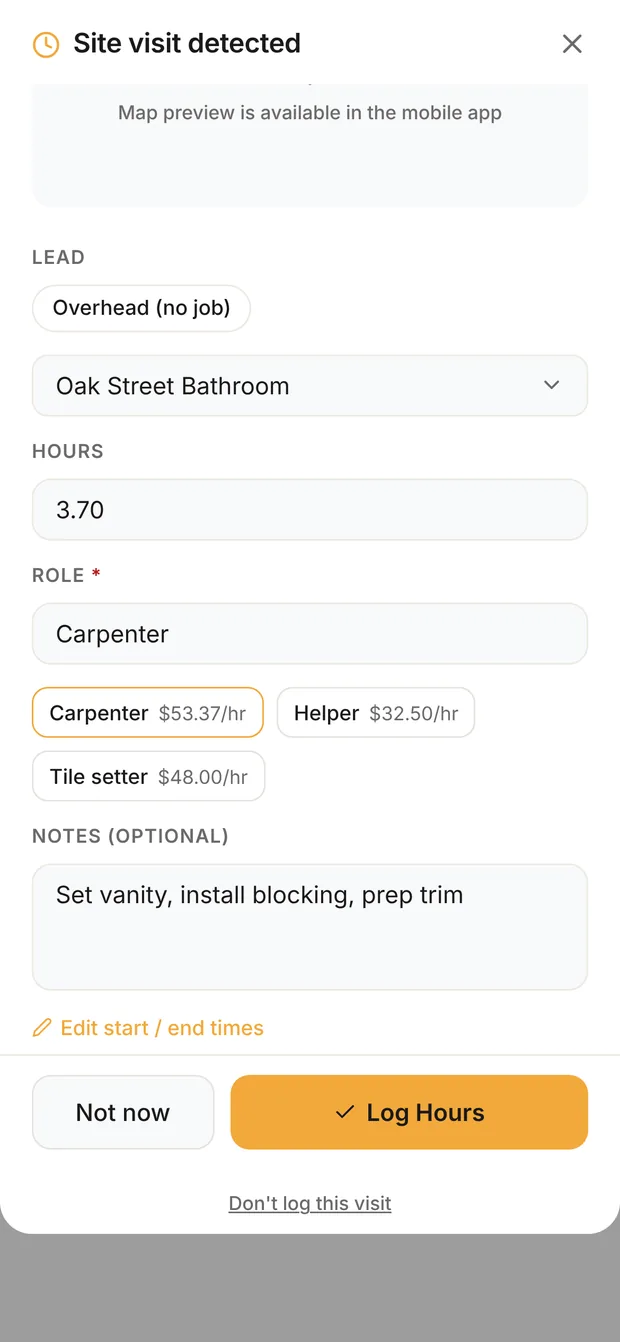
Confirmed with a role
A detected visit in Clamp waits to be confirmed with the job, the hours and a role. Demo data.
Detected visits. A detected visit says your phone was at the site. It doesn't say the time was work, or in which role. Confirm each one the same day, take out the time that wasn't work, and pick the role.
Job cost. Each entry is costed at its role's loaded rate for the work date (loaded labor rate).
Payroll. The hours feed your payroll provider's record, which adds the workweek total, rate, overtime and pay.
The estimate. The roll-up is compared with the estimate in contractor time tracking, and for painting in painting labor hours.
Never the customer's invoice in Clamp. Clamp jobs are fixed price; hours feed job cost, not the invoice. Billing time and materials is a different contract, priced and signed as such.
Most time records fail for the same few reasons.
| Mistake | Instead |
|---|---|
| Rebuilding the week from memory | Log the same day; review exceptions promptly |
| Treating a detected visit as hours worked | Confirm it and take out the time that wasn't work |
| Putting the crew's time under one person | Record who actually did the work |
| Daily hours but no weekly total for payroll | Keep both (29 CFR Part 516) |
| Unpaid 10-minute breaks | Count short rest breaks as work (785.18) |
| Deducting lunch when the worker worked through it | Exclude only a bona fide meal period, completely relieved from duty (785.19) |
| Treating the drive between job sites as personal | It's hours worked for an employee (785.38) |
| Rounding only downward | Record exact minutes, or make sure rounding is neutral over time (785.48) |
| Erasing an entry to fix it | Correct it with a reason, so the history stays |
| Logging hours under the wrong role | Use the role actually done, so the right rate applies |
| Owner hours on jobs left without a rate | Set an owner rate if those hours are job labor |
| Treating logged hours as billable hours | In Clamp they feed job cost, not invoices |
| Keeping time cards only until payroll runs | Generally 2 years for time cards and 3 for payroll records under federal rules |
What it means
Time on site in Clamp
Log Hours takes a job or business time, a role and hours, entered as a number or as Start / Stop times kept to the minute. A meal break is optional and only what the person enters: Clamp saves net hours and keeps the times and the break on the record, but never adds a break or decides whether it can be unpaid. With location set to Always, Clamp detects a visit to a job or a saved place and holds it until you confirm it, and keeps no location trail. An entry is never edited or deleted: Correct adds a new record with a reason, and Void hides it. Each entry is costed at its role's loaded rate from Labor Costing, and only the owner and admins see rates unless the owner turns them on for others. Teammates' entries reach the owner in Time to review. The Timesheet PDF and Payroll CSV export the hours. Clamp does not run a clock, apply overtime or meal-break rules, or bill time to a customer.
Compare the hours with your estimate in contractor time tracking, and score your Operations system in the contractor business self-assessment.
Sources & provenance
- Fact Sheet #21: Recordkeeping Requirements under the Fair Labor Standards Act (FLSA) U.S. Department of Labor, Wage and Hour Division (official source)
- 29 CFR Part 516, Records to Be Kept by Employers Electronic Code of Federal Regulations (official source)
- 29 CFR Part 785, Hours Worked Electronic Code of Federal Regulations (official source)
- Breaks and Meal Periods U.S. Department of Labor (official source)
- Federal Rules of Evidence, Rule 803(6): Records of a Regularly Conducted Activity Office of the Law Revision Counsel, U.S. House of Representatives (official source)
- Estimating Construction Profitably Michael C. Stone (book)
- Contractor Time Tracking: Compare Estimated Hours With Actual Job Hours Clamp Research
- Where a Contractor's Non-Billable Time Gets Paid For Clamp Research