How to Keep a Mileage Log: What Each Trip Must Show
What each trip entry needs for the IRS, how to fill it in the same day, how to handle a personal detour, and what keeps the log believable when someone checks it.
The assumptions
This model assumes
- A contractor recording business trips in their own vehicle or a company vehicle
- Whether a trip is deductible is settled first, in the mileage deduction guide; this guide is about the record
- The worked example is the trip published in the mileage deduction guide: 20.0 miles on August 18, 2026
- The owner's practice: trips logged the same day, detection as a backstop, separate legs for a personal detour, odometer readings at the start and end of the year and at vehicle changes, a written reimbursement policy for crew vehicles, and the log never billed to a customer
- This is recordkeeping guidance drawn from IRS publications, not tax advice. Confirm your situation with a tax professional.
The model, step by step
A mileage log is one record among several that describe the same drive. Each one proves something different.
| Record | What it can support | What it does not establish by itself |
|---|---|---|
| Mileage log | Date, business miles, destination and purpose of each trip | Whether the trip is deductible (the mileage deduction guide) |
| Calendar or appointments | Where you were expected to be | Miles actually driven |
| Phone or GPS location history | Where you went and when | Why you went |
| Time on site | That you were there, and for how long | Miles driven |
| Fuel and repair receipts | What the vehicle cost to run (the actual-expense records) | The business miles of any one trip |
| Job cost | What the job cost the business | A mileage deduction |
A calendar can corroborate where you were expected to be. A mileage log records where you went, how far, and why. Whether a trip qualifies, and at what rate, is covered in the mileage deduction guide; hours on site are covered in how to track time on a job.
IRS Publication 463, chapter 5, Table 5-1, lists what to prove for car use: the mileage for each business use, the date, the business destination and the business purpose. The other fields make the record easier to check.
| Field | This guide | Why |
|---|---|---|
| Date | Always | IRS-required element (Pub. 463, Table 5-1) |
| Miles | Always | IRS-required: the mileage for each business use |
| Destination | Always | IRS-required: the business destination |
| Business purpose | Always | IRS-required |
| Start point | Usually | Supports the distance, and separates the legs of a mixed trip |
| Job | Usually | Shows which job the trip served; this guide's practice, not an IRS field |
| Start and end time | Usually | Corroboration; not required for business mileage |
| Vehicle | When you have more than one | Keeps each vehicle's log and annual total separate |
| Driver | On a crew | Who made the trip |
| Trip type | When it isn't business | Medical, charitable and personal miles are not business miles |
Once a year, for each vehicle, keep its total miles for the year and the date it began business use (Table 5-1). Odometer readings at the start and end of the year are the practical way to support the total; Pub. 463's sample log (Table 5-2) records start and stop readings for each trip.
Clamp saves a trip with miles and a purpose, and asks for a destination on a business trip. That is the app's minimum, not the IRS standard.
Log the trip the same day, before the end of the day, while you still know why you drove there. If automatic detection caught it, review it the same day and add what the app can't know: the purpose, the job and the trip type.
A filled example, the trip published in the mileage deduction guide:
| Field | The entry | Note |
|---|---|---|
| Date | August 18, 2026 | When you drove |
| Start | Oak Street jobsite | Where the trip began |
| Destination | The tile supplier, by name | Not just "supplier"; the trip returns to the Oak Street jobsite |
| Miles | 20.0 | The distance of this trip, out and back |
| Purpose | Collect tile ordered for the Oak Street bathroom | Not "job" or "business": the IRS asks for the business purpose |
| Job | Oak Street bathroom | This guide's practice |
| Trip type | Business | Medical, charitable and personal trips are recorded as such |
| Vehicle | 2022 Ford Transit | When you run more than one |
| Driver | The crew member who drove | On a team account |
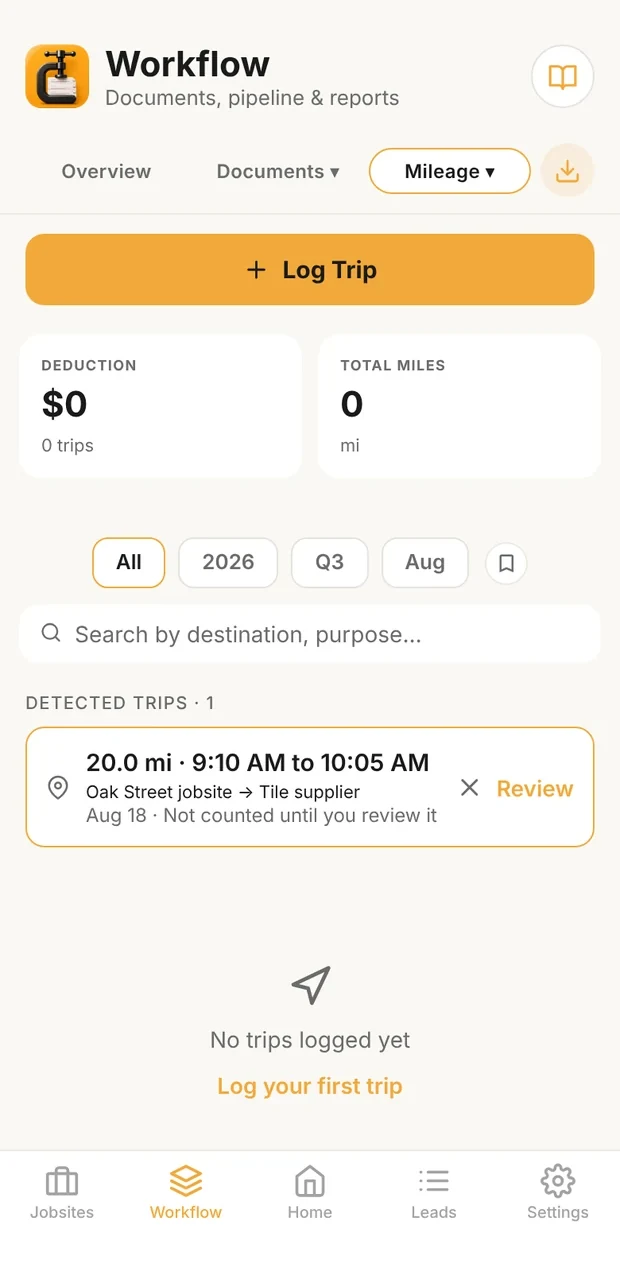
Detected, not yet counted
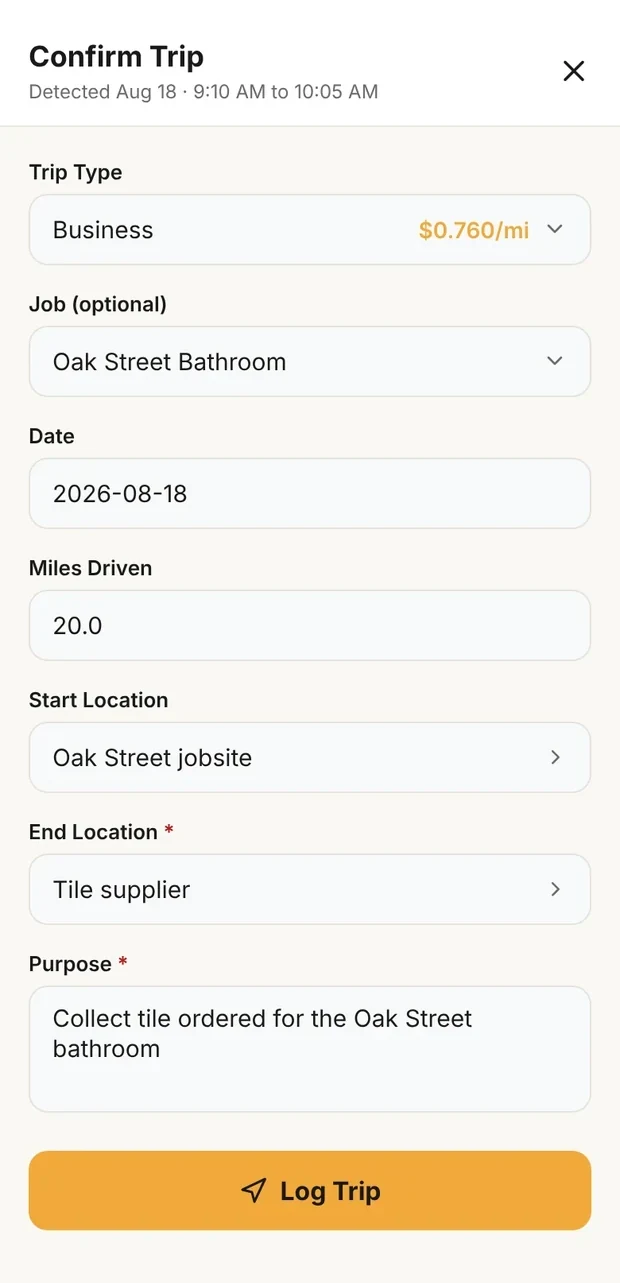
Reviewed with a purpose
A detected drive in Clamp: it waits under Detected trips until you review it, and Review opens it filled in from the detection for you to add the purpose and the job. Demo data; the trip is the worked example.
Clamp records one trip type per entry and can't split a detected drive. If detection captures business and personal legs together, don't confirm the combined drive as business. Discard it and record the business and personal legs by hand as separate trips.
The published trip, at the IRS business rate for its date. The rates are 72.5 cents a mile through June 30, 2026, and 76 cents from July 1 (IRS standard mileage rates; Announcement 2026-11).
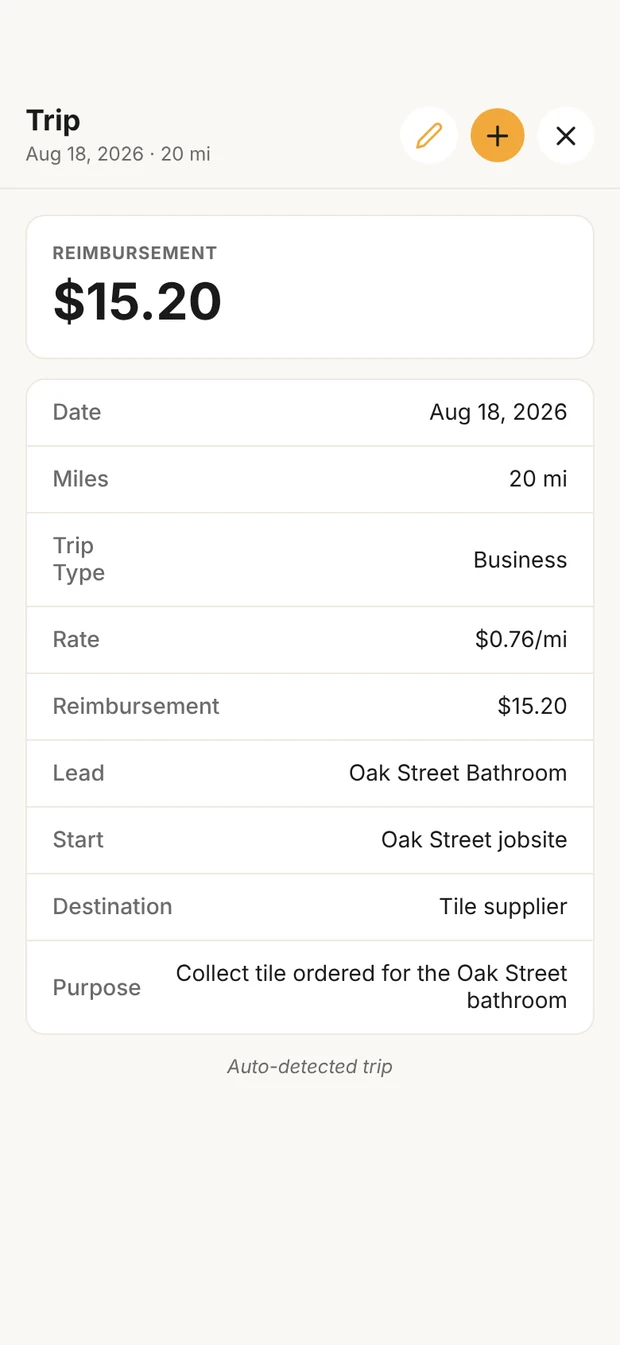
Rate by trip date
The logged trip in Clamp, priced at the rate for its own date. Demo data.
On August 18, 2026:
The same trip on June 30, 2026, at 72.5 cents, and on July 1, at 76 cents, as an illustration:
Together, 40.0 miles:
Cross-check: because the two trips are the same 20.0 miles, their average rate is $0.7425; 40.0 × $0.7425 = $29.70.
That is why every trip needs its date: the same 20.0 miles is worth a different amount a day apart. These are standard-rate figures for an eligible trip. Whether a trip is eligible is in the mileage deduction guide.
Made at the time. Pub. 463 asks for records made at or near the time of the business use, and explicitly treats a weekly log covering that week as timely. This guide logs trips the same day, because the purpose and the destination are still fresh.
Written, not remembered. An adequate record is a written one, such as a log or a trip sheet. A computer or app record can serve as the written record, provided it contains the required elements and is adequately supported (Pub. 463, chapter 5, "What are adequate records?").
Backed up where it can be. Calendars, invoices, supplier receipts, job schedules and location history can corroborate a log. Use them to corroborate a timely log rather than as your normal mileage-recording system.
When records are incomplete, Pub. 463 lets you prove a missing element with your own specific statement plus other supporting evidence. For the date, the place and the amount, that evidence generally has to be direct or documentary. The business purpose can sometimes be shown from the circumstances ("What if I have incomplete records?"). A log rebuilt in April from a calendar is weaker than one kept as you went.
Destroyed records are a separate rule. When records are lost to a fire, a flood or another casualty beyond your control, the publication permits a reasonable reconstruction ("Destroyed records"). Forgetting to keep a log is not that.
Sampling. Pub. 463 permits adequate records for a representative part of the year when other evidence shows that part is representative ("Sampling"). This guide logs every trip rather than having to prove a sample period was representative.
The annual vehicle record. For each vehicle, keep its total miles for the year and the date it began business use. Under this guide's practice, read the odometer at the start and end of the year, and when the vehicle starts or stops business use. The rest of the vehicle record (cost, depreciation, the actual-expense method) is in the mileage deduction guide.
Decide these once, so every trip is logged the same way.
| Decision | Practice | Why |
|---|---|---|
| When trips are logged | The same day | The IRS explicitly treats a weekly log covering that week as timely; the purpose is clearest the same day |
| Automatic detection | A backstop, if you're comfortable with background location; review detected trips the same day | It catches drives you forget, and Clamp doesn't count a detected trip until you review it. Manual same-day entry is just as valid |
| A personal detour on a business run | Separate business and personal trips | The IRS divides mixed use by miles; a minimal incidental stop doesn't interrupt business use (Pub. 946) |
| Odometer readings | Start and end of each year, and when a vehicle starts or stops business use | They support the annual total for each vehicle |
| Crew in their own vehicles | A written reimbursement policy set with your accountant; an accountable-plan mileage reimbursement rather than an informal allowance where it fits | How a reimbursement is taxed depends on the business and the worker (the mileage deduction guide) |
| Miles and the customer | The log is never billed. Unusual travel is priced in the proposal or a change order | The IRS rate is a tax figure, not a customer price |
To the tax return. The log is the evidence behind the deduction (the mileage deduction guide).
To your accountant. Clamp's accountant export carries business miles as a reference line for review, not as a posted expense.
To the job. A trip linked to a job appears on that job's trip list.
To your prices, not your job cost. Clamp doesn't add logged miles to job cost. In Clamp's pricing, vehicle cost is recovered through the vehicle allocation on each labor role. That is Clamp's pricing design, not an IRS rule.
Michael C. Stone, a builder and remodeler with more than six decades in the industry and the author of Estimating Construction Profitably, treats travel time and mileage as costs an estimate may need to carry (chapter 7, "Estimating Labor", "Travel Time"). His point is that travel cost has to be recovered somewhere, not paid silently out of profit. When a job's travel is unusual, price it in the proposal or a change order (How to Write and Price a Change Order). Don't price it by passing the IRS rate through.
Most mileage records fail for the same few reasons.
| Mistake | Instead |
|---|---|
| Keeping only a year-end total | Record each business trip: date, miles, destination, purpose (Pub. 463, Table 5-1) |
| "Job" or "business" as the purpose | Say what the trip was for: "Collect tile ordered for the Oak Street bathroom" |
| No destination | Name where you went |
| Rebuilding the log from memory at tax time | Record the trip the same day; Pub. 463 explicitly treats a weekly log covering that week as timely |
| Treating location history or a calendar as the log | Use them to corroborate a timely log |
| Counting a personal detour as business | Log the business miles and the detour separately (Pub. 463) |
| No annual total for the vehicle | Read the odometer at the start and end of the year |
| One annual total for two vehicles | Keep each vehicle's total separately |
| Assuming a detected trip already counts | Review it, with a purpose, or discard it, the same day |
| Confirming a detected drive with a personal detour in it as business | Record the business and personal legs as separate trips; Clamp can't split a detected drive |
| Treating a trip on a job as job cost | It's a mileage record; vehicle cost is priced in the labor rate |
| Taking the rate an app shows as proof the trip qualifies | Check eligibility first, in the mileage deduction guide |
What it means
Mileage in Clamp
Log Trip asks for the miles and a purpose, and a Business trip also asks for its destination. Start and end can be a saved place or a job's address, the trip can sit on a job, and each trip type shows its rate: Business, Medical, Charity, Moving or Personal. With location set to Always, Clamp detects drives and holds each one under Detected trips until you review it and add the purpose, the job and the trip type, or discard it. Each trip is priced at the IRS rate for its own date, or at your own rates for a year. Driver Info & Odometer keeps the driver, each vehicle, its odometer at the start and end of the year, and the date it began business use. On a crew, each trip records who logged it. The Mileage tab exports a PDF mileage tax report and a CSV, a job exports its trip list, and the accountant export carries business miles as a reference line. Clamp does not split one detected trip into legs, add miles to job cost or an invoice, store odometer photos, or keep the route.
See the mileage deduction guide for eligibility, rates and deduction rules, and score your Operations system in the contractor business self-assessment.
Sources & provenance
- Publication 463, Travel, Gift, and Car Expenses Internal Revenue Service (official source)
- Publication 946, How To Depreciate Property Internal Revenue Service (official source)
- Standard mileage rates Internal Revenue Service (official source)
- Announcement 2026-11, Internal Revenue Bulletin 2026-29 Internal Revenue Service (official source)
- Estimating Construction Profitably Michael C. Stone (book)
- Independent Contractor Mileage Deduction 2026 Clamp Research
- How to Write and Price a Change Order Clamp Research