Clamp vs Square Invoices: Free invoicing with built-in payments, or a connected job from estimate to final invoice
Square Invoices is a free invoicing and payments tool with estimates, e-signed contracts, deposits and, on Square Plus, milestone payment schedules. Clamp is a job workflow: estimate at cost plus markup, signed proposal with milestones, change orders, customer decisions and job costing.
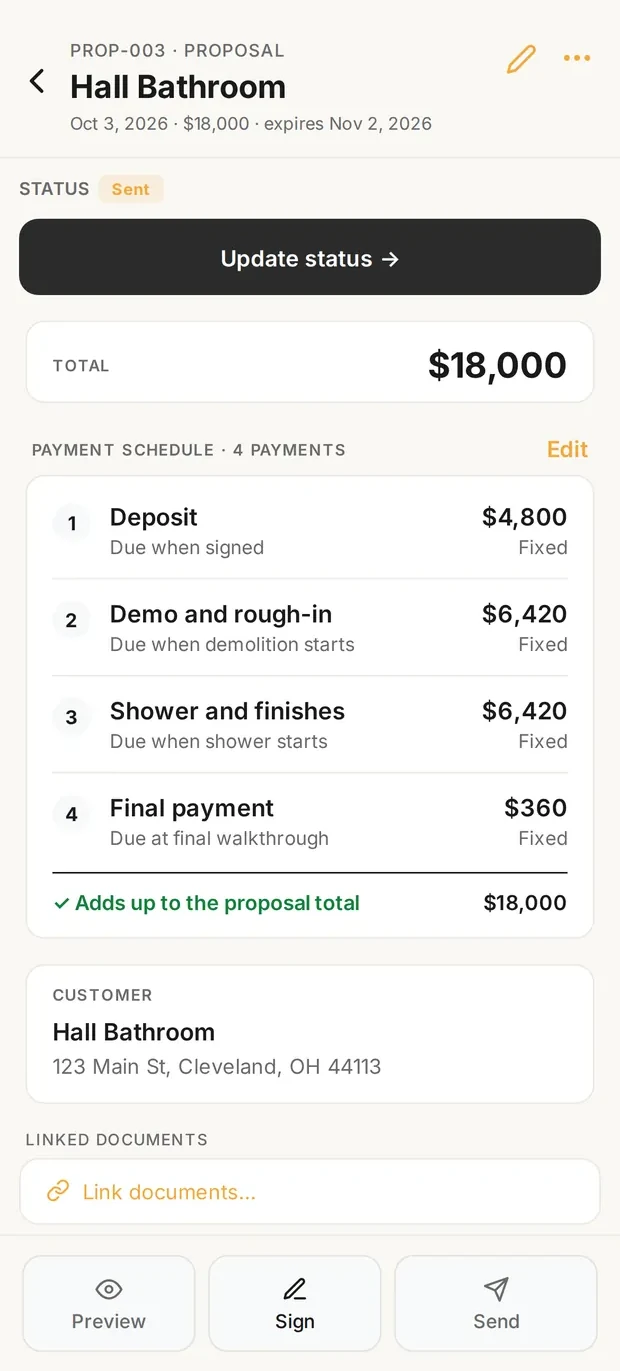
Proposal with milestones
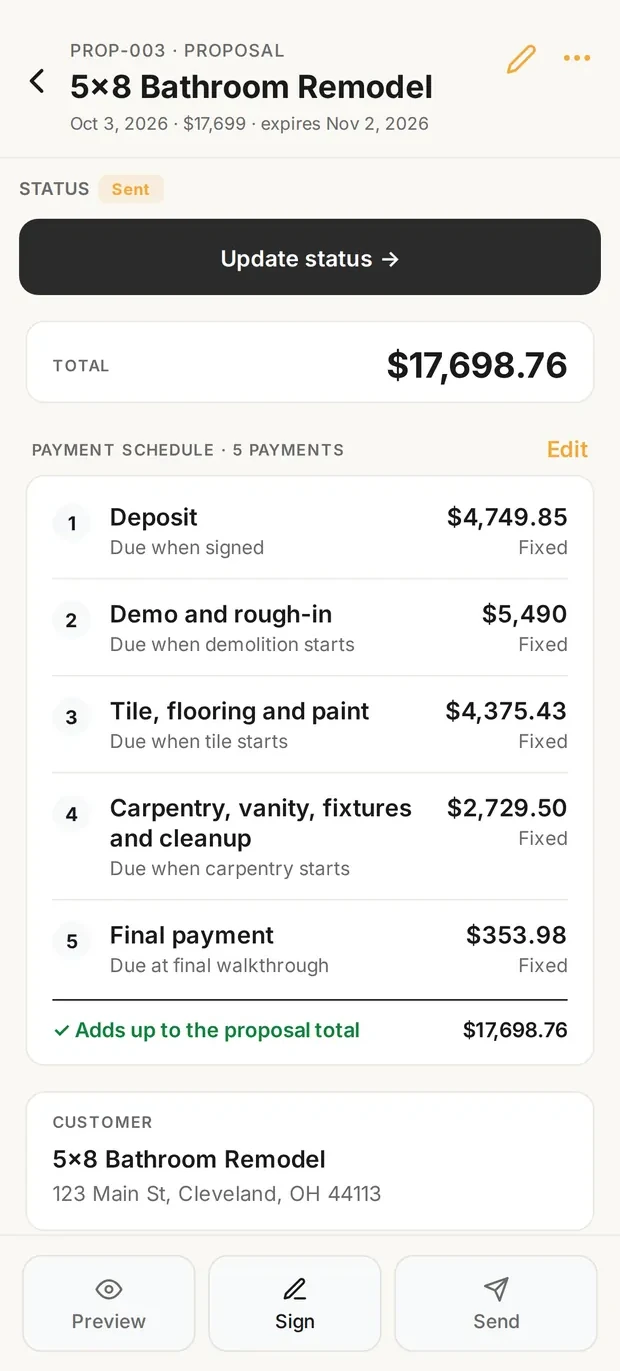
Invoices on the schedule
Sample data. The proposal carries the milestone schedule the customer signs, and the invoices follow that schedule through the final payment.
What it costs
| Situation | Clamp | Square Invoices |
|---|---|---|
| One person: estimates, invoices, a signed contract and a deposit | Solo, billed monthly $19.99 a month $239.88 a year, calculated | Square Free Free No subscription. |
| One person who needs milestone payment schedules | Solo, billed annually $12.50 a month $149.99 a year, calculated | Square Plus, billed monthly, one location $49.00 a month $588.00 a year, calculated |
| One person who wants a customer portal with e-signatures | Assistant, billed monthly $49.99 a month $599.88 a year, calculated | Square Free Free No subscription. |
| A crew of 5 that needs job costing | Teams (up to 10 people), billed annually $83.33 a month $999.99 a year, calculated | Not available as job costing Square prices by location, not by user; job costing against an estimate was not found on Square's official pages. |
Every Clamp feature, next to Square Invoices
Solo includes 28 of Clamp's 44 features. Square Invoices's pages show 7 of the 44 in full and 11 in part, across its plans.
| Feature | Clamp | Square Invoices |
|---|---|---|
| CRM and leads | 3 of 5 | 0 of 5 |
| Email remindersEmail reminders before appointments, follow-ups, and scheduled installs, deliveries, and inspections. | ✓ Assistant and TeamsAssistant, $41.67 a month billed annually | Payment remindersBefore, on or after the due date; no appointment reminders |
| Customer appointment remindersHomeowners get an email before an appointment, with confirm and reschedule built in. | ✓ Assistant and TeamsAssistant, $41.67 a month billed annually | Not foundPayment reminders only; Square Appointments is separate |
| Five-factor lead scoringA clear yes, no, or maybe on a lead before driving out. | ✓ Every planSolo, $12.50 a month billed annually | Not found |
| Lead reportingClose rate, revenue won, open pipeline, close rate by lead source, and lost leads by reason, on Home and the stats screen, with CSV and PDF export. Revenue by source does not exist; see _excluded. | ✓ Every planSolo, $12.50 a month billed annually | Not found |
| Daily briefingOverdue invoices, detected trips, follow-ups, appointments, and open proposals in one morning view. | ✓ Every planSolo, $12.50 a month billed annually | Not found |
| Estimating | 7 of 7 | 1 of 7 |
| Design agreementsPaid preconstruction sits in the document chain, so planning work is paid work. | ✓ Every planSolo, $12.50 a month billed annually | Contract templatesService agreement template; no design-agreement flow |
| Itemized estimatesAssembly-based estimates with quantities and rates the contractor can inspect line by line. | ✓ Every planSolo, $12.50 a month billed annually | ✓ Square FreeHelp article names Invoices Plus or Premium; pages disagree |
| Estimate templatesSave an estimate as a template for work done often. | ✓ Every planSolo, $12.50 a month billed annually | PartlyInvoice layouts and contract templates; saved estimates not stated |
| Proposals with multiple package tiersGood, better, best packages in one proposal. | ✓ Every planSolo, $12.50 a month billed annually | Invoices Plus2 to 9 packages; not in the Invoices app |
| AI estimating from a plain-language job descriptionDescribe the job in plain words and get an itemized draft: assemblies, quantities, researched baseline rates, with the contractor's own saved rates taking over once set. | ✓ Every planSolo, $12.50 a month billed annually | Not foundSquare AI listed for marketing and contract clauses |
| Remodel and new-home estimatingOne estimator covers remodels and new homes and detects which one a description is. Detect is the default job type; a contractor can pick Remodel or New home per estimate, or set Kind of work to Remodeling to turn the choice off. | ✓ Every planSolo, $12.50 a month billed annually | Not found |
| Labor hours on estimatesEstimated labor hours, shown as a range, on every labor line, with an allowance for setup, cleanup, and material runs (15% by default) the contractor can change in Settings or per estimate. A planning figure; it never appears on proposals, PDFs, or the portal. | ✓ Every planSolo, $12.50 a month billed annually | Not found |
| Contracts and invoicing | 5 of 5 | 3 of 5 |
| Payment schedulesSplit a proposal into a deposit, milestone payments, and a final payment, then invoice each one from the signed contract. | ✓ Every planSolo, $12.50 a month billed annually | ✓ Square Plus, $49Up to 12 milestones; deposit on Free |
| Sales tax on documentsAdd a sales tax rate or a flat amount to invoices and other documents, with collected tax totaled by quarter and year. The contractor enters the rate; Clamp does not look rates up. | ✓ Every planSolo, $12.50 a month billed annually | ✓ Square FreeTax applied per line item |
| Customer credits and refundsApply a customer's credit to an open invoice, record a refund, or adjust a balance, with the history kept on the job. Recorded only; Clamp moves no money. | ✓ Every planSolo, $12.50 a month billed annually | RefundsFrom Dashboard or POS; credits not stated |
| Change orders that update the contractScope changes get written up and tied to the original contract, so verbal changes stop costing money. | ✓ Every planSolo, $12.50 a month billed annually | Not foundInvoices can be edited after a partial payment |
| Invoices tied to the contractEvery invoice belongs to the contract or change order it bills. | ✓ Every planSolo, $12.50 a month billed annually | ✓ Square Free |
| Customer portal | 0 of 6 | 1 of 6 |
| Password-free customer portalThe homeowner opens a link. No account, no password, no app to install. | ✓ Assistant and TeamsAssistant, $41.67 a month billed annually | Emailed linksReview, sign and pay from a link; no project portal named |
| Unlimited documents and photos shared to the portalShare job documents and photos to the customer portal without a count cap, subject to per-item size limits. | ✓ Assistant and TeamsAssistant, $41.67 a month billed annually | AttachmentsUp to 10 files, 25 MB on an estimate |
| E-signing on the homeowner's phoneDocuments get signed on the homeowner's own phone, no account required. | ✓ Assistant and TeamsAssistant, $41.67 a month billed annually | ✓ Square ContractsSigned electronically from an emailed link |
| Several signers on one documentSend one document to up to five people, each signing their own line, see who has signed, and remind anyone who has not. | ✓ Assistant and TeamsAssistant, $41.67 a month billed annually | Not found |
| Project updates and decisions in the portalPost project updates to the customer's portal and ask the customer to make a decision, which they answer from their phone. | ✓ Assistant and TeamsAssistant, $41.67 a month billed annually | Not found |
| Not delivered email handlingWhen a customer email Clamp sends bounces, the document is marked Not delivered so the contractor can fix the address and resend, or copy the link to text it. | ✓ Assistant and TeamsAssistant, $41.67 a month billed annually | Not found |
| Expense tracking | 5 of 5 | 0 of 5 |
| Automatic GPS mileage trackingBackground trip detection, route maps, IRS rates, trips linked to the job that caused the drive. | ✓ Every planSolo, $12.50 a month billed annually | Not found |
| Automatic time on siteGPS geofence tracking of hours at the jobsite. | ✓ Every planSolo, $12.50 a month billed annually | Not foundSquare Staff is a separate product |
| Receipts and expenses on the jobReceipts logged against the job they belong to. | ✓ Every planSolo, $12.50 a month billed annually | Not found |
| Purchase ordersCommitted costs captured between the estimate and the receipt. | ✓ Every planSolo, $12.50 a month billed annually | Not found |
| Accounts payable and vendor billsVendor bills tracked and surfaced in the attention flows, with first-class vendor records. | ✓ Every planSolo, $12.50 a month billed annually | Not found |
| Job costing and reports | 3 of 3 | 0 of 3 |
| Job costingWhat the job actually cost, with a variance and catalog learning loop. | ✓ Every planSolo, $12.50 a month billed annually | Not foundInsights cover estimates, invoices and payments |
| Accountant export packageA package of the business's records prepared for an accountant. | ✓ Every planSolo, $12.50 a month billed annually | Not found |
| Time reporting with CSV exportReported labor time with a time-tracking CSV export for payroll preparation and per-person rate decomposition. | ✓ Every planSolo, $12.50 a month billed annually | Not foundSquare Staff is separate |
| Jobsites and teams | 2 of 8 | 0 of 8 |
| Teams: up to 10 linked accountsUp to 10 accounts, including the owner, sharing one business. | ✓ TeamsTeams, $83.33 a month billed annually | Priced per locationNot per user; Square Staff is separate |
| Role-based permissionsFive roles: owner, admin, staff, contributor, viewer. | ✓ TeamsTeams, $83.33 a month billed annually | Not foundNot stated on the Invoices pages |
| Unlimited subcontractor linkingSubs share jobsite photos and notes into the business account without consuming a seat. | ✓ TeamsTeams, $83.33 a month billed annually | Not found |
| Jobsites tab: jobs and schedule in one placeA Jobsites tab with Jobs and Schedule views. With Assistant each job has its own screen with its schedule, photos, and updates, and the Schedule view holds every install, delivery, inspection, appointment, and follow-up; Teams adds the crew and subs on each job, shaped by role. Subs invited to a job use it free and see their own jobs grouped by builder. | ✓ Assistant and TeamsAssistant, $41.67 a month billed annually | ProjectsListed on Square Free; no jobsite screen described |
| Job scheduleSchedule installs, deliveries, and inspections on each job, with the contractor, a supplier, or nobody yet on each item, and see them all in the Jobsites tab. Putting crew or subs on an item is the Teams shared schedule. | ✓ Assistant and TeamsAssistant, $41.67 a month billed annually | Square AppointmentsSeparate product |
| Shared job scheduleOne schedule for the business: installs, deliveries, and inspections visible to the team, with clash notes when dates collide. | ✓ TeamsTeams, $83.33 a month billed annually | Not found |
| Punch listsThe small final items that close a job out, tracked per job and shareable as a text message or a PDF. | ✓ Every planSolo, $12.50 a month billed annually | Not found |
| Job site photosPhotos saved to the project with full-screen viewing. | ✓ Every planSolo, $12.50 a month billed annually | AttachmentsUp to 10 files, 25 MB on an estimate |
| Backup and offline | 3 of 5 | 2 of 5 |
| Full job workflow, offlineLeads, design agreements, estimates, proposals, change orders, and invoices on the phone, working without a connection. | ✓ Every planSolo, $12.50 a month billed annually | Not foundNot stated on the pages checked |
| Cloud backupBusiness data backed up to the cloud and restorable on a new device. | ✓ Assistant and TeamsAssistant, $41.67 a month billed annually | ✓ Cloud software |
| Business portal: read-only web viewA read-only view of the business in a browser. | ✓ Assistant and TeamsAssistant, $41.67 a month billed annually | ✓ Square DashboardOnline Dashboard |
| Device backup, restore, CSV export, bulk importLocal backup and restore with CSV export and bulk import. | ✓ Every planSolo, $12.50 a month billed annually | Not found |
| No account required to startThe app opens to local use; an account is needed only for server features or subscribing. | ✓ Every planSolo, $12.50 a month billed annually | Not foundStarts from a Square account |
| Only in Square Invoices | Where Square Invoices is ahead | |
| Free plan, pay per payment | Paid plans from $19.99 | ✓ Square Free $0 a month per location |
| Built-in payments | Your own payment link | ✓ Cards, Apple Pay, Google Pay, Cash App Pay, Afterpay, ACH |
| Recurring invoices | Not in Clamp | ✓ Square Free |
| Contract templates | Documents in the job chain | ✓ Five standard templates plus custom |
| Square ecosystem | Not in Clamp | ✓ Appointments, Staff, Checking, websites, marketing |
| Next-day transfers | Not in Clamp | ✓ Free; instant for a fee |
Nothing here matches. Pick All or another filter.
Square Invoices column from its pricing page, feature pages and help center, checked October 14, 2026. Not found means not on those pages, not that Square Invoices can't do it another way. Partly means something narrower than the Clamp feature. No product was tested against another.
Where each Square Invoices answer comes from
- Square Invoices Pricing Square Invoices, accessed October 14, 2026
- Square Invoices Square Invoices, accessed October 14, 2026
- Square for Contractors Square Invoices, accessed October 14, 2026
- Payments schedule with Square Invoices Square Invoices, accessed October 14, 2026
- Create and send Square Contracts Square Invoices, accessed October 14, 2026
- Create and send invoice estimates Square Invoices, accessed October 14, 2026
Verdict
Clamp may fit when
- You build estimates at direct job cost and apply your overhead and profit markup once, after the cost is built
- You want the milestones on a signed proposal to become the payment schedule without moving to a $49 a month plan
- You need priced, signed change orders that update the contract total
- You track receipts, vendor bills, time on site, labor and mileage against the estimate and review job cost at close
- You want a customer decisions list, a punch list and a customer portal with photos and schedule on the same job
- You work with employees or subs who need their own access without seeing your customer prices
Square Invoices may fit when
- Your main need is to send estimates and invoices, get a contract signed and collect payment, and you would rather pay processing fees than a subscription
- You want cards, Apple Pay, Google Pay, Cash App Pay, Afterpay and ACH processed in the same system, in the field or online
- You want a deposit request and recurring invoices on a free plan
- You already run Square hardware, Square Appointments, Square Checking or Square Staff and want invoicing in the same account
- You want automatic payment reminders and next-day transfers without a monthly fee
- You run several locations and want one invoicing system across them
Before you compare them
- The overlap is real. Both handle estimates, invoices, electronic signatures, deposits and milestone schedules, and both let a customer see and act on a document from a link.
- Square's strongest documented advantages are a free plan, payment processing with many payment methods, deposits and recurring invoices on Free, e-signed contract templates, reminders, and the Square ecosystem of hardware, appointments, banking and staff tools.
- Clamp's advantage is the job record around the documents: lead qualification, estimates at cost with markup applied once, a signed proposal whose milestones become the schedule, change orders, customer decisions, time, mileage, sub access and the estimate-against-actual job cost review.
- Square's milestone payment schedules are on Square Plus, Square Premium and Square Invoices Plus. Clamp's payment schedule is on every plan.
- Square processes payments and charges a fee on each one. Clamp records payments made through your own payment link and does not process payments, so it charges no processing fee.
- Square's monthly fee applies to each location. Clamp's plans are per account, with Teams covering up to 10 accounts plus free sub invites.
- Square's Invoices pricing page lists ACH via invoice at 1% with a $1 minimum; its Square for Contractors page says 'no-fee ACH transfers' and a '$10 fee cap for ACH bank transfers'. This page uses the pricing page and notes the difference.
- Clamp is not accounting software and neither is Square Invoices; both leave the general ledger, payroll and taxes to another product.
- "Not found" on this page means not found on Square's current Invoices, pricing, contractor or Support Center pages. It does not mean Square cannot do it another way.
- Neither product was tested against the other. No speed or accuracy claim is made.
Workflow
| Feature | Clamp | Square Invoices |
|---|---|---|
| Monthly price to start | Solo $19.99 a month, free for the first month on monthly billing | Square Free $0 a month per location; Square Plus $49; Square Premium $149 |
| Estimates | Line by line in the order the job is built, at direct cost, with your markup applied once and allowances visible | Custom estimates that convert to invoices when accepted; multiple options in one estimate |
| AI estimates | A draft at direct cost from a plain-words description, then your markup (3 free AI credits, then 25 or 50 a month by plan; an estimate is 1 credit, a revision half) | An AI estimate from a job description was not found on Square's Invoices, pricing or contractor pages |
| Proposal and contract | A proposal carrying the milestones, signed in the customer portal (Assistant and Teams); a design agreement document on every plan | Square Contracts: five standard templates or custom templates, signed electronically from an emailed link, attached to an estimate or invoice; custom fields and signature-before-payment on Plus |
| Deposits | The deposit is the first milestone on the proposal | A deposit as a percentage or dollar amount with its own due date, on Square Free |
| Milestone payment schedule | Every plan: milestones tied to job events, each with a checklist of evidence; billed as the stage starts | Square Plus, Premium and Invoices Plus: up to 12 milestone payments on one invoice plus a deposit |
| Change orders | Every plan: priced and billed, e-signed in the portal on Assistant and Teams, with the new contract total shown before signing | Not found on Square's Invoices, pricing, contractor or Support Center pages; invoices can be edited after sending |
| Customer decisions after signing | A Decisions needed list: needed by, what it blocks, who owes the answer, the resolution | Not found on Square's Invoices, pricing, contractor or Support Center pages |
| Invoices | Invoices follow the milestone schedule; unlimited documents on every plan | Invoices and recurring invoices on Square Free; custom invoice templates on Plus; automatic payment reminders |
| Payments | Not processed by Clamp: add your own payment link and record what was paid; no processing fee | Processed by Square: card on an invoice 3.3% + 30 cents on Free, 2.9% + 30 cents on Plus and Premium; card on file 3.5% + 15 cents; in person 2.6% + 15 cents on Free; Apple Pay, Google Pay, Cash App Pay and Afterpay |
| ACH bank transfers | Through your own payment link; no Clamp fee | Pricing page: 1% with a $1 minimum, capped at $10 on Plus and Premium. The contractor page says 'no-fee ACH transfers' and a '$10 fee cap'; the two pages disagree |
| Email reminders | Assistant and Teams | Automatic payment reminders |
| Customer portal | One place to sign proposals and change orders, see milestones, invoices, photos and schedule, and answer decisions (Assistant and Teams) | Customers review, sign and pay from emailed links; a persistent project portal with photos, schedule and decisions was not found on Square's official pages |
| Job costing | Every plan: receipts, vendor bills, time at the loaded rate and labor, reviewed against the estimate at close | Not found on Square's Invoices, pricing or contractor pages; Square Analytics is described as revenue, costs and payroll insights for the business |
| Time on site | Logged by role, or detected automatically when you leave a job site; not a GPS crew time clock with geofencing | Not part of Invoices; Square Staff is a separate product for team hours |
| Business mileage log | Automatic trip detection, confirmed per trip, at the IRS rate for its date | Not found on Square's Invoices, pricing or contractor pages |
| Team and subs | Up to 10 accounts on Teams, plus unlimited free sub invites who never see your prices; sub jobsites | Plans are priced per location, not per user; staff tools are in Square Staff, a separate product |
| Accounting | Not accounting software: an accountant export package, no ledger, payroll, bank feeds or tax filing | Not accounting software; Square Checking, Square Analytics and next-day or instant transfers are in the same account |
What was and was not tested
What was compared: Hands-on testing of either product. Neither was tested against the other, and no speed or accuracy claim is made. Documented, not tested.
| Statement | Basis |
|---|---|
| Published by Clamp, using each product's own pricing, feature and support pages. | Clamp's own statement |
| Estimates, invoices, a signed contract and a deposit, one person: Square Free is $0 a month plus processing fees; Clamp Solo is $19.99 a month or $149.99 a year with no processing fee. On a $10,000 job paid by card on an invoice, Square Free's 3.3% + 30 cents is $330.30, calculated; by ACH at 1% it is $100 on Free and $10 on Plus, calculated. | Calculated from published prices |
| Milestone payment schedules: Square Plus is $49 a month per location, $588 a year at the monthly rate, calculated; Clamp Solo includes the payment schedule and change orders at $19.99 a month or $149.99 a year. The plans are not equivalent: Square Plus includes payment processing at a lower card rate and custom invoice templates, and Clamp includes job records Square does not document. | Calculated from published prices |
| Square's own pages differ on ACH: the Invoices pricing page lists 1% with a $1 minimum, the Square for Contractors page says 'no-fee ACH transfers'. This page uses the pricing page figure. | Verified against a published source |
Switching
- Keep your Square account for payment processing if you switch the job workflow to Clamp; Clamp records payments made through your own payment link and does not replace a processor.
- Export your customers, estimates, invoices and signed contracts from Square before you close or downgrade a plan.
- Do not assume Square history can be imported into Clamp; confirm formats first.
- If you are on Square Plus only for milestone schedules, check whether Square Free plus Clamp's payment schedule covers the same jobs before you cancel.
- Finish open jobs and their payment schedules where they started; start new ones in Clamp.
Questions
Is Square Free enough for a contractor's estimates and invoices?
For basic billing, often yes. Square's pricing page lists estimates that become invoices, e-signed contract templates, recurring invoices and deposit requests on Square Free, though one Square help article places estimates on Plus. Processing fees apply when customers pay electronically. A change-order, customer-decision or estimate-versus-actual job-cost workflow was not found on Square's pages.
How much does Square Invoices cost, including payment fees?
Square Free has no monthly fee; Plus is $49 a month and Premium $149 a month, each per location, and no annual price is listed. Online invoice card payments cost 3.3% plus 30 cents on Free and 2.9% plus 30 cents on Plus and Premium. Clamp does not process payments, but the payment provider behind your own link may still charge fees.
Can Square Invoices schedule milestone payments and approve change orders?
Square's paid plans support up to 12 milestone payments plus a deposit on one invoice, while Square Free supports a deposit only. A separate change-order workflow was not found on Square's official pages. Clamp turns proposal milestones into the invoice schedule and has change orders on every plan, with e-signing on Assistant and Teams.
How does Square turn an accepted estimate into a contract and invoice?
Square converts an accepted estimate into an invoice and can attach a signed contract, which covers a simple estimate-to-payment job. A separate proposal or change-order document was not found on Square's official pages. Clamp keeps the estimate, proposal, milestones, change orders and invoice schedule together, with e-signing on Assistant and Teams.
Do Square Invoices or Clamp replace QuickBooks accounting?
No. Neither Square Invoices nor Clamp replaces accounting software's general ledger, payroll, bank feeds or tax filing. Clamp tracks job costs and provides an accountant export package. Square's payment records feed its own reporting and banking products, which is not the same as replacing the accounting system your bookkeeper uses.
Sources & provenance
- Square Invoices Pricing Square (official source)
- Square Invoices Square (official source)
- Square for Contractors Square (official source)
- Payments schedule with Square Invoices Square Support Center (official source)
- Create and send Square Contracts Square Support Center (official source)
- Clamp Pricing Clamp Research
- The Clamp Method Clamp Research