How to Coordinate a Remodeling Jobsite: Crew, Subs, Photos, and Schedule
The subcontract tells a sub what they owe. The jobsite tells everyone what is happening now. Who goes on a job, what to share and what to keep private, how to get dates agreed, and what to do when one slips.
The assumptions
This model assumes
- A residential remodeler running jobs with a small crew and a handful of trade subs
- The sub's scope, price and payment terms live in the subcontract; paying subs is outside this guide
- The owner's practice: no date counts until both sides agree, subs added when their part needs coordinating, photos private by default
- The worked week is an illustration, not trade durations or inspection waits
- Recordkeeping guidance, not legal advice; follow your contract's notice requirements
The model, step by step
A job runs on several records. Each one is for something different.
| Record | What it is for |
|---|---|
| The subcontract, written quote and purchase order | What the sub has agreed to do, for what price, on what terms. The formal scope lives here. |
| The jobsite | What everyone on the job needs to coordinate the work: who's on it, the dates, updates, shared photos. |
| Your lead notes | The business's own record. Private. |
| The customer portal | What the homeowner sees and signs. |
| A change order | A signed change to scope, price or time. |
| The sub's bill | What you owe the sub. |
| Group texts | Fast, but scattered. The record is split across phones and people instead of living with the job. |
The jobsite is what everyone on the job sees. The lead is what only the business sees.
Michael C. Stone, a builder and remodeler with more than six decades in the industry and the author of Markup & Profit: A Contractor's Guide, Revisited, puts the sub's obligations in the subcontract: show up on the agreed date and time, follow your work rules, make no side agreements with your client, and handle changes the agreed way, plus a job-specific part saying exactly what the sub is to do. The jobsite doesn't replace that agreement. It is the field history behind it.
Sorted from always shared to never shared.
| Information | This guide's practice |
|---|---|
| Job name and address | Always: everyone on the job sees it |
| The customer's name | Always: Clamp shows it to subs |
| Who else is on the job | Always |
| Agreed dates | Always: everyone affected sees the same date |
| The sub's formal scope and specifications | Always settled, but in the subcontract, not on the jobsite |
| Access: gate, lockbox, parking, working hours, rules for an occupied house | Usually, posted in the thread |
| Photos of the area a trade will work in | Usually, chosen for that trade |
| Site conditions and inspection results that change the sequence | Usually |
| Delivery and install status the next trade depends on | Usually |
| Plans or selection sheets for one trade | Only when it helps, and outside Clamp, since Jobsites doesn't share documents |
| A photo of a hidden condition | When it explains a problem |
| Prices, estimates, the contract, invoices, change orders | Never |
| The customer's phone or email | Never |
| Your private lead notes | Never, unless you deliberately post one to the jobsite |
| Sales appointments and follow-ups | Never |
| Anyone else's hours or miles | Never |
Share what someone needs to do the work. Keep price, sales history, private notes, the customer's contact details and unrelated records off the jobsite.
The lines below are this guide's examples to adapt, not a script.
That sentence sets the line between the coordination record and the contract record. Add each sub when their part needs coordinating, not every sub on day one. Remove them when their work is done. Their posts and photos stay on the job.
While the item shows Waiting on them, don't tell anyone it's scheduled. Ask once the work is real enough to plan, and before later trades depend on the date. Clamp's email follow-up two days before an unconfirmed date is a safety net. It shouldn't be the first time you chase.
Propose the new date and get it agreed. Don't quietly change it.
A field problem is a record first. If it changes the scope, price or time, it goes through a change order before anyone does the changed work.
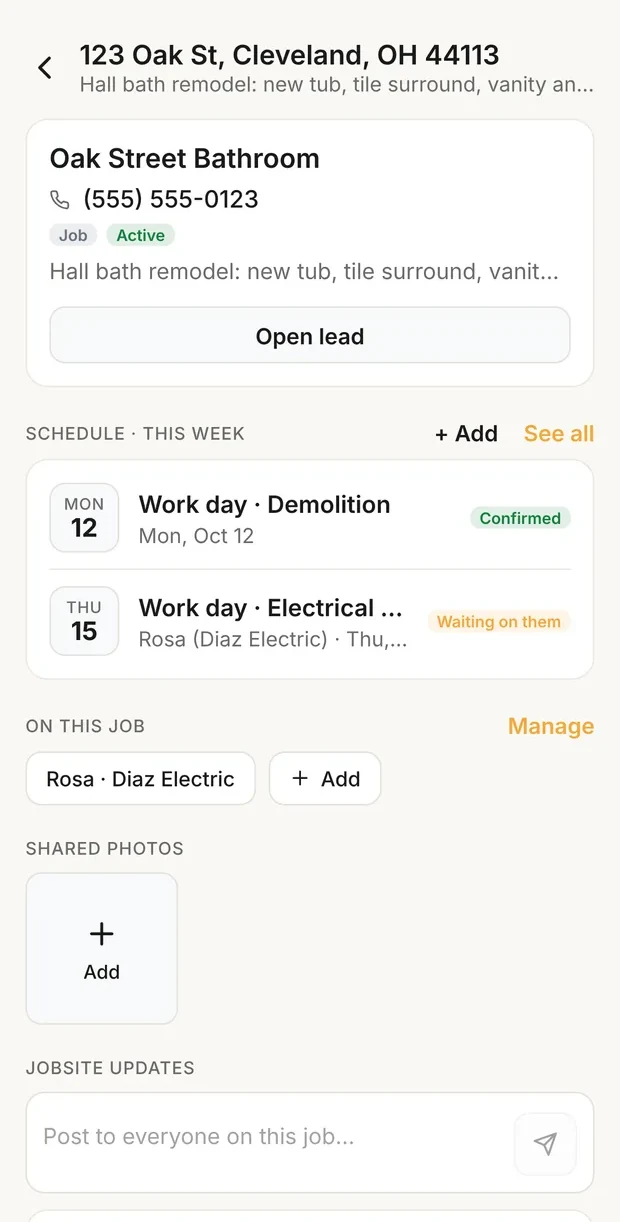
Your job screen
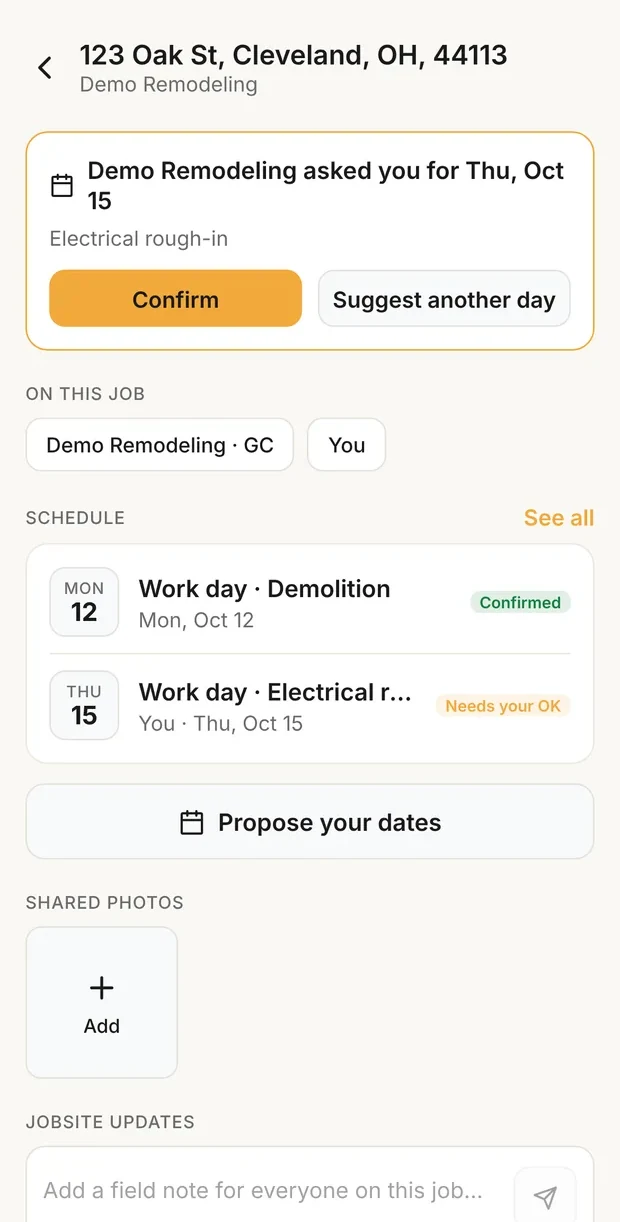
What the sub sees
The ask from step 3 in Clamp: the job screen shows the electrical rough-in Waiting on them, and the sub sees it with Confirm and Suggest another day. Demo data.
That post does more than an angry one would. It records what was confirmed, what happened, who was told, and what it moved. It doesn't decide who owes whom; the subcontract and the facts do that.
Illustration only. These dates show the sequence and the communication, not normal trade durations or inspection waits.
| Day | Item | Who | Status |
|---|---|---|---|
| Mon, Oct 12 | Demolition | Crew | Confirmed |
| Tue, Oct 13 | Plumbing rough-in | Plumber | Asked, then confirmed |
| Tue, Oct 13 | Electrical rough-in | Electrician | Asked, then confirmed |
| Wed, Oct 14 | Rough-in inspection | Nobody (you booked it with the building department) | Confirmed, added once booked |
| Thu, Oct 15 | Close-up | Crew | Confirmed, if the inspection passes |
| Fri, Oct 16 | Tile | Tile sub | Proposed, waiting on the inspection and close-up |
Wednesday's inspection fails. Don't just push every date a day. Post the failed inspection and what has to be corrected, and add the corrective work to the schedule. Book a reinspection, and add it once it's booked. Move close-up back to proposed, and tell the tile sub their date is no longer agreed. Agree tile again only once the inspection passes and close-up is really ready.
| Day | Item | Status |
|---|---|---|
| Thu, Oct 15 | Corrections | Confirmed |
| Fri, Oct 16 | Reinspection | Added once the inspection is actually booked |
| Mon, Oct 19 | Close-up | Proposed until the reinspection passes |
| Tue, Oct 20 | Tile | Proposed until close-up is agreed |
No date counts until both sides have agreed to it in writing.
A date you set and a date someone agreed to look the same on a calendar. They aren't the same. Clamp keeps them apart: an unagreed date stays in Waiting on them or Needs your OK, and becomes Confirmed once the side that still needs to agree accepts it. Something you arrange yourself, like an inspection or a delivery, goes on the schedule only once it's booked. Book inspections and the trades that follow against agreed dates, and treat everything else as a proposal.
This is the owner's practice. It doesn't replace the subcontract: if the agreement says how dates are set or changed, follow it.
Decide these before the first sub joins a job.
| Decision | Options | This guide's practice |
|---|---|---|
| When a sub goes on the job | Every sub from day one; each when their part needs coordinating | Each when their part needs coordinating, and off when it's done. Their posts and photos stay. |
| Photos | Share most job photos; private, share what's needed | Private by default. Share the photos of the area each trade works in. |
| How far ahead to ask for dates | A fixed number of days; when the work is real enough to plan | No set number. Ask once the work is real enough to plan, before later trades depend on it. Trade availability, materials and inspections vary too much for one number. |
| Chasing an unconfirmed date | The app's email two days before; when it has to become a commitment | When the date has to become a commitment for what comes after it. The email is a safety net. |
| Texts and calls | Everything in the thread; call or text, then summarize | Urgent or private things can start by phone or text. Anything that affects the job, the schedule, a site condition or another trade gets a short summary in the thread. |
| What subs post | Everything in the thread; routine in the thread, urgent by phone | In the thread: done, delayed, a problem or hidden condition, short on materials, a date change. Phone first for safety, emergencies, or anything that stops work, then a summary in the thread. |
Hours, miles and receipts are logged in Workflow; see time on site and the mileage log. A change in scope, price or time becomes a change order, signed before the changed work. What you owe a sub is handled under the subcontract and the bills process: quotes, purchase orders, bills and payment. See How to Track What a Job Costs Before You Pay It. The posts and photos remain part of the job record after a sub is removed.
A dated, shared jobsite record can help later, because it keeps what was known, proposed, agreed and changed, and when people were told. Write it the way you'd want it read in a dispute: promptly, plainly and factually, without blame. This is the owner's practice. The jobsite thread isn't a daily log, and the record doesn't decide a dispute.
This is recordkeeping guidance, not legal advice: follow the notice requirements in your contract, and have your subcontract reviewed for your state.
What goes wrong coordinating crew and subs, and what to do instead.
| Mistake | What to do instead |
|---|---|
| Treating a proposed date as scheduled | Call it scheduled only once both sides have agreed. |
| Adding an inspection or delivery before it's booked | Add it once it's booked; Clamp shows it as Confirmed as soon as it's saved. |
| Putting every sub on every job from day one | Add each sub when their part needs coordinating. |
| Writing a sub's scope only in the thread | Keep the scope and specifications in the subcontract or purchase order; use the thread to coordinate. |
| Sharing every job photo | Keep photos private until someone needs them. |
| Moving a date without the affected person's OK | Propose the new date and get it agreed. |
| Letting a no-show disappear into phone calls | Call right away, then post what happened and the new proposal. |
| Arguing or blaming in the thread | Post facts, dates, what it affects and the next step. |
| Treating a field note as a go-ahead for extra work | Stop at the original scope; no changed work without a signed change order when the scope, price or time changes. |
| Waiting for the two-days-before email to chase | Follow up when later trades need the date to be firm. |
| Giving subs the customer's phone or email to work it out directly | Keep the customer's contact details private. |
| Posting a safety problem and waiting for someone to read it | Call the people affected now, then post what happened. |
| Expecting the schedule to move later items for you | When an earlier step fails, move the later items back to proposed by hand. |
| Settling payment in a jobsite post | Handle price, bills and payment under the subcontract and the bills process. |
What it means
Jobsites in Clamp
Jobsites is a window onto your jobs. On Teams, the owner or an admin adds crew to a job and invites subs by email. A sub joins free. They see the job's name, address and customer name, the people on it, its schedule, shared photos and the shared thread, and never your prices, documents, customer contact details or private notes. Photos stay private until you share them, and your lead notes reach the jobsite only when you choose Also post to jobsite. The shared schedule holds installs, deliveries, inspections and work days. An item for a sub or teammate starts as Waiting on them; they can confirm it or suggest another day, and a suggested date comes back to you as Proposed, for you to confirm or suggest back. A sub can also propose their own dates. Jobsites › Schedule shows every job's dates and flags clashes, and requests and follow-ups go out by email with one-tap Confirm links. Clamp doesn't pay subs, track their insurance or lien waivers, or link schedule items to each other.
Score your Operations system in the contractor business self-assessment, and see how to write and price a change order for what a field problem becomes when the contract changes.
Sources & provenance
- Markup & Profit: A Contractor's Guide, Revisited Michael C. Stone (book)
- Estimating Construction Profitably Michael C. Stone (book)
- How to Write and Price a Change Order Clamp Research