Contractor Foreman Alternatives for Small Residential Contractors (2026)
Contractor Foreman starts at $49 a month billed annually and lists 47 modules. Five alternatives for one to ten person residential crews that use less of it, priced by team size from each vendor's own pages, with where Contractor Foreman is still stronger.
By Clamp ResearchReviewed by Emmanuel ForgePublished Oct 15, 2026✓ Reviewed Oct 2026
Direct answer: Contractor Foreman Basic is $49 a month billed annually for one user, and month to month starts at Standard, $139 for up to three users. For a one to ten person residential crew that uses a fraction of its 47 modules, Clamp has change orders, purchase orders, job costing and mileage on every plan from $12.50 a month billed annually, and $83.33 for up to 10 people. BuildBook, JobTread, Houzz Pro and Projul start higher. Stay with Contractor Foreman if you need AIA billing, submittals, geofenced time cards or automatic QuickBooks sync.
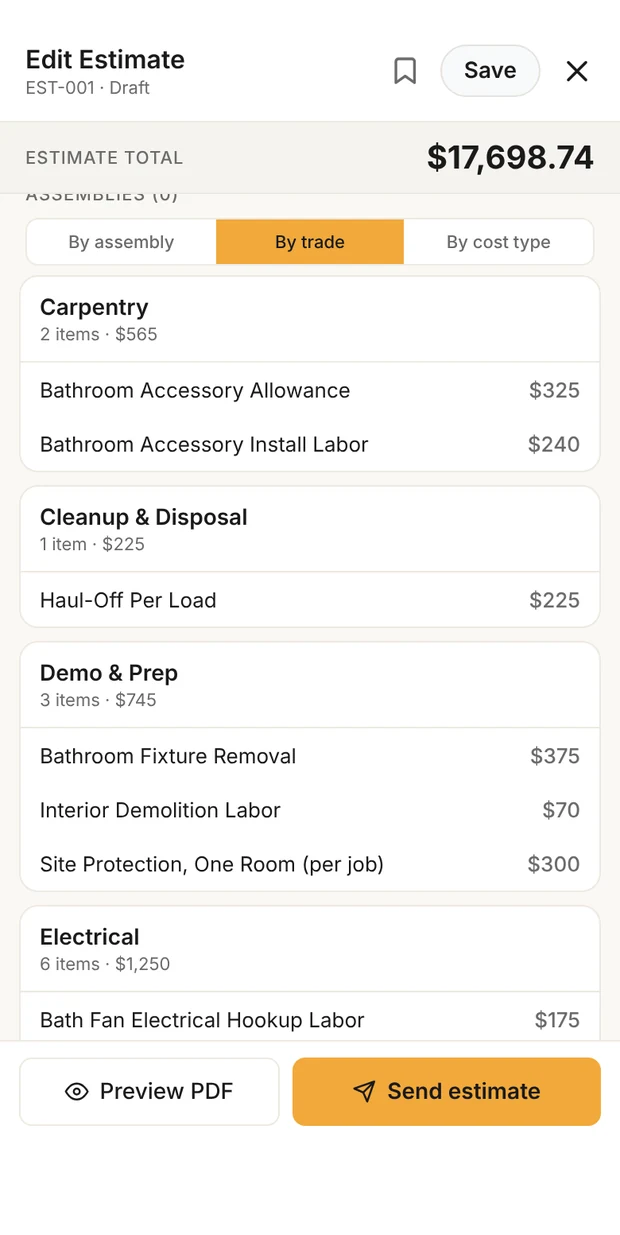
Estimate at cost, by trade
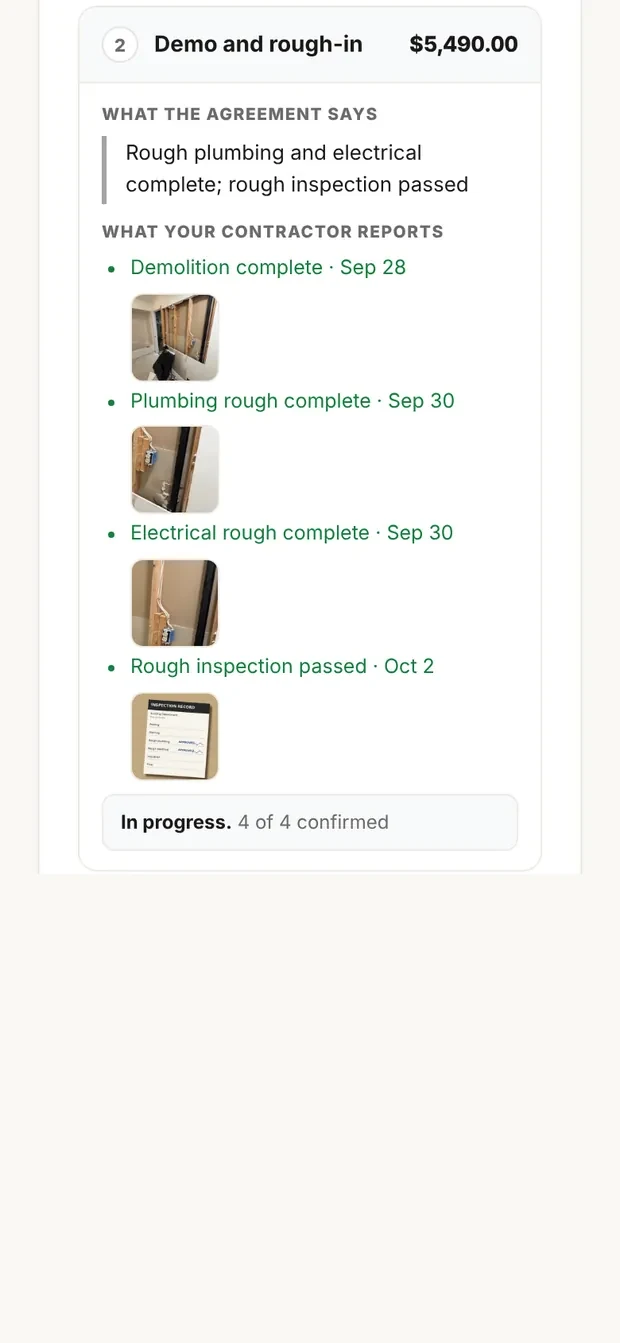
Milestones in the portal
Sample data. The estimate is built by trade at direct cost with the markup applied once, and the customer portal shows the milestones a client signs and pays against.
At a glance
Contractor Foreman is broad construction software at a low entry price: 47 modules, from permits and submittals to bid management, AIA billing and safety meetings. That breadth is the reason to buy it, and for a one to ten person residential crew it can also be the reason to leave. This list compares the alternatives on the work a small residential contractor actually does each week: estimates, change orders, purchase orders, invoices, job cost and the costs that leak, like mileage.
Every price and feature comes from each vendor's own pricing, feature or help pages, read on October 14, 2026. Where a page doesn't mention something, this list says 'not found on official pages' rather than 'can't'.
Every Clamp feature, next to each alternative
Solo includes 28 of Clamp's 44 features. In full, across their plans: Contractor Foreman 21, BuildBook 18, JobTread 25, Houzz Pro 26, Projul 23.
Compare Clamp with (pick one or more)
Clamp plan
Every Clamp feature, next to each alternative
Feature
Clamp
Contractor Foreman
BuildBook
JobTread
Houzz Pro
Projul
CRM and leads
3 of 5
0 of 5
0 of 5
0 of 5
0 of 5
3 of 5
Email remindersEmail reminders before appointments, follow-ups, and scheduled installs, deliveries, and inspections.
✓ Assistant and TeamsAssistant, $41.67 a month billed annually
PartlyPlan not stated. Crew schedule texts and emails; expiration reminders
Invoices and leadsInvoice and lead reminders, not appointments
PartlyFollow-ups on unsigned estimates and unpaid invoices; task emails
PartlyDocument and payment reminders; work reminders to assignees
✓ Plan not statedClient reminders; crew get push alerts
Customer appointment remindersHomeowners get an email before an appointment, with confirm and reschedule built in.
✓ Assistant and TeamsAssistant, $41.67 a month billed annually
Not foundReminders go to crews, not clients
Not foundNotifications article did not load
Not foundGeneral notifications only
PartlyBooking confirmation and calendar invite; no reminder stated
✓ Plan not stated24-hour email; how clients confirm or reschedule not described
Five-factor lead scoringA clear yes, no, or maybe on a lead before driving out.
✓ Every planSolo, $12.50 a month billed annually
Not foundLead stages and sources; custom fields only
Lead analysisProperty data on each lead; no yes or no score
Not foundLead forms and pipeline only
Not foundScreening questionnaire, no score
Not foundManual qualification stage
Lead reportingClose rate, revenue won, open pipeline, close rate by lead source, and lost leads by reason, on Home and the stats screen, with CSV and PDF export. Revenue by source does not exist; see _excluded.
✓ Every planSolo, $12.50 a month billed annually
PartlyPlan not stated. Lead stats by source, stage and timing; no close rate
Pipeline by stageNo reports described
PartlyCustom reports, Leads by Source; close rate not stated
PartlyLead Insights; no lost reasons or export stated
✓ Lead reportsClose rate and revenue by source, lost reasons; plan not stated
Daily briefingOverdue invoices, detected trips, follow-ups, appointments, and open proposals in one morning view.
✓ Every planSolo, $12.50 a month billed annually
PartlyPlan not stated. Dashboard of widgets you pick
Not foundPro Dashboard article not read
PartlyCustom KPI dashboards
PartlyHomepage: projects, leads, schedule, tasks
Not foundOn-demand AI questions on Pro only
Estimating
7 of 7
2 of 7
2 of 7
3 of 7
3 of 7
2 of 7
Design agreementsPaid preconstruction sits in the document chain, so planning work is paid work.
✓ Every planSolo, $12.50 a month billed annually
Not foundDocument Writer contracts and warranties
Not found
Not foundContract language on estimates
PartlyRetainers for design time
Not found
Itemized estimatesAssembly-based estimates with quantities and rates the contractor can inspect line by line.
✓ Every planSolo, $12.50 a month billed annually
✓ IncludedPlan not stated. Estimates; 1build pricing not on Basic or Standard
✓ Every planEstimating
✓ IncludedBudgets from a cost catalog, takeoff quantities
✓ Every planEstimates with assemblies
✓ Starter, $199Line items and assemblies
Estimate templatesSave an estimate as a template for work done often.
✓ Every planSolo, $12.50 a month billed annually
✓ IncludedPlan not stated. Estimate templates (KB title only)
✓ Every planPrice book; reusable line items
✓ IncludedBudget and job templates
✓ IncludedTemplate Center; plan not stated
✓ Starter, $199Save any estimate as a template
Proposals with multiple package tiersGood, better, best packages in one proposal.
✓ Every planSolo, $12.50 a month billed annually
PartlyPlan not stated. Optional items, selections and options (KB titles only)
Not foundPayment milestones, no package tiers
✓ IncludedGood, better, best options
Not foundPick items from selections only
Pro, $1,199Selections inside one estimate; one estimate per lead
AI estimating from a plain-language job descriptionDescribe the job in plain words and get an itemized draft: assemblies, quantities, researched baseline rates, with the contractor's own saved rates taking over once set.
✓ Every planSolo, $12.50 a month billed annually
Not foundAI assistant for takeoffs only
Not foundLead analysis only
PartlyAI Estimating drafts budgets; input not described
✓ IncludedHouzz AI; Gemini pricing, own rates not stated
Pro, $1,199Drafts from your templates through your own ChatGPT, Claude or Gemini
Remodel and new-home estimatingOne estimator covers remodels and new homes and detects which one a description is. Detect is the default job type; a contractor can pick Remodel or New home per estimate, or set Kind of work to Remodeling to turn the choice off.
✓ Every planSolo, $12.50 a month billed annually
Not foundResidential and commercial templates; no job-type detection
Not foundNo job-type detection
Not foundNo job-type detection
Not foundNo job-type detection
Not foundNo job-type detection
Labor hours on estimatesEstimated labor hours, shown as a range, on every labor line, with an allowance for setup, cleanup, and material runs (15% by default) the contractor can change in Settings or per estimate. A planning figure; it never appears on proposals, PDFs, or the portal.
✓ Every planSolo, $12.50 a month billed annually
Not foundLabor pricing in the cost database; no hour ranges
Not found
Not foundNot stated on estimating pages
Not foundMaterial and labor items, no hours
PartlyLabor hours in assemblies at a crew rate; no range or allowance
Contracts and invoicing
5 of 5
3 of 5
3 of 5
5 of 5
5 of 5
3 of 5
Payment schedulesSplit a proposal into a deposit, milestone payments, and a final payment, then invoice each one from the signed contract.
✓ Every planSolo, $12.50 a month billed annually
✓ IncludedPlan not stated. Schedule of values and progress invoicing; deposits not stated
✓ Every planProposal payment milestones; percentage billing
✓ IncludedPayment schedules, progress billing
✓ IncludedDeposit and scheduled payments on estimates
✓ Core+, $599Progress billing by milestone or percentage
Sales tax on documentsAdd a sales tax rate or a flat amount to invoices and other documents, with collected tax totaled by quarter and year. The contractor enters the rate; Clamp does not look rates up.
✓ Every planSolo, $12.50 a month billed annually
PartlyPlan not stated. Tax rates by location; no tax report found
Tax per lineOn estimates and change orders; no tax report described
✓ IncludedTax rate or fixed amount; no tax report found
✓ IncludedTax rates; Sales Tax Liability report
PartlyTax rate on estimates and invoices; no tax report found
Customer credits and refundsApply a customer's credit to an open invoice, record a refund, or adjust a balance, with the history kept on the job. Recorded only; Clamp moves no money.
✓ Every planSolo, $12.50 a month billed annually
Not foundKB credit article did not load; offline payments recorded
Not found
✓ IncludedLog credits and refunds (2023 update)
✓ IncludedCredit memos, retainers; refunds recorded only
PartlyRefunds of Projul card and ACH payments only; no credits
Change orders that update the contractScope changes get written up and tied to the original contract, so verbal changes stop costing money.
✓ Every planSolo, $12.50 a month billed annually
✓ IncludedPlan not stated. Contract amount updates on approval
✓ Every planApproved by email or in the dashboard
✓ IncludedFrom the budget, approved by link
✓ Pro, $199E-signed, invoice the difference
✓ Core, $399E-signed; updates the budget, contract update not stated
Invoices tied to the contractEvery invoice belongs to the contract or change order it bills.
✓ Every planSolo, $12.50 a month billed annually
✓ IncludedPlan not stated. Progress, AIA and time and material invoices
✓ Every planFrom the budget
✓ IncludedTurned from estimates
✓ Every planConverted from the estimate
✓ Starter, $199Created from the estimate
Customer portal
0 of 6
2 of 6
1 of 6
4 of 6
4 of 6
4 of 6
Password-free customer portalThe homeowner opens a link. No account, no password, no app to install.
✓ Assistant and TeamsAssistant, $41.67 a month billed annually
PartlyPlan not stated. Client Portal per contact; no-account access stated only for estimate links
Client dashboardNeeds a login; change order links open without one
✓ Customer portalOpens from the email link; password for app or payments
✓ Client DashboardOpen by link; links expire after a year
✓ Core+, $599Feature page: no account or password; help center: link plus login instructions
Unlimited documents and photos shared to the portalShare job documents and photos to the customer portal without a count cap, subject to per-item size limits.
✓ Assistant and TeamsAssistant, $41.67 a month billed annually
✓ IncludedPlan not stated. Pick files and photos to share; limits not stated
Files and logsNo photos tab; photos arrive in comments
✓ IncludedUnlimited documents and files
✓ IncludedPublish files, folders and photos; no cap stated
✓ Core+, $599Documents and photos; no limit stated
E-signing on the homeowner's phoneDocuments get signed on the homeowner's own phone, no account required.
✓ Assistant and TeamsAssistant, $41.67 a month billed annually
✓ IncludedPlan not stated. Estimates by link, no account; change orders
Electronic approvalsSignature step not described
✓ IncludedSign and approve in the portal
✓ Pro, $199Contracts signed from any device
✓ Core, $399Email or text link, no account
Several signers on one documentSend one document to up to five people, each signing their own line, see who has signed, and remind anyone who has not.
✓ Assistant and TeamsAssistant, $41.67 a month billed annually
Not foundCourtesy copies on estimate approvals only
Not found
Not foundOne signer described
Pro, $199Fields for clients and team; no signer tracking stated
Not found
Project updates and decisions in the portalPost project updates to the customer's portal and ask the customer to make a decision, which they answer from their phone.
✓ Assistant and TeamsAssistant, $41.67 a month billed annually
PartlyPlan not stated. Approvals of estimates, change orders, RFIs and submittals
✓ Every planUpdates, chat and selection approvals
✓ IncludedMessages and e-signed selections
✓ IncludedProject updates; selection approvals
✓ Core+, $599Messages and updates; selection decisions on Pro
Not delivered email handlingWhen a customer email Clamp sends bounces, the document is marked Not delivered so the contractor can fix the address and resend, or copy the link to text it.
✓ Assistant and TeamsAssistant, $41.67 a month billed annually
Not foundKB troubleshooting article only; body did not load
Not found
Not found
Not found
Not foundShows sent and opened only
Expense tracking
5 of 5
3 of 5
2 of 5
3 of 5
2 of 5
1 of 5
Automatic GPS mileage trackingBackground trip detection, route maps, IRS rates, trips linked to the job that caused the drive.
✓ Every planSolo, $12.50 a month billed annually
Not foundVehicle logs record mileage for maintenance
Not found
Not foundNot on pricing or mobile pages
Not found
Not foundGPS location while clocked in only
Automatic time on siteGPS geofence tracking of hours at the jobsite.
✓ Every planSolo, $12.50 a month billed annually
PartlyPlan not stated. GPS and geofenced time cards; automatic clock-in not stated
Not found
Not foundManual clock-in with location on a map
PartlyPrompt to clock in within 150 m; user confirms
Pro, $1,199Geofence checks a tapped clock-in
Receipts and expenses on the jobReceipts logged against the job they belong to.
✓ Every planSolo, $12.50 a month billed annually
✓ IncludedPlan not stated. Expenses; receipt photos not stated
✓ Every planReceipt attached to an expense; photo capture not stated
✓ IncludedAI receipt scanning
✓ IncludedAI receipt scan into project expenses
Core+, $599Expenses on the budget; receipt capture not described
Purchase ordersCommitted costs captured between the estimate and the receipt.
✓ Every planSolo, $12.50 a month billed annually
✓ IncludedPlan not stated. One-click bill from a PO
Not found
✓ IncludedPOs and work orders
✓ IncludedFrom estimates or selections, per vendor
✓ Pro, $1,199
Accounts payable and vendor billsVendor bills tracked and surfaced in the attention flows, with first-class vendor records.
✓ Every planSolo, $12.50 a month billed annually
✓ IncludedPlan not stated. Bills tied to POs and subcontracts
✓ Every planVendor invoices tied to budget lines
✓ IncludedBill approval, reconciled with POs
PartlyBilled POs sync to QuickBooks; no bill tracking described
Pro, $1,199Vendor profiles; supplier invoice matched to PO; no AP
Job costing and reports
3 of 3
2 of 3
1 of 3
1 of 3
2 of 3
2 of 3
Job costingWhat the job actually cost, with a variance and catalog learning loop.
✓ Every planSolo, $12.50 a month billed annually
✓ IncludedPlan not stated. Original and revised budgets; job costing reports
✓ Every planBudget from the won estimate
✓ IncludedBudget vs actual, variance
✓ Pro, $199Budget vs. approved estimate
✓ Core+, $599Estimate against actual
Accountant export packageA package of the business's records prepared for an accountant.
✓ IncludedPlan not stated. Custom roles, four access levels per feature
✓ Team, $149Five roles; Help says a Free plan is owner only, pricing shows none
✓ IncludedCustom roles
✓ Three rolesAdmin, Field Crew, Finance; editable
✓ Permission profilesView, add, edit, delete per feature; plan not stated
Unlimited subcontractor linkingSubs share jobsite photos and notes into the business account without consuming a seat.
✓ TeamsTeams, $83.33 a month billed annually
Not foundSub project access exists; seat use not stated
✓ Every planUnlimited subs invited per project
✓ Free, unlimitedSub and vendor portals
✓ Free sub linkNo login or seat; daily logs need an account
Core+, $599Unlimited sub profiles; help center says subs cannot log in
Jobsites tab: jobs and schedule in one placeA Jobsites tab with Jobs and Schedule views. With Assistant each job has its own screen with its schedule, photos, and updates, and the Schedule view holds every install, delivery, inspection, appointment, and follow-up; Teams adds the crew and subs on each job, shaped by role. Subs invited to a job use it free and see their own jobs grouped by builder.
✓ Assistant and TeamsAssistant, $41.67 a month billed annually
✓ IncludedPlan not stated. Projects
✓ Every planUnlimited projects
✓ IncludedUnlimited jobs
✓ IncludedProjects
✓ Starter, $199Projects with schedule, photos and files
Job scheduleSchedule installs, deliveries, and inspections on each job, with the contractor, a supplier, or nobody yet on each item, and see them all in the Jobsites tab. Putting crew or subs on an item is the Teams shared schedule.
✓ Assistant and TeamsAssistant, $41.67 a month billed annually
✓ IncludedPlan not stated. Gantt scheduling per project
✓ Every planGantt with dependencies
✓ IncludedCalendar, Gantt and list
✓ Pro, $199Gantt, calendar and list
✓ Starter, $199Tasks; Gantt from Core+
Shared job scheduleOne schedule for the business: installs, deliveries, and inspections visible to the team, with clash notes when dates collide.
✓ TeamsTeams, $83.33 a month billed annually
✓ IncludedPlan not stated. Gantt and crew schedule; no clash alerts found
✓ Every planGantt shared with collaborators and clients
✓ IncludedTasks to multiple people, calendar sync
✓ Pro, $199Conflicts spotted by eye in multi-project view
Punch listsThe small final items that close a job out, tracked per job and shareable as a text message or a PDF.
✓ Every planSolo, $12.50 a month billed annually
✓ IncludedPlan not stated. Punchlists, sent as PDF
✓ Every planDedicated punch lists as tasks; print
PartlyTasks and to-dos
✓ IncludedPunchlist; client dashboard, PDF export
PartlyTask steps; printable, not shared as text or PDF
Job site photosPhotos saved to the project with full-screen viewing.
✓ Every planSolo, $12.50 a month billed annually
✓ IncludedPlan not stated. Files and Photos, with markup
Every planPhotos in comments, tasks and logs; no photo tab
✓ IncludedFiles, photos and video; daily logs
✓ IncludedFiles & Photos, daily logs
✓ Photo captureTags, galleries, markup; plan not stated
Backup and offline
3 of 5
2 of 5
2 of 5
2 of 5
2 of 5
2 of 5
Full job workflow, offlineLeads, design agreements, estimates, proposals, change orders, and invoices on the phone, working without a connection.
✓ Every planSolo, $12.50 a month billed annually
Not foundOffline use not stated
Not foundNot stated on the pages
Not foundOffline not stated
PartlyView-only; notes, photos and scans offline
PartlyPhotos queue on a weak signal; nothing else stated
Cloud backupBusiness data backed up to the cloud and restorable on a new device.
✓ Assistant and TeamsAssistant, $41.67 a month billed annually
✓ Cloud softwareWeb and mobile app
✓ Cloud software
✓ Cloud software
✓ Cloud software
✓ Cloud software
Business portal: read-only web viewA read-only view of the business in a browser.
✓ Assistant and TeamsAssistant, $41.67 a month billed annually
✓ Web app
✓ Web appPro Dashboard
✓ Web app
✓ Web app
✓ Web app
Device backup, restore, CSV export, bulk importLocal backup and restore with CSV export and bulk import.
✓ Every planSolo, $12.50 a month billed annually
PartlyCSV import and export of some records
Not found
PartlyCSV export of tables, data imports
PartlyContact import; report CSV exports only
PartlyCSV export and import; no backup or restore
No account required to startThe app opens to local use; an account is needed only for server features or subscribing.
✓ Every planSolo, $12.50 a month billed annually
Not foundStarts from a 30-day trial on the plans page
Not found10-day trial, no card; account needed
Not foundStarts from a paid subscription
Not foundStarts from a Houzz Pro sign-up
Not foundStarts from a Projul signup
Only in Contractor Foreman
Where Contractor Foreman is ahead
Plan takeoffs
Not in Clamp
✓ Measure plans and link quantities to estimates
Bid management and subcontracts
Not in Clamp
✓ Vendor bid invites, convert to a PO or subcontract
AIA G702 and G703 billing with retainage
Payment schedules, no AIA forms
✓ Schedule of values and retention tracking
Two-way QuickBooks sync
Accountant export package
✓ QuickBooks Online and Desktop
Gantt scheduling
Shared job schedule, no Gantt
✓ Dependencies, critical path, baselines
Built-in payments and client financing
Your own payment link
✓ Stripe card and ACH; SweetPay financing
Only in BuildBook
Where BuildBook is ahead
Client selections with allowances
Decisions in the portal (Assistant)
✓ Every plan; actual cost against the allowance
Gantt scheduling with dependencies
Whole-day schedule, no Gantt
✓ Every plan; iCal sync
Private client chat per project
Not in Clamp
✓ Every plan
Daily logs shared with clients
Project updates (Assistant)
✓ Every plan
Lead enrichment with property data
Five-factor lead score
✓ Homeowner, parcel and property data
Price book with cost codes
Saved rates and templates
✓ Every plan
Only in JobTread
Where JobTread is ahead
On-screen takeoff from plans
Not in Clamp
✓ Synced to the budget
Sub and vendor bids, POs and work orders e-signed by subs
Purchase orders, no sub bidding
✓ Free sub and vendor portals
Two-way QuickBooks Online sync
Accountant export package
✓ Included
Built-in online payments
Your own payment link
✓ Card, ACH, Apple Pay, Google Pay
Gantt scheduling with calendar sync
Not in Clamp
✓ Google, Outlook, iCal
Custom reports and KPI dashboards
Fixed lead and job reports
✓ Included
Only in Houzz Pro
Where Houzz Pro is ahead
Houzz marketplace leads and ads
Not in Clamp
✓ Subscription leads; ads from $499 a month
3D floor plans and room scans
Not in Clamp
✓ Free plan and up
Plan takeoff
Not in Clamp
✓ Pro, $199
Built-in card and ACH payments
Your own payment link
✓ Design, $99
Selections, mood boards and product clipper
Not in Clamp
✓ Design, $99
Only in Projul
Where Projul is ahead
Gantt schedules with dependencies and critical path
Not in Clamp
✓ Core+, $599
Built-in card and ACH payments
Your own payment link
✓ Core, $399
Lead capture form and lead source ROI reports
Not in Clamp
✓ Form from Core
QuickBooks Online and Desktop sync
Accountant export package
✓ Online Core+, Desktop Pro
Field takeoffs, daily logs and Spanish app
Not in Clamp
✓ Pro, $1,199
Live map of clocked-in crew
Not in Clamp
✓ GPS on Pro
Nothing here matches. Pick All or another filter.
Competitor columns from each vendor's own pricing page, feature pages and help center, checked October 14, 2026. Not found means not on those pages, not that the product can't do it another way. Partly means something narrower than the Clamp feature. No product was tested against another.
Why small contractors look past Contractor Foreman
Contractor Foreman Basic is $49 a month billed annually ($588 a year) for one user and is not sold month to month. Standard is $105 billed annually or $139 monthly for up to 3 users, Plus $166 or $199 for up to 8, Pro $221 or $279 for up to 15, and Unlimited $332 or $399. There is a 30-day free trial. Its feature pages say plans include unlimited users with no per-user charges, which the pricing page's user bands do not match.
Contractor Foreman lists 47 modules, including permits, submittals, inspections, safety meetings, bid management and sub-contracts, that a small residential crew may never need.
Basic is sold on annual billing only; month to month starts at Standard, $139 a month for up to 3 users.
The pricing page's plan-by-feature check marks could not be read as text, so which plan includes the client portal, change orders and job costing is not stated here.
Its vehicle logs record mileage for maintenance; GPS trip detection, job-linked trips and the IRS rate were not found on official pages.
5 Contractor Foreman alternatives
In order of fit for a one to ten person residential crew that bought more administration than it uses. Each entry says where it is stronger, not only where it falls short.
1ClampBest for one to ten person residential crews running the job from a phone
Price
Solo $19.99 a month or $149.99 a year ($12.50 a month billed annually). Assistant $49.99 or $499.99. Teams $99.99 a month or $999.99 a year for up to 10 accounts. Solo is free for the first month on monthly billing.
Team
One account on Solo and Assistant; up to 10 on Teams, plus unlimited free sub invites who never see your prices.
Where it is stronger
The whole residential job in one record, first call to final invoice: lead score, design agreement, estimate at direct cost with your markup applied once, proposal, change orders, invoices and payment schedule.
Change orders, purchase orders, vendor bills, job costing, receipts and punch lists on every plan, including Solo. A purchase order counts as committed, not as cost, until the bill arrives.
Mileage and time on site detected automatically and costed to the job, on every plan.
A customer portal with e-signatures and email reminders from Assistant, $41.67 a month billed annually.
Teams covers up to 10 people plus unlimited free sub invites, who never see your prices, for $99.99 a month.
Where it falls short for a small residential contractor
No Gantt chart and no plan takeoff; the shared schedule is whole days, on Teams.
No AIA forms, submittals, permits or bid management, and no geofenced time clock.
Not accounting software and no QuickBooks sync; an accountant export package of CSV files instead.
Clamp does not process payments; you add your own payment link and record what was paid.
2BuildBookBest for custom builders and remodelers who want every feature on the entry plan and a strong client side
Price
Solo $79 a month billed annually or $99 monthly for one user; Team $149 billed annually; Business from $279 or $249 billed annually. The pricing page's two plan tables disagree on Team and Business user caps and monthly prices.
Team
Extra users $20 a month; unlimited projects, clients and subs on every plan.
Where it is stronger
Every feature on every plan, so a one-person shop gets the same tools as a crew.
Change orders with line items, markup and tax, approved by email or from a link without a client login.
Gantt scheduling with dependencies and iCal sync, published to clients by link.
Client selections with allowances and actual cost against each allowance.
Where it falls short for a small residential contractor
Purchase orders, crew time tracking and a business mileage log: not found on official pages.
QuickBooks Online only, pushed one way from BuildBook.
A signature step and online card or ACH payment are not described; approvals are electronic and invoices go out by email, link or PDF.
3JobTreadBest for crews that estimate from plans and want free sub, vendor and customer portals
Price
$199 a month with one internal user; $20 a month per extra internal user ($16 billed annually) for users 2 to 10; 20% off billed annually; no contract or setup fees.
Team
Internal users are paid; vendors, subs and customers are free and unlimited.
Where it is stronger
On-screen takeoff on calibrated plans, synced to the budget.
Sub and vendor bids converted to purchase orders and work orders that subs e-sign.
Two-way QuickBooks Online sync.
Card, ACH, Apple Pay and Google Pay on invoices, with payment schedules.
Where it falls short for a small residential contractor
$199 a month before adding anyone, $159.20 billed annually (calculated).
The mobile app is a web app saved to the home screen, not an App Store or Google Play download.
Time tracking is a manual clock-in with the location on a map; a business mileage log was not found on official pages.
4Houzz ProBest for design-led remodelers who want Houzz marketplace leads and 3D plans
Price
Free basic plan; Design $99 a month and Pro $199 a month, one user each; Teams from $399 a month with unlimited users. Most plans are 12-month contracts.
Team
Extra users $50 a month; subs work through a personalized link with no login or payment.
Where it is stronger
Homeowner leads from the Houzz marketplace and targeted ads, on subscription pricing.
3D floor plans from room scans and 2D plans, on the free plan and up.
AI estimates from a text or voice description of the project.
A clock-in prompt when you are within 150 m of a job site.
Where it falls short for a small residential contractor
Most plans are 12-month contracts that cannot be cancelled early; non-renewal needs 30 days notice.
Change orders, contracts, the project schedule and job costing start on Pro, $199 a month.
QuickBooks Online sync runs one way, from Houzz Pro; a business mileage log was not found on official pages.
5ProjulBest for growing crews that want flat team pricing and can budget for the upper tiers
Price
Starter $199 a month billed annually or $249 monthly, up to 3 users. Core $399 or $529, up to 10. Core+ $599 or $799, up to 20. Pro $1,199 or $1,599, unlimited.
Team
Flat price per plan with a user cap and no per-user fee; subcontractor profiles are schedule placeholders and cannot log in.
Where it is stronger
No per-user fees within a plan.
Estimates and change orders signed from an email or text link, with no app or account.
Lead reports on close rate, revenue and cost per acquisition by source, with lost reasons.
From Core+, a Gantt with dependencies and critical path, plus a heat map of overbooked crews and subs.
Where it falls short for a small residential contractor
Change orders start on Core ($399 a month billed annually); job costing, the client portal and QuickBooks Online on Core+ ($599); purchase orders and geofencing on Pro ($1,199).
A free trial is not stated on the pricing page.
Business mileage log: not found on official pages.
What each costs by team size
What the whole business pays each month for one person, a three-person crew and ten people.
Monthly cost by team size
Software
1 person
3 people
10 people
Clamp
$12.50 billed annually ($19.99 monthly), Solo
$83.33 billed annually ($99.99 monthly), Teams
$83.33 billed annually ($99.99 monthly), Teams
Contractor Foreman
$49 billed annually, Basic (annual only; month to month starts at Standard, $139)
$105 billed annually ($139 monthly), Standard (up to 3)
$221 billed annually ($279 monthly), Pro (up to 15)
BuildBook
$79 billed annually ($99 monthly), Solo
$149 billed annually ($186 or $179 monthly; the page's tables disagree), Team
From $279 billed annually, Business (10+ users) on one table; from $249 for 6 to 8 users plus $20 per extra user on the other
Per month for the whole business, from each vendor's own pricing page read 2026-10-14. Billed annually where the vendor offers it, with the monthly-billing price in parentheses where published; 'calculated' figures add the vendor's per-user price or apply its stated annual discount. Contractor Foreman's feature pages also say plans include unlimited users with no per-user charges; ask which applies. The plans compared are not equivalent: check what each includes before you compare totals.
When to stay with Contractor Foreman
You bill AIA-style, with G702 and G703 forms, a schedule of values and retainage.
You track submittals, RFIs, permits and inspections, and clients approve submittals in the portal.
You need GPS-verified, geofenced crew time cards with automatic breaks that roll into job costing.
You want two-way sync with QuickBooks Online or QuickBooks Desktop, plus a Gusto time card export.
You schedule on a Gantt chart with critical path and baselines.
How to choose
List the Contractor Foreman modules you opened last month. If it is estimates, change orders, purchase orders, invoices and time, you are paying for the rest.
Write down what each job needed: change orders, purchase orders, progress invoices, crew hours, mileage.
Price your actual team size on each vendor's current pricing page, including anyone who only needs field access.
Check the contract terms before the features: annual billing, renewal dates and how to cancel.
Run one real job through a trial from first call to final invoice before you move your records.
Keep your current software until the trial job closes cleanly.
Before you switch
Export your projects, estimates, invoices, change orders, purchase orders and client list before you cancel.
Check your renewal date; Basic and other annual plans renew at the published annual price.
If you depend on QuickBooks sync, AIA billing or geofenced time cards, decide how you will handle them before you switch.
Finish open jobs and open purchase orders where they started, and start new jobs in the new software.
If clients pay through Contractor Foreman's portal today, set up your payment link first.
How this list was made
Published by Clamp, which is one of the options listed. Clamp's own facts come from its pricing page, method guide, bills guide and accountant export guide.
Competitor prices and features come only from each vendor's own pricing, feature or help pages, read on October 14, 2026. Prices change; check the vendor's page before you buy.
Where a vendor's own pages disagree, as Contractor Foreman's pages do on user limits and BuildBook's pricing tables do, both figures are shown.
'Not found on official pages' means exactly that. It does not mean the product cannot do it another way.
No product was tested against another. No speed or accuracy claim is made.
Small residential contractor here means one to ten people doing residential project work: remodeling, specialty trades and small builds.
Questions
How much does Contractor Foreman cost for one person, three people and ten?
Contractor Foreman Basic is $49 a month billed annually, $588 a year, for one user, and is not sold month to month. Three people fit Standard at $105 billed annually or $139 monthly. Ten people need Pro, $221 billed annually or $279 monthly for up to 15 users. Its feature pages also say plans include unlimited users, so ask which limit applies.
What is a simpler Contractor Foreman alternative for a small residential crew?
Clamp covers the residential job from first call to final invoice, with change orders, purchase orders, job costing and mileage on every plan from $12.50 a month billed annually, and $83.33 for up to 10 people. BuildBook is $79 a month billed annually for one user with every feature on every plan, but purchase orders and crew time tracking were not found on its official pages.
Does Clamp have purchase orders like Contractor Foreman?
Yes. Clamp has purchase orders on every plan, including Solo: a purchase order records what is committed, the vendor bill becomes job cost when the goods or work arrive, and the payment reduces what you owe. Contractor Foreman also turns a purchase order into a bill with one click. Clamp does not pay vendors or sync bills to QuickBooks, and it has no bid management or sub-contract documents.
When is Contractor Foreman the better choice?
When the work needs AIA G702 and G703 billing with retainage, submittals and RFIs, GPS-verified geofenced time cards, or two-way sync with QuickBooks Online or Desktop. Contractor Foreman documents all four, and no Clamp plan replaces them.
Which Contractor Foreman alternatives sync with QuickBooks?
JobTread syncs both ways with QuickBooks Online. BuildBook pushes invoices, bills and expenses one way into QuickBooks Online, and Houzz Pro syncs one way from Houzz Pro. Projul adds QuickBooks Online on Core+, $599 a month billed annually, and Desktop on Pro. Clamp has no sync; it builds an accountant export of CSV files from payments, receipts, bills and mileage.
Does Contractor Foreman track business mileage?
Contractor Foreman's equipment and vehicle logs record mileage and hours so maintenance follows real use. GPS trip detection, trips tied to a job and the IRS rate were not found on its official pages. Clamp detects trips automatically on every plan, and each trip is confirmed before it counts and carries the IRS rate.