Compare software · alternatives

Job Costing Apps for Small Contractors: Clamp, busybusy, Workyard, QuickBooks and Alternatives

Six apps that say job costing, compared on what they actually cost against the estimate: labor only, labor and purchases, or the whole job, and which plan you have to be on to get it.

Direct answer: Clamp job costs receipts, vendor bills, time on site and labor against the estimate on every plan, from $12.50 a month billed annually. QuickBooks Online puts job costing on Plus at $140 a month list and Knowify on Advanced at $329 or $399; Contractor Foreman starts at $49 billed annually. busybusy (free) and Workyard (from $6 a user) cost labor only. Pick QuickBooks or Knowify when you need accounting behind the numbers.

At a glance

Job costing compares what a job is costing with what you said it would cost, while the job is still running. Six apps on this page say they do it. They do not mean the same thing. Two of them cost labor hours from a crew time clock and nothing else. Two are accounting products, or sit on top of QuickBooks, and put job costing on a higher tier. One is a full project management suite. One carries receipts, vendor bills, time on site and labor against the estimate on every plan, and is not accounting software.

Clamp publishes this comparison and is one of the six. Every competitor price and feature comes from that vendor's own pricing, feature or help pages, read October 14, 2026. No product was tested against another, so this page makes no accuracy or speed claim, and it does not rank the six.

Job costing, feature by feature

FeatureClampbusybusyWorkyardQuickBooks OnlineKnowifyContractor Foreman
Price and where job costing starts
Lowest plan with job costingSolo, $19.99 a month or $149.99 a year ($12.50 a month billed annually)Free, $0, labor only; budgets by cost code on Pro, $9.99 per user a month billed annually plus a $40 admin licensePro, labor cost by project and cost code; price not published. Plans start at $6 per user a month billed annuallyPlus, $140 a month list, 5 users; 50% off for 3 months promo on the pageAdvanced, $329 or $399 a month (the page does not label which is annual), 10 usersPlans from $49 a month billed annually, 1 user; which plans include job costing is not shown in the plan matrix as read
Users1 on Solo and Assistant; up to 10 on Teams, plus free sub invitesUnlimited on Free; per user on Pro and PremiumPer user; no minimum stated5 on Plus; 25 on Advanced1 on Core, 10 on Advanced; $29 a month per extra user1 on Basic, 3 on Standard, 8 on Plus, 15 on Pro, unlimited on Unlimited
BillingMonthly or annual; Solo free for the first month on monthlyMonthly or annual ('get 2 free months'); 14-day trialAnnual price published; monthly 'also available' with no rate; 14-day trialMonthly, no annual contract; 30-day trial; annual price not publishedYearly and monthly toggles, prices unlabeled; free trialAnnual with a 30-day trial; monthly from Standard at $139; Basic is annual only
What gets costed against the estimate
The budget is the estimateYes: the estimate linked to the signed proposal, changed only by a signed change orderLabor budgets by project and cost code on Pro; no estimatingOver and under budget by job; no estimatingEstimates assigned to a project; estimate versus actuals stated for AdvancedCosts tracked against the project budget in real timeReal-time job costing on projects; change orders update the contract and feed it
ReceiptsEvery plan; each receipt tied to the estimate line it was bought for, with its imageShared as photos and notes; not described as job cost'Receipts & Job Coding' listed under expense cards; not described on the cost tracking pageSnap photos of receipts and tag expenses to a job, on Plus and AdvancedExpenses logged in Knowify or QuickBooks; receipt photos not describedNot found on official pages; expenses sync with QuickBooks
Vendor bills and purchase ordersEvery plan; PO is committed, bill is cost when received, payment is neitherNot found on official pagesNot found on official pagesBills, checks and expenses assigned to a projectPOs from the project budget with committed costs; bills paid in Knowify or QuickBooksPOs that generate bills when materials arrive
Labor hours by jobEvery plan; who, date, job, role, hours; auto-detected site visits confirmed by the personGPS clock in by job, all plans; estimated vs current labor cost on ProHours per job and cost code on every time card; labor cost auto-calculated on ProTimesheets to a project with hourly cost rates per employeeClock in and out linked to job and phase, with fully loaded labor burdenTime cards tied to projects and cost codes feed job costing
GPS and geofencingAuto-detected site visits and mileage; not a geofenced crew clockGPS breadcrumbing, geofence-required clock in, location remindersPrecise GPS on Starter; arrival detection on Pro; automatic clock in on AutopilotNot in QuickBooks Online itself; QuickBooks Time is a separate productLocation at clock in and out, optional geofence, no tracking during the dayGPS verification and geofencing on time cards
Mileage by jobAuto mileage on every plan, trips attached to jobsMileage logged in progress trackingMileage and travel time on Starter; driving assigned to the arrival project on ProNot found on the pages readNot found on official pagesNot found on official pages
Before and after the job cost
Estimate at cost with markupEvery plan; direct cost with markup applied once, shown apartNo estimating describedNo estimating describedEstimates; cost versus price and markup not described on the pages readNot on the job costing page read; see the Knowify comparisonBulk and line-item markups with a 1build cost database
Change ordersEvery plan; only a change order moves the budgetNot found on official pagesNot found on official pagesNot found on the pages readNot on the job costing page readYes; approved change orders update the contract amount
InvoicesEvery plan, with a payment scheduleNo invoicing describedHours and mileage fed to 'your invoicing processes'Yes, assigned to the projectInvoices sync with QuickBooksProgress invoices with retainage and AIA G702/G703
AccountingNot accounting software: no ledger, payroll, bank feeds or tax filingIntegrates with QuickBooks, Sage, Foundation, ADP, Paychex and othersTimesheets sent to your accounting system by job and cost codeIs the accounting softwareTwo-way sync with QuickBooks Online, Payroll and TimeTwo-way sync with QuickBooks Online and Desktop

From each vendor's own pricing, feature and help pages, read October 14, 2026. 'Not found on official pages' means exactly that; the product may do it another way. Plan names show where a feature starts. Clamp publishes this page.

What they all do, and what each one actually costs against

All six report what a job is costing by job. They differ on what counts: labor hours from a time clock, labor plus purchases, or the whole job against a signed estimate. They also differ on which plan you need to be on to see it, and on whether the app keeps your books or expects QuickBooks beside it.

Six job costing apps

Not a ranking. Each entry says what the product is best for, where it is stronger and where it falls short, from its own pages.

ClampBest for a residential contractor of 1 to 10 who wants receipts, bills, time and mileage costed against the signed estimate on a phone, with the books kept elsewhere

Price
Solo $19.99 a month or $149.99 a year ($12.50 a month billed annually), free for the first month on monthly billing. Assistant $49.99 or $499.99 ($41.67) adds the customer portal, e-signatures and email reminders. Teams $99.99 or $999.99 ($83.33) for up to 10 accounts. Job costing is on every plan.
Team
One account on Solo and Assistant; up to 10 on Teams, plus unlimited free sub invites who never see your prices.

Where it is stronger

  • The budget is the estimate linked to the signed proposal, and only a signed change order moves it, so the job cost report answers whether the price was right.
  • A receipt is tied to the estimate line it was bought for, so the line shows estimated against actual while the job runs, not at closeout.
  • Purchase orders, vendor bills and payments are kept apart: committed, cost and paid, with each purchase counted once.
  • Time on site and mileage are recorded by job, with auto-detected visits and drives confirmed by the person, and land in the same job cost as the receipts.
  • The same app writes the estimate at direct cost with markup, the proposal, change orders and invoices, so nothing is re-keyed into a second tool to job cost it.
  • Teams is one price for up to 10 accounts, $83.33 a month billed annually, with no per-user or admin fee.
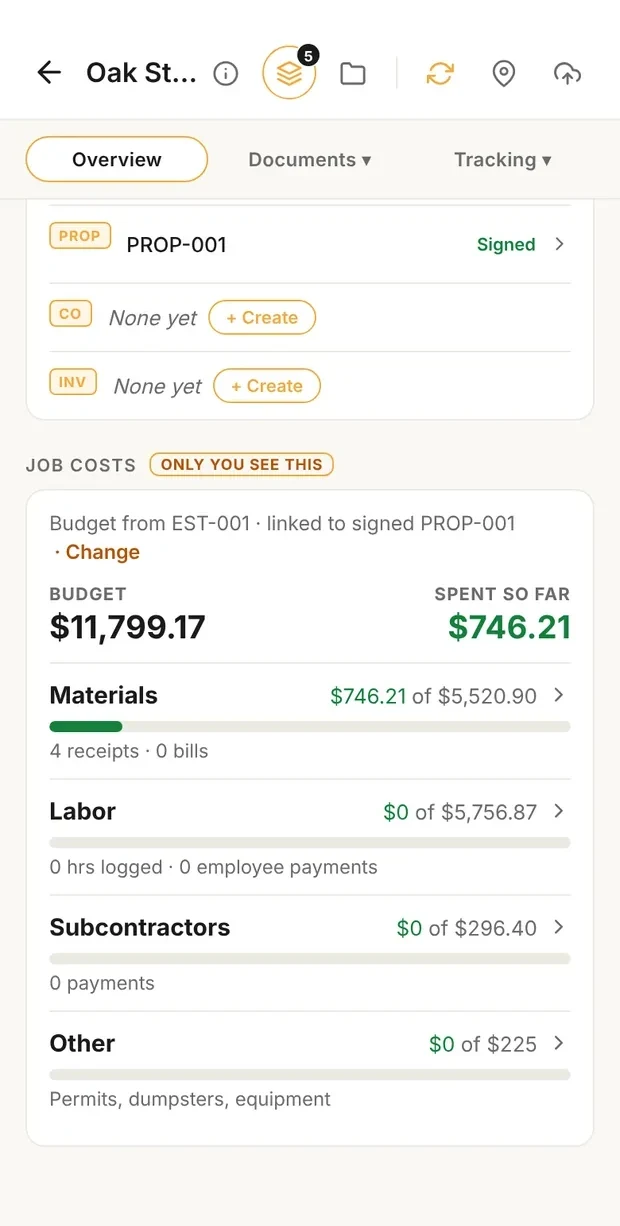
Clamp's job costs card for the Oak Street Bathroom, only you see this: budget $11,799.17 from EST-001, linked to signed PROP-001; spent so far $746.21; materials $746.21 of $5,520.90 from 4 receipts, labor $0 of $5,756.87, subcontractors $0 of $296.40, other $0 of $225

Budget vs spent

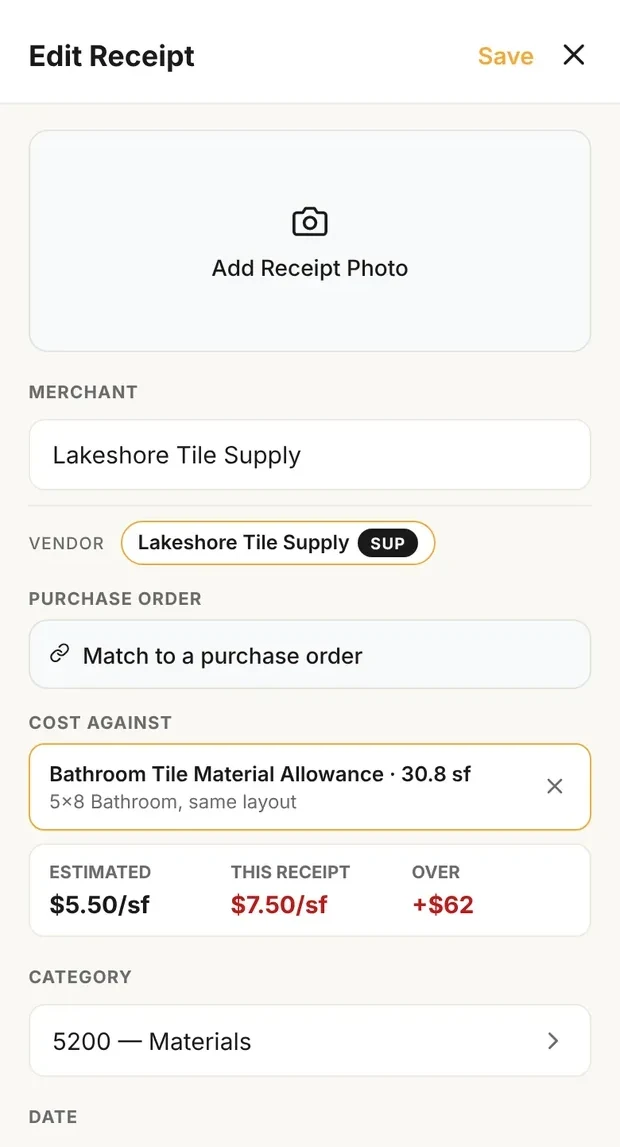
Clamp's Edit Receipt for Lakeshore Tile Supply: cost against Bathroom Tile Material Allowance, 30.8 sf, on the 5x8 bathroom estimate; estimated $5.50/sf, this receipt $7.50/sf, over +$62; category 5200 Materials

Receipt against its line

Job cost in Clamp: the budget is the signed estimate, and a receipt is costed against the line it was bought for. Sample data: the published 5x8 bathroom.

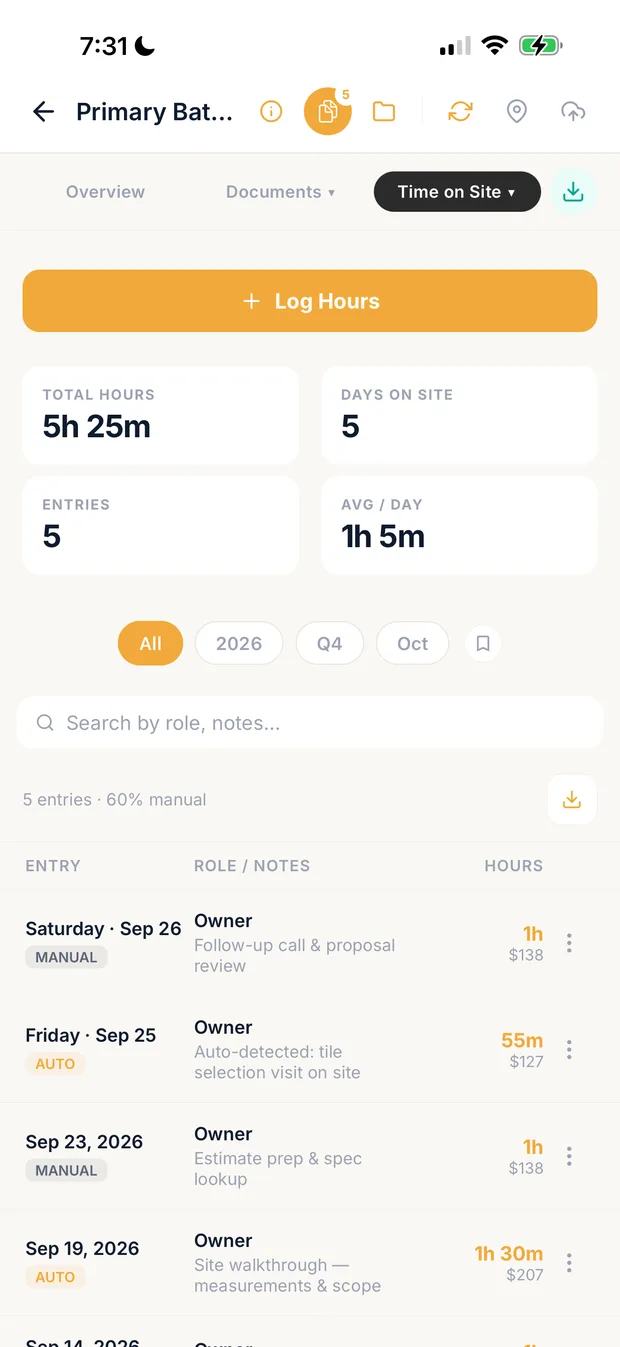
Clamp time on site screen with hours on the job by role

Hours by role

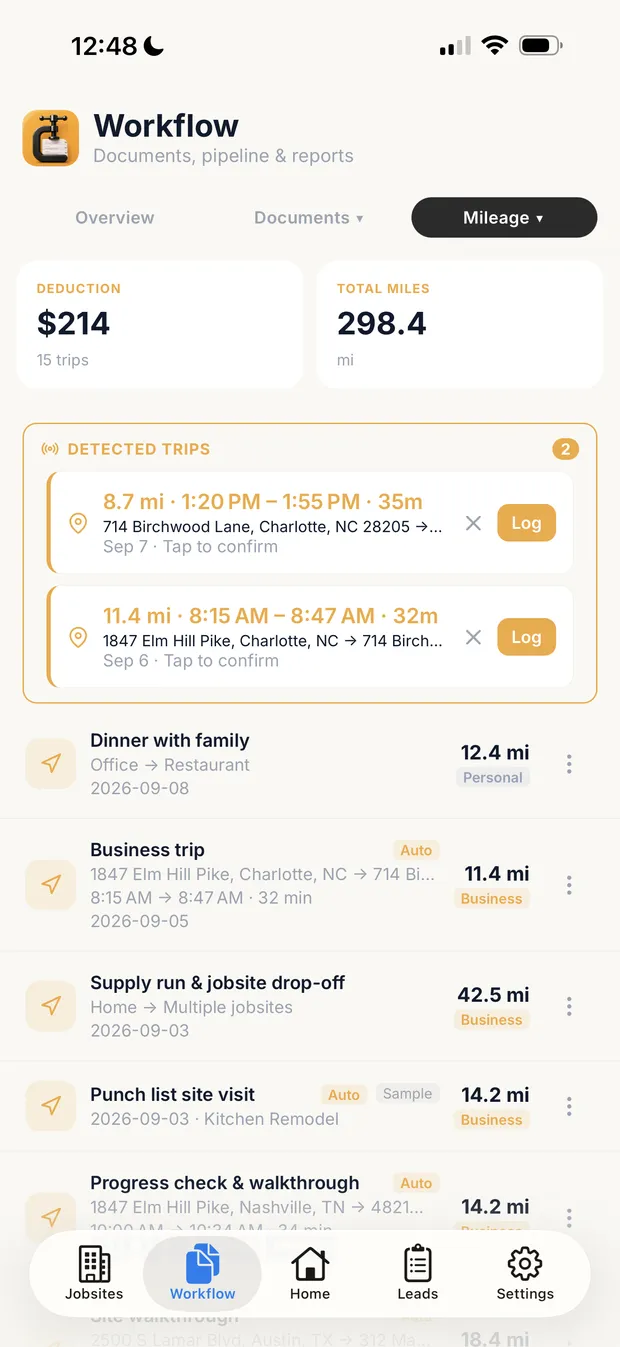
Clamp mileage screen with detected trips awaiting confirmation and logged trips attached to jobs

Trips by job

Labor and drives by job: hours on site by role, and detected trips attached to jobs. Sample data.

Where it falls short for a small residential contractor

  • Not accounting software: no general ledger, payroll, bank feeds or tax filing. You still need QuickBooks or another accounting tool for the books.
  • Not a GPS crew time clock with geofencing. Auto-detected site visits are presence, not labor, and a person confirms them.
  • Does not pay vendors, sync with QuickBooks, or track W-9s, 1099s, insurance certificates or lien waivers.
  • No plan takeoff, no AIA progress billing and no Gantt schedule.
  • The customer portal and e-signatures start on Assistant, not Solo.

How to job cost a project in Clamp →

busybusyBest for a crew that needs a free GPS time clock by job today, with labor budgets by cost code when it is ready to pay

Price
Free, $0, with GPS time tracking, job costing, equipment tracking and unlimited users. Pro $11.99 per user a month billed monthly or $9.99 billed annually. Premium $17.99 or $14.99. Pro and Premium add a $40 admin license, first user included. 14-day trial, no card.
Team
Unlimited users on Free; per user on Pro and Premium plus the admin license.

Where it is stronger

  • The only free plan here with GPS time tracking and job costing for unlimited users.
  • Geofence-required clock in, GPS breadcrumbing and location reminders to clock in on arrival and out on departure.
  • Budgets by project and cost code on Pro, with charts of estimated against current labor cost and hours.
  • Equipment hours, equipment GPS and which machine is on which site, which none of the others here describe.
  • Integrations named for QuickBooks, Procore, Sage, Viewpoint, Foundation, ADP and Paychex.

Where it falls short for a small residential contractor

  • Labor and equipment only. Receipts are shared as photos and notes, and vendor bills, materials cost against an estimate, estimating, change orders and invoicing are not described on its pages.
  • Budgets by cost code and the comparison of estimated against actual labor start on Pro, not Free.
  • Paid plans add a $40 admin license on top of the per-user price; a 3-person crew on Pro is $59.98 to $69.97 a month billed annually depending on whether the admin counts as one of the users (calculated).
  • Daily project reports are an add-on on Pro and included on Premium.

WorkyardBest for a crew owner who wants payroll-grade GPS timesheets and labor cost by project and cost code, and keeps materials elsewhere

Price
'Plans start at $6 per user / month, billed annually.' Monthly billing is available with no rate shown. Pro, which has labor cost by project and cost code, and Autopilot and Enterprise have no published price. 14-day trial, no card.
Team
Per user; no minimum or base fee stated on the pricing page.

Where it is stronger

  • Hours per job and cost code on every time card, with labor cost auto-calculated on every clock out on Pro.
  • GPS arrival detection on Pro and automatic clock in on Autopilot, with driving assigned to the arrival project.
  • Reports that group and pivot job cost by employee, period and cost code, and show 'where you are over and underestimating'.
  • Timesheets sent to your accounting system by job and cost code, and the lowest published per-user entry price here.

Where it falls short for a small residential contractor

  • Labor only on the cost tracking page: materials, vendor bills and a budget-versus-actual report are not described there. Receipts appear under an expense card feature.
  • The $6 start is Starter, which the page does not show with project labor cost; the Pro price is not published.
  • No estimating, change orders or customer-facing documents are described; hours and mileage feed 'your invoicing processes' elsewhere.
  • Monthly billing exists but its rate is not on the page.

QuickBooks OnlineBest for a contractor who wants job cost reports inside the same product as the books, payroll and the accountant

Price
Plus $140 a month list, 5 users, 'Track project profitability'. Advanced $340, 25 users, with estimate versus actuals on the project dashboard. Simple Start $38 and Essentials $85 do not list project profitability. Each paid plan shows 50% off for 3 months; 30-day trial; no annual contract; annual pricing not published.
Team
5 users on Plus, 25 on Advanced.

Where it is stronger

  • Estimates, invoices, bills, checks, expenses and timesheets assigned to a project, with income, expenses and profit margin per project.
  • Labor cost from timesheets with an hourly cost rate per employee, or synced from QuickBooks Payroll.
  • Receipt photos tagged to a job, in the same place as the ledger, bank feeds and the accountant's access.
  • It is the accounting software, so there is no second tool to reconcile the job cost against.

Where it falls short for a small residential contractor

  • Job costing is a Plus and Advanced feature; the $38 and $85 plans do not have Projects.
  • The estimate versus actuals view is stated for Advanced, at $340 a month list.
  • Estimating at direct cost with markup, change orders and a customer portal are not described on the pages read.
  • GPS time tracking is a separate QuickBooks Time subscription, not part of QuickBooks Online.
  • The 50% off promo lasts 3 months; the list price is what you pay after.

KnowifyBest for a trade contractor on QuickBooks Online who wants a project budget with committed costs, fully loaded labor and progress billing

Price
Core shows $99 and $149 a month, 1 user, plus $29 a month per extra user; Advanced shows $329 and $399 a month, 10 users. The pricing page's yearly and monthly toggles do not label which price is which. Job costing, the client portal and cost-plus contracts are on Advanced, not Core. Free trial.
Team
1 user on Core, 10 on Advanced, $29 a month each beyond that.

Where it is stronger

  • Costs tracked against the project budget in real time, with purchase orders created from the budget and committed costs shown as they are placed.
  • Fully loaded labor burden, including insurance and benefits, not just wages.
  • Clock in and out linked to the job and phase, with location at clock in and out and an optional geofence.
  • Two-way sync with QuickBooks Online, Payroll and Time, so expenses and bills can be logged in either place.

Where it falls short for a small residential contractor

  • Job costing is not on Core; Advanced starts at $329 or $399 a month.
  • The pricing page shows two prices per plan without saying which is annual billing.
  • Receipt photos and mileage are not described on the job costing page.
  • The job costing page says QuickBooks Desktop needs the 'Unlimited' plan; the pricing page names no such plan, only Enterprise.

Contractor ForemanBest for a contractor who wants job costing inside a broad project management suite with AIA billing, scheduling and a client portal

Price
Billed annually: Basic $49 a month ($588 a year), 1 user; Standard $105 ($1,264), up to 3; Plus $166 ($1,997), up to 8; Pro $221 ($2,654), up to 15; Unlimited $332 ($3,984). Billed monthly: Basic not available; Standard $139; Plus $199; Pro $279; Unlimited $399. 30-day trial on annual; 100-day money-back guarantee on Plus and up.
Team
1 user on Basic, 3 on Standard, 8 on Plus, 15 on Pro, unlimited on Unlimited.

Where it is stronger

  • Real-time job costing on projects, with time cards tied to projects and cost codes that feed the reports.
  • Change orders that update the contract amount and flow into job costing, and purchase orders that generate bills when materials arrive.
  • GPS verification and geofencing on time cards.
  • Progress invoices with retainage and AIA G702/G703, and two-way QuickBooks Online and Desktop sync.
  • The cheapest published entry here with estimating, change orders and invoicing in one suite: $49 a month billed annually for one user.

Where it falls short for a small residential contractor

  • The plan comparison matrix on the pricing page did not show, as read, which plans include job costing, time cards, estimates, change orders, invoices or the client portal. Confirm the tier before you buy.
  • Basic is annual only; monthly billing starts at Standard, $139 a month.
  • A standalone receipt capture feature is not described on the features page; expenses are mentioned as items synced with QuickBooks.
  • Mileage by job is not found on the features page.

Every Clamp feature, tool by tool

Solo includes 28 of Clamp's 44 features. In full, across their plans: busybusy 4, Workyard 8, QuickBooks Online 13, Knowify 21, Contractor Foreman 21.

Clamp plan
Every Clamp feature, tool by tool
FeatureClampbusybusyWorkyardQuickBooks OnlineKnowifyContractor Foreman
CRM and leads3 of 50 of 50 of 50 of 50 of 50 of 5
Email remindersEmail reminders before appointments, follow-ups, and scheduled installs, deliveries, and inspections.✓ Assistant and TeamsAssistant, $41.67 a month billed annuallyNot foundClock in and out reminders to employees; email not statedNot foundClock-in reminders and schedule notifications; email not statedNot foundPartlyUnpaid invoice and service appointment reminders; app alerts for schedule changesPartlyPlan not stated. Crew schedule texts and emails; expiration reminders
Customer appointment remindersHomeowners get an email before an appointment, with confirm and reschedule built in.✓ Assistant and TeamsAssistant, $41.67 a month billed annuallyNot foundTime tracking only; no such feature describedNot foundTime tracking only; no such feature describedNot foundService work onlyAutomated reminders; confirm or reschedule not describedNot foundReminders go to crews, not clients
Five-factor lead scoringA clear yes, no, or maybe on a lead before driving out.✓ Every planSolo, $12.50 a month billed annuallyNot foundTime tracking only; no such feature describedNot foundTime tracking only; no such feature describedNot foundPlus lists Customer AI for leads; no score describedNot foundCRM pipeline stages onlyNot foundLead stages and sources; custom fields only
Lead reportingClose rate, revenue won, open pipeline, close rate by lead source, and lost leads by reason, on Home and the stats screen, with CSV and PDF export. Revenue by source does not exist; see _excluded.✓ Every planSolo, $12.50 a month billed annuallyNot foundTime tracking only; no such feature describedNot foundTime tracking only; no such feature describedNot foundNo close rate or lead source reports describedPartlyPipeline board and bid value; no close rate or source reportsPartlyPlan not stated. Lead stats by source, stage and timing; no close rate
Daily briefingOverdue invoices, detected trips, follow-ups, appointments, and open proposals in one morning view.✓ Every planSolo, $12.50 a month billed annuallyNot foundDaily project reports are field reports, not a briefing; PremiumNot foundNo morning summary describedNot foundDashboards on AdvancedPartlyDashboard: today's jobs and check-ins; no overdue invoicesPartlyPlan not stated. Dashboard of widgets you pick
Estimating7 of 70 of 70 of 71 of 72 of 72 of 7
Design agreementsPaid preconstruction sits in the document chain, so planning work is paid work.✓ Every planSolo, $12.50 a month billed annuallyNot foundTime tracking only; no such feature describedNot foundTime tracking only; no such feature describedNot foundContracts and a deposit on estimates onlyNot foundProposals carry termsNot foundDocument Writer contracts and warranties
Itemized estimatesAssembly-based estimates with quantities and rates the contractor can inspect line by line.✓ Every planSolo, $12.50 a month billed annuallyNot foundTime tracking only; no such feature describedNot foundTime tracking only; no such feature described✓ Simple Start and upLimited on Free✓ Every planBudget, then markup per line✓ IncludedPlan not stated. Estimates; 1build pricing not on Basic or Standard
Estimate templatesSave an estimate as a template for work done often.✓ Every planSolo, $12.50 a month billed annuallyNot foundTime tracking only; no such feature describedNot foundTime tracking only; no such feature describedNot foundNot stated on the estimates Help article✓ Every planBudget templates✓ IncludedPlan not stated. Estimate templates (KB title only)
Proposals with multiple package tiersGood, better, best packages in one proposal.✓ Every planSolo, $12.50 a month billed annuallyNot foundTime tracking only; no such feature describedNot foundTime tracking only; no such feature describedNot foundOne estimate, no package tiers describedWorkaroundOptions as $0 lines; client notes choices when signingPartlyPlan not stated. Optional items, selections and options (KB titles only)
AI estimating from a plain-language job descriptionDescribe the job in plain words and get an itemized draft: assemblies, quantities, researched baseline rates, with the contractor's own saved rates taking over once set.✓ Every planSolo, $12.50 a month billed annuallyNot foundTime tracking only; no such feature describedNot foundTime tracking only; no such feature describedNot foundAI listed is for books, tax and leadsNot found'Knowify AI' teased; no AI estimating describedNot foundAI assistant for takeoffs only
Remodel and new-home estimatingOne estimator covers remodels and new homes and detects which one a description is. Detect is the default job type; a contractor can pick Remodel or New home per estimate, or set Kind of work to Remodeling to turn the choice off.✓ Every planSolo, $12.50 a month billed annuallyNot foundTime tracking only; no such feature describedNot foundTime tracking only; no such feature describedNot foundNot foundNo job-type detectionNot foundResidential and commercial templates; no job-type detection
Labor hours on estimatesEstimated labor hours, shown as a range, on every labor line, with an allowance for setup, cleanup, and material runs (15% by default) the contractor can change in Settings or per estimate. A planning figure; it never appears on proposals, PDFs, or the portal.✓ Every planSolo, $12.50 a month billed annuallyNot foundBudgets compare estimated and actual labor cost; no hours on estimate linesNot foundOver/under budget insight by job; no hours on estimate linesNot foundLabor cost rates, not estimated hoursNot foundLabor priced in the budget; no hour ranges describedNot foundLabor pricing in the cost database; no hour ranges
Contracts and invoicing5 of 50 of 50 of 54 of 53 of 53 of 5
Payment schedulesSplit a proposal into a deposit, milestone payments, and a final payment, then invoice each one from the signed contract.✓ Every planSolo, $12.50 a month billed annuallyNot foundTime tracking only; no such feature describedNot foundTime tracking only; no such feature described✓ Simple Start and upProgress invoices by percent or line; online deposit✓ Every planProgress billing, AIA G702/G703✓ IncludedPlan not stated. Schedule of values and progress invoicing; deposits not stated
Sales tax on documentsAdd a sales tax rate or a flat amount to invoices and other documents, with collected tax totaled by quarter and year. The contractor enters the rate; Clamp does not look rates up.✓ Every planSolo, $12.50 a month billed annuallyNot foundTime tracking only; no such feature describedNot foundTime tracking only; no such feature described✓ Simple Start and upAutomatic tax on invoices and sales receiptsPartlyTax rates sync from QuickBooks; no tax report describedPartlyPlan not stated. Tax rates by location; no tax report found
Customer credits and refundsApply a customer's credit to an open invoice, record a refund, or adjust a balance, with the history kept on the job. Recorded only; Clamp moves no money.✓ Every planSolo, $12.50 a month billed annuallyNot foundTime tracking only; no such feature describedNot foundTime tracking only; no such feature described✓ Credit memosApplied to open invoices; plan not statedNot foundRetainage adjustments onlyNot foundKB credit article did not load; offline payments recorded
Change orders that update the contractScope changes get written up and tied to the original contract, so verbal changes stop costing money.✓ Every planSolo, $12.50 a month billed annuallyNot foundTime tracking only; no such feature describedNot foundTime tracking only; no such feature describedNot foundListed as a feature to look for, not described✓ Every planE-signed, feed the billing schedule✓ IncludedPlan not stated. Contract amount updates on approval
Invoices tied to the contractEvery invoice belongs to the contract or change order it bills.✓ Every planSolo, $12.50 a month billed annuallyNot foundTime tracking only; no such feature describedNot foundHours and mileage feed 'your invoicing processes'; no invoices in Workyard✓ Every planFree: 2 invoices a month✓ Every plan✓ IncludedPlan not stated. Progress, AIA and time and material invoices
Customer portal0 of 60 of 60 of 61 of 63 of 62 of 6
Password-free customer portalThe homeowner opens a link. No account, no password, no app to install.✓ Assistant and TeamsAssistant, $41.67 a month billed annuallyNot foundTime tracking only; no such feature describedNot foundTime tracking only; no such feature describedSimple Start and upEstimate link with sign and pay page; no job portal✓ Advanced, $329 or $399No-login link; portal page says from $99, pricing page says AdvancedPartlyPlan not stated. Client Portal per contact; no-account access stated only for estimate links
Unlimited documents and photos shared to the portalShare job documents and photos to the customer portal without a count cap, subject to per-item size limits.✓ Assistant and TeamsAssistant, $41.67 a month billed annuallyNot foundTime tracking only; no such feature describedNot foundTime tracking only; no such feature describedNot foundPhotos on estimates only✓ Advanced, $329 or $399Photos, invoice PDFs, shared files✓ IncludedPlan not stated. Pick files and photos to share; limits not stated
E-signing on the homeowner's phoneDocuments get signed on the homeowner's own phone, no account required.✓ Assistant and TeamsAssistant, $41.67 a month billed annuallyNot foundEmployees sign timecards only; no homeowner document signingNot foundSignature capture only in the Smart Forms add-on; no homeowner document signing✓ Simple Start and upTyped legal name✓ Every planBids and change orders✓ IncludedPlan not stated. Estimates by link, no account; change orders
Several signers on one documentSend one document to up to five people, each signing their own line, see who has signed, and remind anyone who has not.✓ Assistant and TeamsAssistant, $41.67 a month billed annuallyNot foundTime tracking only; no such feature describedNot foundTime tracking only; no such feature describedNoOne recipient signsNot foundNot foundCourtesy copies on estimate approvals only
Project updates and decisions in the portalPost project updates to the customer's portal and ask the customer to make a decision, which they answer from their phone.✓ Assistant and TeamsAssistant, $41.67 a month billed annuallyNot foundTime tracking only; no such feature describedNot foundTime tracking only; no such feature describedNot foundAdvanced, $329 or $399Optional project log; no decisionsPartlyPlan not stated. Approvals of estimates, change orders, RFIs and submittals
Not delivered email handlingWhen a customer email Clamp sends bounces, the document is marked Not delivered so the contractor can fix the address and resend, or copy the link to text it.✓ Assistant and TeamsAssistant, $41.67 a month billed annuallyNot foundTime tracking only; no such feature describedNot foundTime tracking only; no such feature describedNot foundNot foundNot foundKB troubleshooting article only; body did not load
Expense tracking5 of 50 of 53 of 53 of 53 of 53 of 5
Automatic GPS mileage trackingBackground trip detection, route maps, IRS rates, trips linked to the job that caused the drive.✓ Every planSolo, $12.50 a month billed annuallyLogged manuallyMileage listed in progress tracking; no automatic trip detection or IRS rate stated✓ ProDriving detection from Starter; Pro assigns driving to projects; IRS rate not stated on pages readApp tracks tripsPlan and IRS rate not stated; no job link describedNot foundFleet vehicle tracking add-on from $25 a vehicleNot foundVehicle logs record mileage for maintenance
Automatic time on siteGPS geofence tracking of hours at the jobsite.✓ Every planSolo, $12.50 a month billed annuallyGPS time clock, FreeGeofence-required clock in and arrival reminders; not automatic hours✓ AutopilotAutomatic clock in on geofence arrival; Pro has arrival detection and geofenced clock inWorkforce Elite, $134Separate QuickBooks Time productEvery planClock in with optional geofence; not detected automaticallyPartlyPlan not stated. GPS and geofenced time cards; automatic clock-in not stated
Receipts and expenses on the jobReceipts logged against the job they belong to.✓ Every planSolo, $12.50 a month billed annuallyProReceipts shared as photos and notes; not coded to job cost✓ ProStarter adds receipts to time cards; Pro codes project expenses to job and cost code✓ Plus, $140Receipt photo on an expense; expenses go to a project✓ Every planPurchases with receipt photo✓ IncludedPlan not stated. Expenses; receipt photos not stated
Purchase ordersCommitted costs captured between the estimate and the receipt.✓ Every planSolo, $12.50 a month billed annuallyNot foundTime tracking only; no such feature describedNot foundTime tracking only; no such feature described✓ Plus, $140Not stated for projects✓ Every planPurchases; POs from the budget✓ IncludedPlan not stated. One-click bill from a PO
Accounts payable and vendor billsVendor bills tracked and surfaced in the attention flows, with first-class vendor records.✓ Every planSolo, $12.50 a month billed annuallyNot foundTime tracking only; no such feature describedNot foundTime tracking only; no such feature described✓ Simple Start and upUnpaid tab; bill pay✓ Every planBills sync both ways with QuickBooks✓ IncludedPlan not stated. Bills tied to POs and subcontracts
Job costing and reports3 of 30 of 31 of 31 of 32 of 32 of 3
Job costingWhat the job actually cost, with a variance and catalog learning loop.✓ Every planSolo, $12.50 a month billed annuallyLabor only, FreeJob costing by project and cost code; budgets on Pro; no materials or estimateLabor, ProLabor cost by project and cost code; materials and estimate not described✓ Plus, $140Projects✓ Advanced, $329 or $399Feature page says from $99; pricing page lists Advanced only✓ IncludedPlan not stated. Original and revised budgets; job costing reports
Accountant export packageA package of the business's records prepared for an accountant.✓ Every planSolo, $12.50 a month billed annuallyIntegrationQuickBooks, Sage and others integrate; no export package or plan statedStarterPayroll export to QuickBooks and others, project sync on Pro; no records packageAccountant access2 accountants; Excel sync on AdvancedQuickBooks syncSync and Accountant's View, no export packageQuickBooks syncTwo-way, Online and Desktop
Time reporting with CSV exportReported labor time with a time-tracking CSV export for payroll preparation and per-person rate decomposition.✓ Every planSolo, $12.50 a month billed annuallyFree, limitedActivity reports exportable and printable; CSV confirmed for Progress only✓ StarterTimesheet reports and one-click payroll export; Excel labor cost reports on ProPlus, $140Timesheets by project; CSV export not stated✓ Every planTime, labor and payroll reports; export format not stated✓ IncludedPlan not stated. Time card reports; Gusto export
Jobsites and teams2 of 83 of 83 of 81 of 86 of 87 of 8
Teams: up to 10 linked accountsUp to 10 accounts, including the owner, sharing one business.✓ TeamsTeams, $83.33 a month billed annually✓ Free, unlimited usersPer-user pricing on Pro and Premium plus $40 admin license✓ Starter, per userPer user; no user cap stated✓ Essentials, $853, 5 or 25 users by plan✓ Priced per user1 user on Core, 10 on Advanced, $29 each extra✓ Standard, $105Up to 3 users; feature pages say unlimited users
Role-based permissionsFive roles: owner, admin, staff, contributor, viewer.✓ TeamsTeams, $83.33 a month billed annually✓ Free, default positionsOwner, Admin, Manager, Supervisor, Employee; custom positions on Pro✓ Every planWorker, Manager, Administrator; manager limits on ProAdvanced, $340Custom user permissions✓ Per-user permissionsAccess type plus module checkboxes; plan not stated✓ IncludedPlan not stated. Custom roles, four access levels per feature
Unlimited subcontractor linkingSubs share jobsite photos and notes into the business account without consuming a seat.✓ TeamsTeams, $83.33 a month billed annuallyNot foundTime tracking only; no such feature describedNot foundTime tracking only; no such feature describedNot foundW-9 requests and 1099 mapping onlyPaid seatsSubs who need the app are paid users; no guest accessNot foundSub project access exists; seat use not stated
Jobsites tab: jobs and schedule in one placeA Jobsites tab with Jobs and Schedule views. With Assistant each job has its own screen with its schedule, photos, and updates, and the Schedule view holds every install, delivery, inspection, appointment, and follow-up; Teams adds the crew and subs on each job, shaped by role. Subs invited to a job use it free and see their own jobs grouped by builder.✓ Assistant and TeamsAssistant, $41.67 a month billed annuallyProjects, schedule on ProProjects with GPS and schedules; no job screen with updatesProjects, ProProjects with tasks and a per-project dashboard; no job screen with updatesPlus, $140Projects track income and costs, not a schedule✓ Every planJobs, job board and calendars✓ IncludedPlan not stated. Projects
Job scheduleSchedule installs, deliveries, and inspections on each job, with the contractor, a supplier, or nobody yet on each item, and see them all in the Jobsites tab. Putting crew or subs on an item is the Teams shared schedule.✓ Assistant and TeamsAssistant, $41.67 a month billed annuallyProCrew schedules with notifications and location pin; not installs or deliveriesProOffice-to-field crew scheduling with notifications; not installs or deliveriesNot found✓ Every planGantt with dependencies✓ IncludedPlan not stated. Gantt scheduling per project
Shared job scheduleOne schedule for the business: installs, deliveries, and inspections visible to the team, with clash notes when dates collide.✓ TeamsTeams, $83.33 a month billed annuallyProSchedules visible by position; no clash notes describedProSortable team schedules; no clash notes describedNot found✓ Every planJob and resource boards, crew notifications✓ IncludedPlan not stated. Gantt and crew schedule; no clash alerts found
Punch listsThe small final items that close a job out, tracked per job and shareable as a text message or a PDF.✓ Every planSolo, $12.50 a month billed annuallyPremiumCustom checklists in field reports; not named punch listsProProject checklists; not named punch listsNot foundNot foundTasks and deficiency notes only✓ IncludedPlan not stated. Punchlists, sent as PDF
Job site photosPhotos saved to the project with full-screen viewing.✓ Every planSolo, $12.50 a month billed annually✓ ProGeo-stamped photos searchable by project; pricing table lists photos & notes on Pro while help article shows photo permissions on Free positions✓ ProProject photos on Pro; photos on time cards from StarterNot foundPhotos on estimates and receipts only✓ Mobile appPhotos uploaded to the job; plan not stated✓ IncludedPlan not stated. Files and Photos, with markup
Backup and offline3 of 51 of 51 of 52 of 52 of 52 of 5
Full job workflow, offlineLeads, design agreements, estimates, proposals, change orders, and invoices on the phone, working without a connection.✓ Every planSolo, $12.50 a month billed annuallyTime tracking onlyOffline time entries and GPS; no leads, estimates or invoicesClock in onlyOffline clock in, breaks and clock out; no leads, estimates or invoicesNot foundNot stated on official pagesPartlyTime check-in only; estimates and invoices not statedNot foundOffline use not stated
Cloud backupBusiness data backed up to the cloud and restorable on a new device.✓ Assistant and TeamsAssistant, $41.67 a month billed annuallyCloud storageTime data uploaded to the cloud; no backup or restore feature namedCloud syncTime and GPS uploaded on reconnect; no backup or restore feature named✓ Cloud softwareData lives in your account✓ Cloud software✓ Cloud softwareWeb and mobile app
Business portal: read-only web viewA read-only view of the business in a browser.✓ Assistant and TeamsAssistant, $41.67 a month billed annually✓ Web dashboardReports and who's working on the web; plan not stated✓ Web dashboardLive per-project dashboard on Pro; charts and map from Starter✓ Web appMobile app not on Free✓ Web appFull office web app✓ Web app
Device backup, restore, CSV export, bulk importLocal backup and restore with CSV export and bulk import.✓ Every planSolo, $12.50 a month billed annuallyNot foundTime tracking only; no such feature describedNot foundTime tracking only; no such feature describedNot foundNot stated on official pagesPartlySpreadsheet import only; no export or backup describedPartlyCSV import and export of some records
No account required to startThe app opens to local use; an account is needed only for server features or subscribing.✓ Every planSolo, $12.50 a month billed annuallyAccount requiredFree plan is created through Create My AccountNot foundNot stated on the pricing page; free trial offeredNot foundFree plan needs an account; no cardNot foundStarts from a 14-day trial accountNot foundStarts from a 30-day trial on the plans page

Where each one is ahead

  • busybusy: Free plan with GPS time tracking (Unlimited users, $0); Geofence-required clock in (Clock in only inside the geofence, with GPS breadcrumbing and arrival reminders); Equipment hours and GPS (Machine hours, equipment location and which site it is on); Safety and compliance (Injury reports, incidents, OSHA forms 300/300A/301, daily sign-in questions); Payroll integrations (ADP, Paychex, Sage, Foundation, Viewpoint, QuickBooks, Procore); Custom permission positions (Unlimited custom positions on Pro)
  • Workyard: Automatic clock in (Autopilot clocks crews in on geofence arrival); Geofenced crew time clock (Pro: unlimited geofences, clock in restricted to the site); Payroll export (One-click export to QuickBooks, ADP, Gusto and more, from Starter); ERP integrations (Sage, NetSuite, Foundation on Autopilot); Expense cards and spend controls (Cards with receipts and job coding, accounting sync); Smart Forms add-on (Forms with photo and signature capture, CSV/Excel export)
  • QuickBooks Online: Accounting: bank feeds, reconciliation, reports (Every plan, one bank on Free); Payroll (Add-on or bundle, from $6.50 per employee plus a base fee); Card and ACH payments on invoices (Cards 2.99%, ACH 1%); W-9 requests and 1099 mapping (Construction page; 1099 e-filing on Advanced); Bill pay by ACH (From Simple Start); Accountant seats (2 accountants, 3 on Advanced)
  • Knowify: Two-way QuickBooks Online sync (Every plan); AIA billing, retainage and WIP reports (Every plan; WIP with job costing); Gantt scheduling with dependencies and a resource board (Every plan); Service dispatch board (Service Pro add-on); Daily logs with automatic weather (Advanced); Built-in payments (Card and ACH via QuickBooks Payments)
  • Contractor Foreman: Plan takeoffs (Measure plans and link quantities to estimates); Bid management and subcontracts (Vendor bid invites, convert to a PO or subcontract); AIA G702 and G703 billing with retainage (Schedule of values and retention tracking); Two-way QuickBooks sync (QuickBooks Online and Desktop); Gantt scheduling (Dependencies, critical path, baselines); Built-in payments and client financing (Stripe card and ACH; SweetPay financing)

Competitor columns from each vendor's own pricing page, feature pages and help center, checked October 14, 2026. Not found means not on those pages, not that the product can't do it another way. Partly means something narrower than the Clamp feature. No product was tested against another.

Where each answer comes from

What job costing costs by team size

The lowest plan with job costing, as each vendor describes it, for 1, 3 and 10 people. Annual-billing rates where published; per-team totals are calculated from the vendor's per-user prices and marked so. Labor-only tools and whole-job tools sit in the same table and are not equivalent.

What job costing costs by team size
Software1 person3 people10 people
ClampSolo, $12.50 a month billed annually ($19.99 monthly)Teams, $83.33 a month billed annually ($99.99 monthly), up to 10 accountsTeams, $83.33 a month billed annually ($99.99 monthly)
busybusyFree, $0, labor only; Pro with budgets $49.99 a month billed annually ($9.99 plus $40 admin, calculated)Free, $0; Pro $59.98 to $69.97 a month billed annually, depending on whether the admin license counts as a user (calculated)Free, $0; Pro $129.91 to $139.90 a month billed annually (calculated)
WorkyardFrom $6 a month billed annually on Starter; Pro, with labor cost by project, not publishedFrom $18 a month billed annually on Starter (calculated); Pro not publishedFrom $60 a month billed annually on Starter (calculated); Pro not published
QuickBooks OnlinePlus, $140 a month list; annual price not publishedPlus, $140 a month list, 5 usersAdvanced, $340 a month list, 25 users, since Plus stops at 5
KnowifyAdvanced, $329 or $399 a month (unlabeled on the page), 10 users includedAdvanced, $329 or $399 a monthAdvanced, $329 or $399 a month, 10 users included
Contractor ForemanBasic, $49 a month billed annually ($588 a year); annual only. Job costing tier not confirmed on the pageStandard, $105 a month billed annually ($1,264 a year) or $139 monthly, up to 3 usersPro, $221 a month billed annually ($2,654 a year) or $279 monthly, up to 15 users, since Plus stops at 8

From each vendor's own pricing page, October 14, 2026. busybusy and Workyard cost labor only; QuickBooks Online is also your books; Knowify and Contractor Foreman bundle far more than job costing. Promo prices (QuickBooks 50% off for 3 months) are left out. Prices change; check the vendor's page before you buy.

How to test them on a real job

Questions to ask before you subscribe

  1. Does it cost labor only, or receipts, bills and subs too?
  2. Is the budget the estimate the customer signed, or a number you type in?
  3. Which plan has job costing, and how many users does that plan include?
  4. Is there a per-user, admin or base fee on top of the plan?
  5. Is it accounting software, does it sync with yours, or neither?
  6. Can a crew member log hours without seeing your prices?
  7. When the scope changes, does a change order move the budget?
  8. Can you export the job cost data if you leave?

Try it on a published Clamp job

How this comparison was made

Questions

How do I compare receipts, bills and labor with my original job estimate?

Use job-costing software that holds the estimate as the budget and assigns receipts, bills and labor to its lines or categories. Clamp does that on every plan; QuickBooks Online offers Projects on Plus, with the estimate-versus-actual dashboard on Advanced. Knowify puts job costing on Advanced, while busybusy and Workyard focus on the labor side.

Is busybusy free for tracking crew hours by job?

Yes. busybusy's free plan includes GPS time tracking and job costing for unlimited users, so you can record crew hours by job without a subscription. Cost-code budgets start on Pro at $9.99 per user a month billed annually, plus a $40 admin license with the first user included. Clamp Teams adds the wider residential job workflow but is not a geofenced crew time clock.

Can a job-costing app replace QuickBooks for my contracting business?

Usually not. Clamp, busybusy and Workyard do not provide a general ledger, payroll or tax filing, and Knowify and Contractor Foreman connect to QuickBooks Online rather than replacing it. QuickBooks Online itself covers accounting and project profitability on Plus, so whether you add a separate app depends on the job workflow you need, not on the books.

Does QuickBooks Simple Start include job costing, or do I need Plus?

QuickBooks Online Simple Start does not include Projects job costing; Plus, $140 a month at list price for five users, and Advanced, $340 a month for 25 users, do. QuickBooks places the project dashboard's estimate-versus-actual view on Advanced. That matters if you need more than each project's income, expenses and margin.

Do busybusy and Workyard replace a full contractor job-costing app?

No. busybusy and Workyard cover labor costing, while full job costing also counts materials, subcontractors and other costs against the estimate. A GPS time record shows where and when someone clocked in, not that the time was productive. Clamp, Knowify, Contractor Foreman and QuickBooks Plus also carry purchase costs; Clamp's detected site visits are confirmed by the person before they count.

Related

Sources & provenance

  1. busybusy features busybusy (official source)
  2. busybusy pricing busybusy (official source)
  3. Contractor Foreman features Contractor Foreman (official source)
  4. Contractor Foreman plans, annual tab Contractor Foreman (official source)
  5. Contractor Foreman plans, monthly tab Contractor Foreman (official source)
  6. 5x8 bathroom remodel: the published example job Clamp Research
  7. How to track vendor bills and purchase orders Clamp Research
  8. How to job cost a construction project Clamp Research
  9. The Clamp method Clamp Research
  10. Clamp plans and prices Clamp Research
  11. How to track receipts on a construction job Clamp Research
  12. How to track time on site Clamp Research
  13. Contractor time tracking: estimated against actual hours Clamp Research
  14. Knowify job costing software Knowify (official source)
  15. Knowify pricing Knowify (official source)
  16. Knowify construction time tracking Knowify (official source)
  17. QuickBooks for construction Intuit (official source)
  18. QuickBooks Online pricing Intuit (official source)
  19. Set up and create projects in QuickBooks Online Intuit (official source)
  20. Workyard construction cost tracking Workyard (official source)
  21. Workyard home page Workyard (official source)
  22. Workyard pricing Workyard (official source)
Changes: Oct 14, 2026: Initial draft. Six job costing apps compared from each vendor's own pricing, feature and help pages, read 2026-10-14: busybusy pricing and features; Workyard pricing, home and cost tracking; QuickBooks Online pricing, construction page and Projects help article; Knowify pricing, job costing and time tracking; Contractor Foreman annual and monthly plan tabs and features. Clamp facts owner-supplied. Direct answer rewritten price first (owner ruling 2026-10-14).; Oct 14, 2026: Published after owner approval; FAQ structured data on.