MileIQ is free for 40 drives a month. Eight alternatives compared on automatic detection, tying a trip to the job, report formats, free plan limits and price per driver, with where MileIQ is still stronger.
By Clamp ResearchReviewed by Emmanuel ForgePublished Oct 15, 2026✓ Reviewed Oct 2026
Direct answer: If mileage is all you need, stay with a mileage app: TripLog Basic and Everlance Basic are free, Hurdlr's free plan has unlimited semi-auto mileage, and MileIQ itself is free for 40 drives a month. Clamp costs more, from $12.50 a month billed annually, and fits when you want the drive on the same job as the estimate, change orders and invoice. For crews, MileIQ and TripLog charge $8 per driver a month; Clamp Teams is $99.99 a month for up to 10 people.
Detected, then confirmed
Rate by trip date
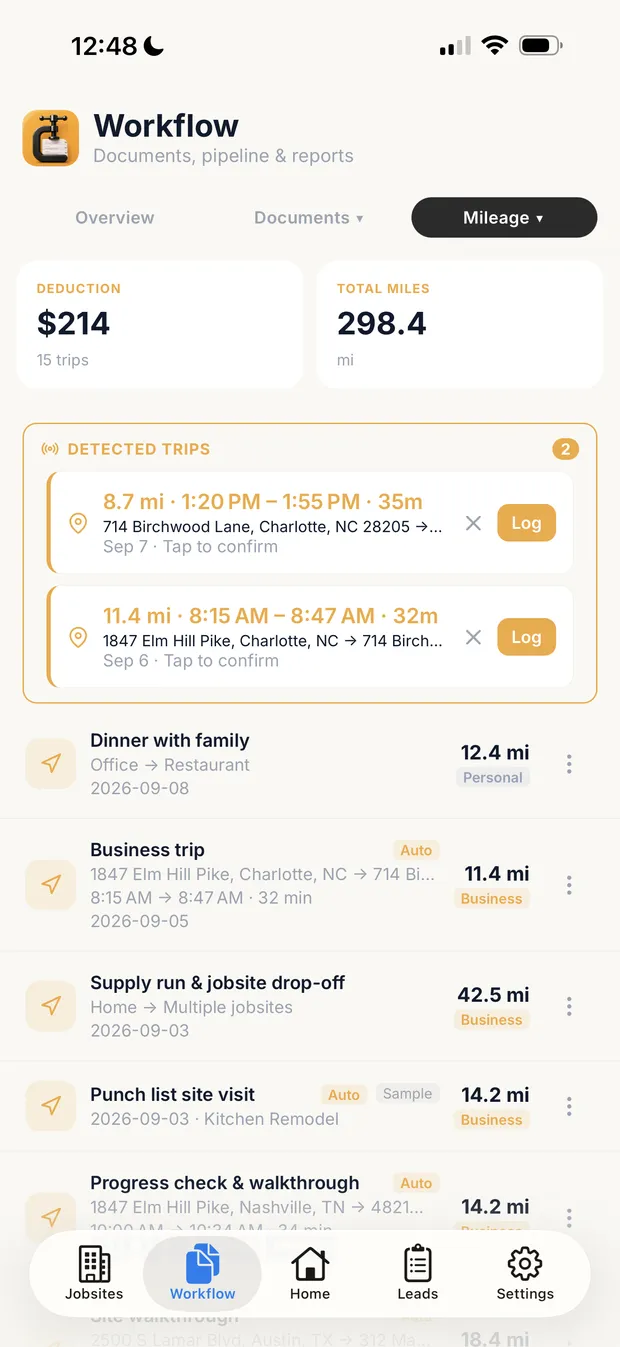
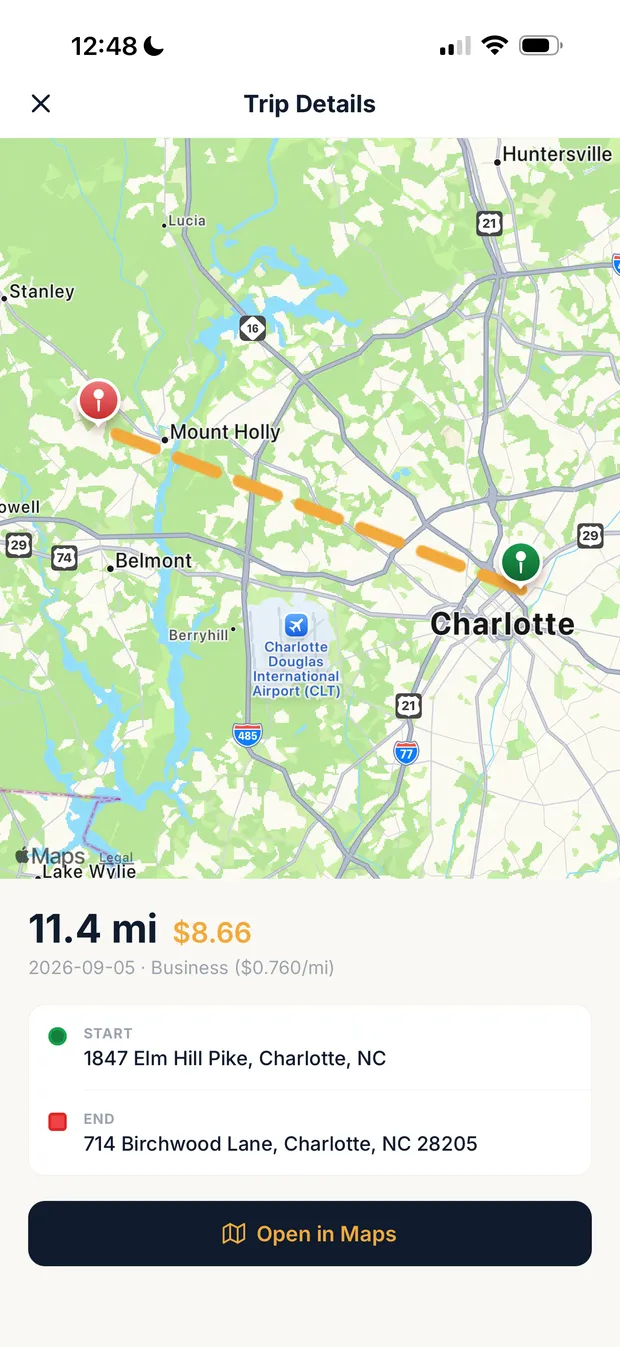
Sample data. Detected drives wait for confirmation before they count, a logged trip can sit on the job it belongs to, and each trip carries the IRS rate for its own date.
At a glance
MileIQ is a good mileage tracker. For a contractor, the question is whether you need only a mileage log for taxes, or the drive attached to the job it belongs to. This list compares the alternatives on what matters for that: automatic or manual detection, whether a trip ties to a client or job, report formats, free plan limits and what a crew pays per driver.
Several of these apps are free and most cost less than Clamp. Clamp is on the list because it puts mileage inside the job, with the estimate, change orders and invoice. If mileage is all you need, a mileage-only app is the cheaper answer.
Every price and feature comes from each vendor's own pricing, feature or help pages, read on October 14 and 15, 2026. Where a page doesn't mention something, this list says 'not found on official pages' rather than 'can't'.
Every Clamp feature, next to each alternative
Solo includes 28 of Clamp's 44 features. In full, across their plans: MileIQ 2, Everlance 4, TripLog 5, Driversnote 3, Stride 1, Hurdlr 2, QuickBooks Solopreneur 3, SimplyWise 8.
Compare Clamp with
Clamp plan
Every Clamp feature, next to each alternative
Feature
Clamp
MileIQ
Everlance
TripLog
Driversnote
Stride
Hurdlr
QuickBooks Solopreneur
SimplyWise
CRM and leads
3 of 5
0 of 5
0 of 5
0 of 5
0 of 5
0 of 5
0 of 5
0 of 5
0 of 5
Email remindersEmail reminders before appointments, follow-ups, and scheduled installs, deliveries, and inspections.
✓ Assistant and TeamsAssistant, $41.67 a month billed annually
Not foundReport reminders only, Teams Pro
Not found
Not found
Not found
Not found
Not found
Not found
Not found
Customer appointment remindersHomeowners get an email before an appointment, with confirm and reschedule built in.
✓ Assistant and TeamsAssistant, $41.67 a month billed annually
Not foundMileage tracker only
Not found
Not found
Not found
Not found
Not found
Not found
Not foundNo scheduling
Five-factor lead scoringA clear yes, no, or maybe on a lead before driving out.
✓ Every planSolo, $12.50 a month billed annually
Not foundMileage tracker only
Not found
Not found
Not found
Not found
Not found
Not found
Not foundClient intake form only
Lead reportingClose rate, revenue won, open pipeline, close rate by lead source, and lost leads by reason, on Home and the stats screen, with CSV and PDF export. Revenue by source does not exist; see _excluded.
✓ Every planSolo, $12.50 a month billed annually
Not foundMileage tracker only
Not found
Not found
Not found
Not found
Not found
Not found
Not found
Daily briefingOverdue invoices, detected trips, follow-ups, appointments, and open proposals in one morning view.
✓ Every planSolo, $12.50 a month billed annually
Not foundUnclassified drives list only
Not found
Not found
Not found
Not found
Not found
Not found
Not foundHome screen Inbox holds intake forms
Estimating
7 of 7
0 of 7
0 of 7
0 of 7
0 of 7
0 of 7
0 of 7
1 of 7
3 of 7
Design agreementsPaid preconstruction sits in the document chain, so planning work is paid work.
✓ Every planSolo, $12.50 a month billed annually
Not foundMileage tracker only
Not found
Not found
Not found
Not found
Not found
Not found
Not foundNo contracts feature yet
Itemized estimatesAssembly-based estimates with quantities and rates the contractor can inspect line by line.
✓ Every planSolo, $12.50 a month billed annually
Not foundMileage tracker only
Not found
Not found
Not found
Not found
Not found
✓ Customer estimates and invoice conversion
✓ Every planItemized lines with unit, quantity and price
Estimate templatesSave an estimate as a template for work done often.
✓ Every planSolo, $12.50 a month billed annually
Not foundMileage tracker only
Not found
Not found
Not found
Not found
Not found
Not found
✓ Every planSave as Template
Proposals with multiple package tiersGood, better, best packages in one proposal.
✓ Every planSolo, $12.50 a month billed annually
Not foundMileage tracker only
Not found
Not found
Not found
Not found
Not found
Not found
NoMultiple options in one estimate not supported
AI estimating from a plain-language job descriptionDescribe the job in plain words and get an itemized draft: assemblies, quantities, researched baseline rates, with the contractor's own saved rates taking over once set.
✓ Every planSolo, $12.50 a month billed annually
Not foundMileage tracker only
Not found
Not found
Not found
Not found
Not found
Not found
✓ Every planFrom a photo, voice, blueprint or room scan
Remodel and new-home estimatingOne estimator covers remodels and new homes and detects which one a description is. Detect is the default job type; a contractor can pick Remodel or New home per estimate, or set Kind of work to Remodeling to turn the choice off.
✓ Every planSolo, $12.50 a month billed annually
Not foundMileage tracker only
Not found
Not found
Not found
Not found
Not found
Not found
Not foundPitched at remodel, repair and service
Labor hours on estimatesEstimated labor hours, shown as a range, on every labor line, with an allowance for setup, cleanup, and material runs (15% by default) the contractor can change in Settings or per estimate. A planning figure; it never appears on proposals, PDFs, or the portal.
✓ Every planSolo, $12.50 a month billed annually
Not foundMileage tracker only
Not found
Optional job and client timesheetsTracked time, not estimated crew hours.
Not found
Not found
Client and task time trackingTracked hours, not estimated crew labor.
Not found
Not foundLabor assumptions go in the description
Contracts and invoicing
5 of 5
0 of 5
0 of 5
0 of 5
0 of 5
0 of 5
1 of 5
2 of 5
2 of 5
Payment schedulesSplit a proposal into a deposit, milestone payments, and a final payment, then invoice each one from the signed contract.
✓ Every planSolo, $12.50 a month billed annually
Not foundMileage tracker only
Not found
Not found
Not found
Not found
Not found
Not found
✓ Every planPayment schedule on the invoice
Sales tax on documentsAdd a sales tax rate or a flat amount to invoices and other documents, with collected tax totaled by quarter and year. The contractor enters the rate; Clamp does not look rates up.
✓ Every planSolo, $12.50 a month billed annually
Not foundMileage tracker only
Not found
Not found
Not found
Not found
Not found
✓ Automated sales tax
PartlyTax added as a line item
Customer credits and refundsApply a customer's credit to an open invoice, record a refund, or adjust a balance, with the history kept on the job. Recorded only; Clamp moves no money.
✓ Every planSolo, $12.50 a month billed annually
Not foundMileage tracker only
Not found
Not found
Not found
Not found
Not found
Not found
Not foundDiscounts as a negative line; payments marked paid
Change orders that update the contractScope changes get written up and tied to the original contract, so verbal changes stop costing money.
✓ Every planSolo, $12.50 a month billed annually
Not foundMileage tracker only
Not found
Not found
Not found
Not found
Not found
Not found
No"No change order feature yet"; duplicate the estimate
Invoices tied to the contractEvery invoice belongs to the contract or change order it bills.
✓ Every planSolo, $12.50 a month billed annually
Not foundMileage tracker only
Not found
Not found
Not found
Not found
✓ Client invoicing and payment collection
✓ Customer invoices and payment acceptance
✓ Every planFrom a saved estimate
Customer portal
0 of 6
0 of 6
0 of 6
0 of 6
0 of 6
0 of 6
0 of 6
0 of 6
1 of 6
Password-free customer portalThe homeowner opens a link. No account, no password, no app to install.
✓ Assistant and TeamsAssistant, $41.67 a month billed annually
Not foundMileage tracker only
Not found
Not found
Not found
Not found
Not found
Not found
PartlyEstimate link to view and sign; no portal
Unlimited documents and photos shared to the portalShare job documents and photos to the customer portal without a count cap, subject to per-item size limits.
✓ Assistant and TeamsAssistant, $41.67 a month billed annually
Not foundMileage tracker only
Not found
Not found
Not found
Not found
Not found
Not found
PartlyChecked photos shared with the estimate
E-signing on the homeowner's phoneDocuments get signed on the homeowner's own phone, no account required.
✓ Assistant and TeamsAssistant, $41.67 a month billed annually
Not foundMileage tracker only
Not found
Not found
Not found
Not found
Not found
Mobile estimate signaturesNot a verified multi-signer construction contract.
✓ Every planClient signs to approve the estimate
Several signers on one documentSend one document to up to five people, each signing their own line, see who has signed, and remind anyone who has not.
✓ Assistant and TeamsAssistant, $41.67 a month billed annually
Not foundMileage tracker only
Not found
Not found
Not found
Not found
Not found
Not found
Not foundClient approval only
Project updates and decisions in the portalPost project updates to the customer's portal and ask the customer to make a decision, which they answer from their phone.
✓ Assistant and TeamsAssistant, $41.67 a month billed annually
Not foundMileage tracker only
Not found
Not found
Not found
Not found
Not found
Not found
Not found
Not delivered email handlingWhen a customer email Clamp sends bounces, the document is marked Not delivered so the contractor can fix the address and resend, or copy the link to text it.
✓ Assistant and TeamsAssistant, $41.67 a month billed annually
Not foundMileage tracker only
Not found
Not found
Not found
Not found
Not found
Not found
Not foundNo open notification for invoices
Expense tracking
5 of 5
0 of 5
2 of 5
2 of 5
1 of 5
1 of 5
0 of 5
0 of 5
0 of 5
Automatic GPS mileage trackingBackground trip detection, route maps, IRS rates, trips linked to the job that caused the drive.
✓ Every planSolo, $12.50 a month billed annually
Free, 40 drives a monthAutomatic detection and IRS rate; tied to a client by custom purpose, not a job
✓ Automatic and manual trip recording
✓ Automatic and manual trip tracking
✓ Automatic and manual mileage logging
Manually started mileage and entriesHelp says recording must be manually started; marketing uses automatic terminology.
Semi-auto free automatic paidAutomatic drive detection starts on Premium.
Five free trips monthlyUnlimited on Lite.
Every planMileage Tracker app: automatic drives, business or personal; not tied to a job
Automatic time on siteGPS geofence tracking of hours at the jobsite.
✓ Every planSolo, $12.50 a month billed annually
Not foundTracks drives, not hours on site
Not found
Client and location time trackingTimer/location records, not confirmed construction-site auto-detection.
Not found
Not found
Manual client and project timerNo automatic site-presence detection established.
Not found
Not found
Receipts and expenses on the jobReceipts logged against the job they belong to.
✓ Every planSolo, $12.50 a month billed annually
Not foundMileage tracker only
✓ Receipt uploads and manual expenses
✓ Expense recording and receipt imagesBasic has basic expenses; receipt-photo/report access mapped conservatively to Premium.
Not found
✓ Expense entries with receipt photos
Expense records and receipt linksReport documents linked receipts; exact capture workflow/tier not established.
Two receipt uploads monthlyUnlimited on Lite.
Every planReceipt Scanner app, by expense category, not by job
Purchase ordersCommitted costs captured between the estimate and the receipt.
✓ Every planSolo, $12.50 a month billed annually
Not foundMileage tracker only
Not found
Not found
Not found
Not found
Not found
Not found
Not found
Accounts payable and vendor billsVendor bills tracked and surfaced in the attention flows, with first-class vendor records.
✓ Every planSolo, $12.50 a month billed annually
Not foundMileage tracker only
Not found
Not found
Not found
Not found
Not found
Automated vendor bill paymentsNot verified job costing.
Not found
Job costing and reports
3 of 3
0 of 3
0 of 3
1 of 3
0 of 3
0 of 3
1 of 3
0 of 3
0 of 3
Job costingWhat the job actually cost, with a variance and catalog learning loop.
✓ Every planSolo, $12.50 a month billed annually
Not foundMileage tracker only
Not found
Not found
Not found
Not found
Not found
Not found
No"Does not try to do" job costing
Accountant export packageA package of the business's records prepared for an accountant.
✓ Every planSolo, $12.50 a month billed annually
Every planMileage reports in PDF, CSV, QuickBooks CSV or Concur
Trip and expense CSV exportsStarter adds PDF reporting; not an estimate-to-actual contractor export.
Mileage and expense report exportsNot a complete construction accounting handoff.
PDF and Excel mileage reportsMileage records, not full contractor accounting.
Tax summary and CSV exportsMileage/expenses/earnings, not construction accounting.
✓ Tax reports and financial exports
Financial record exportsNot a contractor closeout package.
PartlyExpense reports in Excel or PDF; no QuickBooks
Time reporting with CSV exportReported labor time with a time-tracking CSV export for payroll preparation and per-person rate decomposition.
✓ Every planSolo, $12.50 a month billed annually
Not foundMileage reports only, no labor time
Not found
✓ Timesheet reports and exports
Not found
Not found
Time record reportingLowest time-report tier not established.
Not found
Not found
Jobsites and teams
2 of 8
0 of 8
2 of 8
2 of 8
2 of 8
0 of 8
0 of 8
0 of 8
1 of 8
Teams: up to 10 linked accountsUp to 10 accounts, including the owner, sharing one business.
✓ TeamsTeams, $83.33 a month billed annually
Teams Lite, $8 a userMileage only, priced per driver
✓ Up to five free members
✓ Team driver account licensing
✓ Licensed team driver accounts
Not found
Employer reimbursement arrangements5+ employees; individual admin/seat licensing not established.
One business user onlyAll three listed plans specify one user.
NoNo team plan, no added users; App Store notes list "Crew setup"
Teams Pro, $10 a userAdmins and drivers; multiple admins on Teams Pro
✓ Administrators managers and reviewers
✓ Driver and administrator workflows
✓ Driver and manager access
Not found
Not found
Business owner and accountant accessNot crew roles.
NoA shared login has full access
Unlimited subcontractor linkingSubs share jobsite photos and notes into the business account without consuming a seat.
✓ TeamsTeams, $83.33 a month billed annually
Not foundEach driver is a paid user
Not found
Not found
Not found
Not found
Not found
Not found
NoNo way to add users
Jobsites tab: jobs and schedule in one placeA Jobsites tab with Jobs and Schedule views. With Assistant each job has its own screen with its schedule, photos, and updates, and the Schedule view holds every install, delivery, inspection, appointment, and follow-up; Teams adds the crew and subs on each job, shaped by role. Subs invited to a job use it free and see their own jobs grouped by builder.
✓ Assistant and TeamsAssistant, $41.67 a month billed annually
Not foundNo job records; custom purposes per client
Not found
Not found
Not found
Not found
Not found
Not found
PartlyProject folders and work order tracking
Job scheduleSchedule installs, deliveries, and inspections on each job, with the contractor, a supplier, or nobody yet on each item, and see them all in the Jobsites tab. Putting crew or subs on an item is the Teams shared schedule.
✓ Assistant and TeamsAssistant, $41.67 a month billed annually
Not foundMileage tracker only
Not found
Not found
Not found
Not found
Not found
Not found
No"Does not try to do" scheduling
Shared job scheduleOne schedule for the business: installs, deliveries, and inspections visible to the team, with clash notes when dates collide.
✓ TeamsTeams, $83.33 a month billed annually
Not foundMileage tracker only
Not found
Not found
Not found
Not found
Not found
Not found
NoNo scheduling, no added users
Punch listsThe small final items that close a job out, tracked per job and shareable as a text message or a PDF.
✓ Every planSolo, $12.50 a month billed annually
Not foundMileage tracker only
Not found
Not found
Not found
Not found
Not found
Not found
Not found
Job site photosPhotos saved to the project with full-screen viewing.
✓ Every planSolo, $12.50 a month billed annually
Not foundMileage tracker only
Not found
Not found
Not found
Not found
Not found
Not found
✓ Every planPhotos on each estimate
Backup and offline
3 of 5
2 of 5
0 of 5
0 of 5
0 of 5
0 of 5
0 of 5
0 of 5
1 of 5
Full job workflow, offlineLeads, design agreements, estimates, proposals, change orders, and invoices on the phone, working without a connection.
✓ Every planSolo, $12.50 a month billed annually
Not foundNo job workflow; offline drive capture not stated
Not found
Optional offline mileage hardwareDrive hardware buffers mileage without a phone; this does not establish offline contractor job management.
Not found
Not found
Not found
Not found
NoInternet required to create or save estimates
Cloud backupBusiness data backed up to the cloud and restorable on a new device.
✓ Assistant and TeamsAssistant, $41.67 a month billed annually
✓ Every planDrives stored in the cloud, restored on a new device
Cloud stored account recordsCloud storage is explicit; independent backup retention and restoration are not documented here.
Mileage cloud backup supportExplicit pricing-table feature; the extracted table does not establish the lowest plan or restore scope.
Not found
Not found
Not found
Not found
PartlyEstimates sync across devices; settings per device
Business portal: read-only web viewA read-only view of the business in a browser.
✓ Assistant and TeamsAssistant, $41.67 a month billed annually
✓ Web dashboarddashboard.mileiq.com; Teams reporting dashboard from Teams, $9
Mileage and expense dashboardNot a contractor operations portal.
Mileage reimbursement web dashboardNot a construction project portal.
Mileage reporting web dashboardNot a construction portal.
Web report download accessLimited viewing and exports; no desktop editing.
Web finances and client recordsNot a construction workflow portal.
Bookkeeping web workspaceAccounting workspace.
✓ Web appapp.simplywise.com; FAQ answers disagree on its scope
Device backup, restore, CSV export, bulk importLocal backup and restore with CSV export and bulk import.
✓ Every planSolo, $12.50 a month billed annually
PartlyDrive reports as CSV; no local backup or bulk import
Not found
Local mileage data backupHelp mentions Data Backup; full job-workflow backup/restore not established.
Not found
Not found
Not found
Not found
PartlyCSV or PDF per estimate; no bulk export or backup
No account required to startThe app opens to local use; an account is needed only for server features or subscribing.
✓ Every planSolo, $12.50 a month billed annually
Not foundDrives tied to an account email
Not found
Not found
Not found
Not found
Not found
Not found
Not foundAccount tied to a phone number
Only in MileIQ
Where MileIQ is ahead
Swipe to classify drives
Detected trips confirmed one by one
✓ Swipe left or right for personal or business
QuickBooks CSV and Concur report formats
IRS mileage tax report as PDF and CSV (rates, odometer, deduction); no QuickBooks or Concur format
✓ PDF, CSV, QuickBooks CSV and Concur
Lower price for mileage only
Solo $149.99 a year, the full job workflow
✓ Free tier, or Unlimited $11.66 a month billed annually
Drive approvals and commute exclusion for employees
Not in Clamp
✓ Teams Pro, $100 a user a year
Only in SimplyWise
Where SimplyWise is ahead
Estimates from a photo or LiDAR room scan
Not in Clamp
✓ Every plan
Local material pricing from the nearest Home Depot
Not in Clamp
✓ Every plan
Before-and-after renders for the client
Not in Clamp
✓ Every plan
Receptionist app
Not in Clamp
✓ Included in the plan
Nothing here matches. Pick All or another filter.
Competitor columns from each vendor's own pricing page, feature pages and help center, checked October 15, 2026. Not found means not on those pages, not that the product can't do it another way. Partly means something narrower than the Clamp feature. No product was tested against another.
MileIQ detects drives automatically and lets you swipe each one business or personal. It is free for 40 drives a month; Unlimited is $11.66 a month billed annually or $13.99 month to month. Team plans are $8, $9 or $10 per driver a month. It updates the IRS rate automatically and exports PDF, spreadsheet, QuickBooks-compatible CSV and Concur reports.
The free plan stops at 40 drives a month. Two work drives a day over 20 workdays already reaches it.
A drive is tied to a client by a custom purpose label, not to a job record holding the estimate and invoice.
Crews pay per driver: $8 to $10 a month each, with drive approvals and commute exclusion on Teams Pro.
It tracks mileage only: no estimates, invoices, time on site or job costing.
8 MileIQ alternatives
Clamp first, because it is the only pick that puts the drive inside the job. The mileage-only apps follow, and most are cheaper. Each entry says where it is stronger, not only where it falls short.
1ClampBest for contractors who want the drive on the same job as the estimate, change orders and invoice
Price
Solo $19.99 a month or $149.99 a year. Teams $99.99 a month or $999.99 a year for up to 10 accounts.
Team
One account on Solo and Assistant; up to 10 on Teams at one flat price, not per driver.
Where it is stronger
Each detected trip is attached to the job that caused it, the same record as the estimate, proposal, change order and invoice.
Automatic trip detection on every plan; detected trips wait for your review before they count.
An IRS mileage tax report as PDF and CSV, with the IRS rates, odometer readings and the deduction total, and the rate resolved by each trip's date.
Time on site, receipts, job costing and change orders on every plan, including Solo.
Teams covers up to 10 people for $99.99 a month, so a crew does not pay per driver.
Where it falls short for a small residential contractor
It costs more than a mileage-only app. If mileage is all you need, a free or cheaper tracker on this list is the better answer.
No ongoing free plan. Clamp's free use is the first month on Solo monthly billing.
No QuickBooks or Concur report format; the mileage report is PDF and CSV.
2EverlanceBest for solo contractors who want free manual tracking and receipts, with automatic detection when they pay
Price
Basic is free. Starter is $10.99 a month or $89.99 a year; Professional is $19.99 a month or $119.99 a year. Starter has a 7-day trial and needs a card.
Team
Business Free covers up to 5 members, with 30 automatic trips each a month. Paid business programs are quoted; per-driver prices are not published.
Where it is stronger
Basic is free with 30 automatically detected trips a month, unlimited manual trips, receipt uploads and CSV export.
Exports apply the IRS rate for each trip's date, including the July 2026 change.
Imports MileIQ export files, so you can bring your history with you.
Business programs add reviewer workflows and commute deductions.
Where it falls short for a small residential contractor
Trips are told apart by tags, notes and business lines; a job record linked to a trip was not found on official pages.
Start and end odometer readings are excluded from exports.
PDF and Excel reports need a paid plan; Basic exports CSV.
3TripLogBest for crews that want low per-driver pricing, approvals and odometer fields
Price
Basic is free. Premium is $59.99 a year. TripLog sells optional tracking hardware (Drive, $79.99, and Beacon, $19.99) as a one-time purchase.
Team
Mileage Teams is $8 per user a month and Enterprise $12, as displayed. Expense and Time modules are priced separately.
Where it is stronger
Basic is free forever with unlimited automatic detection.
Automatic, manual start and stop, and manual entry, with optional start and end odometer readings.
Reports in HTML, PDF and CSV with maps, and receipt photos on qualifying plans.
Submitted-trip approvals for a crew, and commute policies on Enterprise.
Government rates follow their effective periods, with custom rates by user.
Where it falls short for a small residential contractor
On Basic, app reports cover only the last 7 days outside a once-a-year 7-day Premium Pass, and there is no web access.
A client or project goes in tags and notes; a link from a trip to a job record was not established on official pages.
QuickBooks Online, Xero and Concur integrations are advertised; check which plan includes each before you buy.
4DriversnoteBest for small teams that want simple per-license pricing and manager approval
Price
Free for reports of up to 15 trips a month. Pro is $11 a month. An optional iBeacon is $40, included with a qualifying yearly subscription.
Team
Teams is $11 per license a month for 2 to 10 users; Teams+ for 11 or more is quoted.
Where it is stronger
Automatic motion detection, an optional iBeacon that starts tracking in a chosen vehicle, and manual start and stop.
PDF and Excel mileage reports with optional odometer logging.
Manager approval and admin-set rates for a team.
Where it falls short for a small residential contractor
The free plan reports only 15 trips a month.
Receipt photos and expense tracking were not found on official pages.
Tags, notes and workplaces separate client work; a job record tied to a trip was not found on official pages.
5StrideBest for a solo contractor who wants a free mileage and expense log for taxes
Price
Free. No paid mileage plan was found on official pages.
Team
No team plan, per-driver pricing or approvals were found on official pages.
Where it is stronger
No subscription charge for its mileage and expense log.
Expense entries and receipt images alongside mileage.
A PDF tax summary and CSV files of mileage, expenses and earnings, downloadable on the web.
Where it falls short for a small residential contractor
Its help center says recording starts when you tell it to; iOS can remind you.
Trips carry a job category and notes, not a link to a client or job record.
Handling of the 2026 midyear rate change was not found on official pages.
6HurdlrBest for self-employed contractors who want mileage, expenses and bookkeeping tied to clients
Price
Free. Premium $9.99 a month or $100 a year, which adds automatic drive detection. Pro $200 a year. Prices are from Hurdlr's help center.
Team
Employer reimbursement programs for 5 or more workers; no public price.
Where it is stronger
The free plan includes unlimited semi-auto mileage and report exports.
Structured client records you can tag mileage to, and a timer for client or project time.
Pro adds invoicing and advanced accounting.
Where it falls short for a small residential contractor
Automatic detection needs Premium.
A client association, not a job record with an estimate and change orders.
Handling of the 2026 midyear rate change was not found on official pages.
7QuickBooks SolopreneurBest for a one-person business that wants mileage inside its bookkeeping
Price
Free with 5 mileage trips and 2 receipts a month. Lite is $20 a month list, $10 for the first 3 months, with unlimited mileage, receipts and invoices. Simple Start is $38 a month list.
Team
One user on each listed plan; Simple Start adds accountant access.
Where it is stronger
Mileage alongside income and expense bookkeeping, estimates and invoices.
Lite adds unlimited receipts and mileage with sales tax and bill pay.
Automatic GPS tracking and manual entry, with parking and toll expenses.
Where it falls short for a small residential contractor
Free covers only 5 trips a month.
Its mileage page still quotes 72.5 cents as the 2026 rate.
Mileage export is CSV; a client or job link for a trip was not found on official pages.
8SimplyWiseBest for solo contractors who want estimates, receipts and mileage under one subscription
Price
$29.99 a month or $239.99 a year after a 7-day free trial, with no permanent free tier. SimplyWise says it runs pricing experiments, so store prices can differ.
Team
No team plan and no way to add users, per its FAQ.
Where it is stronger
One subscription covers its Cost Estimator, Receipts and Expenses, Mileage Tracker and Receptionist apps.
The mileage app tracks drives automatically, sorts business and personal with a swipe, and exports CSV or PDF.
An approved estimate converts to an invoice with a payment schedule.
Where it falls short for a small residential contractor
No change order feature yet, per its FAQ.
Linking a drive to a job or project was not mentioned on the mileage app listing.
No QuickBooks integration.
What each costs by team size
What the whole business pays each month for mileage tracking with one driver, three drivers and ten.
Monthly cost by number of drivers
Software
1 driver
3 drivers
10 drivers
Clamp
$12.50 billed annually ($19.99 monthly), Solo
$83.33 billed annually ($99.99 monthly), Teams
$83.33 billed annually ($99.99 monthly), Teams
MileIQ
$0 for 40 drives; Unlimited $11.66 billed annually ($13.99 monthly)
$24, Teams Lite at $8 per driver
$80, Teams Lite at $8 per driver
Everlance
$0 Basic; Starter $10.99 ($89.99 a year)
$0, Business Free (up to 5 members)
Quoted; not published
TripLog
$0 Basic; Premium $59.99 a year
$24, Mileage Teams at $8 per user
$80, Mileage Teams at $8 per user
Driversnote
$0 for 15 trips; Pro $11
$33, Teams at $11 per license
$110, Teams at $11 per license
Stride
$0
No team plan found
No team plan found
Hurdlr
$0; Premium $9.99 ($100 a year)
No team price found
Employer program; price not published
QuickBooks Solopreneur
$0 for 5 trips; Lite $20 list
One user per plan
One user per plan
SimplyWise
$29.99 ($239.99 a year)
No team plan
No team plan
Per month for the whole business, from each vendor's own pricing page on 2026-10-14 and 2026-10-15, in the form each vendor publishes. Team figures multiply the vendor's per-driver price at its lowest team tier and are calculated; TripLog's annual commitment and billing for team plans were not established. MileIQ's Teams Pro, with approvals, is $10 per driver. Clamp's price includes the whole job workflow, not only mileage, so the plans are not equivalent.
When to stay with MileIQ
Mileage is all you need tracked, and 40 drives a month on the free plan covers you.
Your accountant or employer wants a QuickBooks-compatible CSV or Concur report.
You reimburse employees and want drive approvals and commute exclusion, on Teams Pro.
You want unlimited individual mileage for $11.66 a month billed annually.
How to choose
Count last month's work drives. If you are under 40, MileIQ's free plan may already cover you; if you are over, compare the free plans above.
Decide whether you need a tax log or job cost. If a drive only needs a business purpose, any app here works; if you want mileage in the job's cost, it has to sit on the job record.
Check the 2026 rate. Business miles are 72.5 cents through June 30 and 76 cents from July 1; confirm the app applies the rate for each trip's date.
Ask your accountant which report format they want: PDF, CSV, Excel, QuickBooks or Concur.
For a crew, multiply the per-driver price by your drivers and compare it with a flat team price.
Before you switch
Export your MileIQ drives as PDF and CSV for the full year before you cancel, and keep them with your tax records.
Classify any unclassified drives first, so the export holds every business trip.
Everlance imports MileIQ export files. For other apps, confirm what they import before you count on moving your history.
MileIQ's free plan stays available at 40 drives a month, so you can run both while you try the new app.
How this list was made
Published by Clamp, which is one of the options listed. Clamp's own facts come from its pricing page and its mileage deduction guide.
Competitor prices and features come only from each vendor's own pricing, feature or help pages and official app store listings, read on October 14 and 15, 2026. Prices change; check the vendor's page before you buy.
The 2026 mileage rates come from IRS Notice 2026-10 and Announcement 2026-11 on irs.gov.
'Not found on official pages' means exactly that. It does not mean the product cannot do it another way.
No product was tested against another. No detection, accuracy or reliability claim is made.
Questions
Is there a free alternative to MileIQ?
Yes, several. TripLog Basic is free with unlimited automatic detection, but app reports cover only the last 7 days. Everlance Basic is free with 30 automatic trips a month and unlimited manual trips. Hurdlr's free plan has unlimited semi-auto mileage, and Stride is a free app. MileIQ's own free plan covers 40 drives a month. Clamp has no free plan beyond the first month on Solo monthly billing.
Which MileIQ alternatives track drives automatically?
Clamp, Everlance, TripLog, Driversnote, QuickBooks Solopreneur and SimplyWise all document automatic drive detection. Hurdlr detects drives automatically on Premium, $9.99 a month, and is semi-auto on its free plan. Stride's help center says recording starts when you tell it to, with reminders on iOS.
Which mileage app ties a trip to the job?
Clamp attaches each trip to the job record that holds its estimate, change orders and invoice, so the drive shows up in that job's cost. Hurdlr links mileage to structured client records. MileIQ, Everlance, TripLog and Driversnote use purposes, tags or notes to mark client work, which works for a tax log but is not a job record.
What is the IRS business mileage rate for 2026?
72.5 cents a mile for business drives from January 1 through June 30, 2026, and 76 cents from July 1 through December 31, after the IRS raised it midyear. Use the rate for each trip's date. MileIQ, Everlance and TripLog document handling the change, and Clamp resolves the rate by trip date. QuickBooks' mileage page still quotes 72.5 cents for 2026.
How much does mileage tracking cost for a crew of three?
Per driver, MileIQ Teams Lite and TripLog Mileage Teams are $8 a month each, $24 for three, and Driversnote Teams is $11 per license, $33. Everlance Business Free covers up to 5 members at no charge. Clamp Teams is $99.99 a month, or $83.33 billed annually, for up to 10 people, and includes the whole job workflow, not just mileage.
Which app gives my accountant the best mileage report?
It depends on the format your accountant uses. MileIQ offers PDF, a spreadsheet, a QuickBooks-compatible CSV and Concur. TripLog exports HTML, PDF and CSV with maps, Driversnote PDF and Excel, and Everlance CSV free or PDF and Excel on paid plans. Clamp exports an IRS mileage tax report as PDF and CSV with rates, odometer readings and the deduction total, but no QuickBooks or Concur format.